SELECT DISTINCT <select_list>
FROM <left_table>
<join_type> JOIN <right_table>
ON <join_condition>
WHERE <where_condition>
GROUP BY <group_by_list>
HAVING <having_condition>
ORDER BY <order_by_condition>
LIMIT <limit_number>
查询去重
利用 groupby
获取信息
获取版本
select version();
查看所有用户信息
SELECT DISTINCT CONCAT('User: ''',user,'''@''',host,''';') AS query FROM mysql.user;

查看某个具体用户的权限
show grants for 'root'@'localhost';
查看数据库相关信息
选择数据库 use xx;
查看显示所有数据库 show databases;
查看当前使用的数据库 select database();
查看数据库使用端口 show variables like 'port';
查看当前数据库大小 use information_schema select concat(round(sum(data_length)/(1024*1024),2) + round(sum(index_length)/(1024*1024),2),'MB') as 'DB Size' from tables where table_schema='gisDb';
查看数据所占的空间大小 use information_schema; select concat(round(sum(data_length)/(1024*1024),2),'MB') as 'DB Size' from tables where table_schema='gisDb';
查看索引所占的空间大小 select concat(round(sum(index_length)/(1024*1024),2),'MB') as 'DB Size' from tables where table_schema='gisDb';
修改数据库编码
SET character_set_client = utf8;
SET character_set_connection = utf8;
SET character_set_database = utf8;
SET character_set_results = utf8;
SET character_set_server = utf8;
修改数据库密码
/etc/init.d/mysql stop   (service mysqld stop )
/usr/bin/mysqld_safe --skip-grant-tables
另外开个SSH连接
[root@localhost ~]# mysql
mysql>use mysql
mysql>update user set password=password("123456") where user="root";
mysql>flush privileges;
mysql>exit
查询后n行记录 select * from table order by id desc limit n;//倒序排序(desc)
查询一条记录($id)的下一条记录 select * from table where id>$id order by id asc limit 1
查询一条记录($id)的上一条记录 select * from table where id<$id order by id desc limit 1
结果集排序
asc 升序排列,从小到大(默认) desc 降序排列,从大到小
多字段排序 select 字段 from 表 order by 字段1 排序关键词,… …字段n desc|asc;
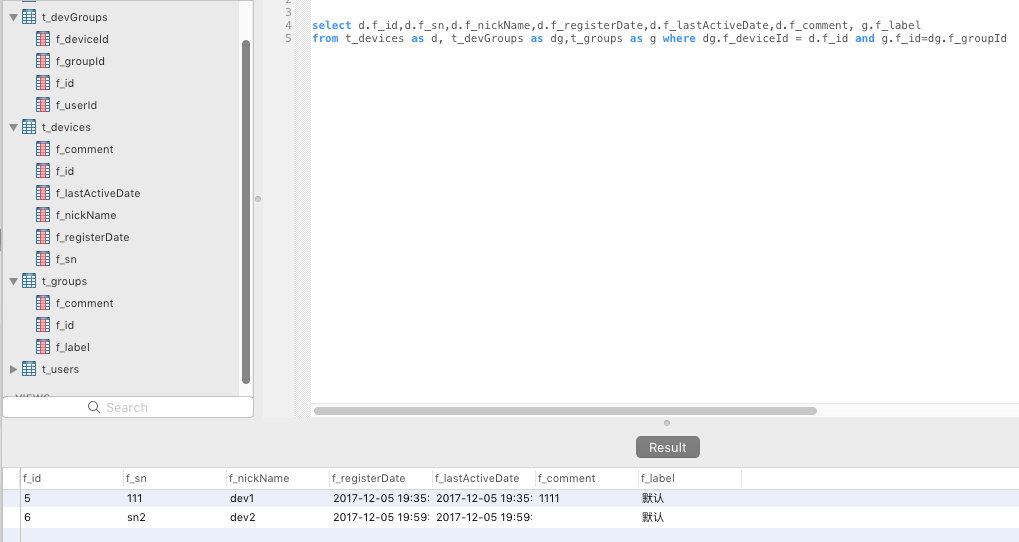
多个表查询
select d.f_id,d.f_sn,d.f_nickName,d.f_registerDate,d.f_lastActiveDate,d.f_comment, g.f_label
from t_devices as d, t_devGroups as dg,t_groups as g where dg.f_deviceId = d.f_id and g.f_id=dg.f_groupId