git-working repo vs bare repo
When I first create a repository by git, usually use git init.
But sometimes I see someone use git --bare init, especially I study an article that use bare git repo deploy website.
what’s the difference?
So I do some study with it.
Short answer:
Use a non-bare repository to work locally and a bare repository as a central server/hub to share your changes with other people.
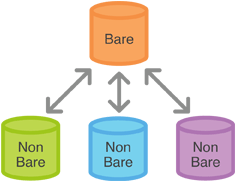
working repository
Repositories created with the git init are called working directories
In the top level folder of the repository you will find two things:
- A .git subfolder with all the git related revision history of your repo
- A working tree, or checked out copies of your project files.
use working repository
Well, a working repository created with git init is for… working.
It is where you will actually edit, add and delete files and git commit to save your changes.
If you are starting a project in a folder on your dev machine where you will add, edit and delete files of your project, use “git init”.
Note: if you git clone a repository you will be given a working repository with the .git folder and copies of the working files for editing.
bare repository
Repositories created with git init –bare are called bare repos
- they contain no working or checked out copy of your source files.
- bare repos store git revision history of your repo in the root folder of your repository instead of in a .git subfolder.
- Note… bare repositories are customarily given a .git extension.
- a bare repository does not have a default remote origin repository
use bare repository
A bare repository created with git init --bare is for… sharing. If you are collaborating with a team of developers, and need a place to share changes to a repo, then you will want to create a bare repository in centralized place where all users can push their changes (often the easy choice is github.com). Because git is a distributed version control system, no one will directly edit files in the shared centralized repository. Instead developers will clone the shared bare repo, make changes locally in their working copies of the repo, then push back to the shared bare repo to make their changes available to other users.
Because no one ever makes edits directly to files in the shared bare repo, a working tree is not needed. In fact the working tree would just get in way and cause conflicts as users push code to the repository. This is why bare repositories exist and have no working tree.
To summarize
I use a working directory created with git init or git clone when I want to add, edit and delete files in myproject locally on my dev machine.
When I am ready, I share my local changes with a git push to a bare repository myproject.git (usually on a remote server like github.com) so other developers can access my local changes.
how to use bare repo
create a bare repo
git init --bare repo.git |
This creates a folder (repo.git) and populates it with git files representing a git repo. As it stands, this repo is useless - it has no commits and more importantly, no branches. Although you can clone this repo, you cannot pull from it.
Next, we need to create a working folder.
git clone /path_to_bare_repo.git /path_to_work |