linux-apt-cacher
Use Cases
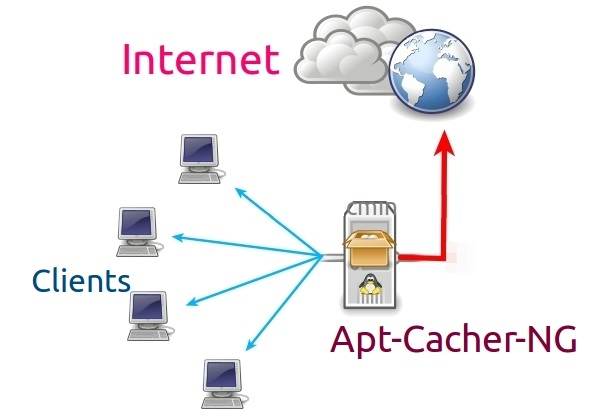
The common use case for apt-cacher-ng is where you have a sizable network and
would like to speed up all the apt-get update calls made by your nodes,
especially if you are running chef or puppet periodically.
It is also used for complying to security policies that restrict internet access
to bulk of hosts except for a designated proxy server.
Apt-Cacher-NG是一个缓存代理服务(或者apt代理),对基于Debian的设备,如 Ubuntu, Kubuntu, Xubuntu, Edubuntu, Linux Mint等,它被是用来缓存已经下载过的包。
install in docker
create docker file
# docker file for apt-cacher-ng service 2018.11.14 |
create image
docker build -t apt_cache_ng_service . |
run image
启动镜像,并且把端口映射到宿主机的3142上
docker run -d -p 3142:3142 --name apt_cacher_service apt_cache_ng_service |
可以使用docker命令来查看日志
docker logs -f apt_cacher_service |
登录浏览器查看
http://localhost:3142
install and use
sudo apt-get install apt-cacher-ng |
If everything went okay, then when visiting http://localhost:3142
you should see instructions on how to configure your clients to use the proxy.
HTTPS repositories:PassThroughPattern: .*
Client Proxy Configuration
There are two ways to tell apt-get to use your proxy:
- Global /etc/apt/apt.conf method
RUN echo “Acquire::http::Proxy "http://dockerhost:3142\";" > /etc/apt/apt.conf.d/00aptproxy
Add this line to /etc/apt/apt.conf (or to a file named /etc/apt/apt.conf.d/00proxy):Acquire::http { Proxy "http://yourdomain.example:3142"; };
This tells apt to proxy all requests to that address and port.
- Per repository /etc/apt/sources.list method
You can edit the /etc/apt/sources.list file and append the proxy to the beginning like so:
Before:After:deb http://ftp.debian.org/debian stable main contrib non-free
deb-src http://ftp.debian.org/debian stable main contrib non-free
deb http://yourdomain.example:3142/ftp.debian.org/debian stable main contrib non-free |
Note about Cache Visibility
It’s important to note that apt-get has it’s own internal cache, and is pretty good about not downloading the same indexes and packages over and over again. Unfortunately, this is at odds with apt-cacher-ng, as it cannot cache requests it never receives. You can force a download by clearing the contents of local caches (/var/cache/apt/* and /var/lib/apt/lists/*), then running apt-get update again to ensure that apt-cacher-ng sees all possible requests. Note: apt-get clean is not sufficient, as it only clears the local package cache, and not the index and list cache.
清理无效的缓存
http://localhost:3142/acng-report.html?abortOnErrors=aOe&byPath=bP&byChecksum=bS&truncNow=tN&incomAsDamaged=iad&purgeNow=pN&doExpire=Start+Scan+and%2For+Expiration&calcSize=cs&asNeeded=an#bottom |