条件筛选 riseUp = len (df[(0.0 < df.rise_percent) & (df.rise_percent < 10.0 )]) result = result[(result['var' ]>0.25 ) | (result['var' ]<-0.25 )] count = df['value' ].isna().sum () (df['value' ] == 'NaN' ).sum () df = df[(df > -2147483645.0 )].dropna(how='all' ) df = df[(df > -2147483645.0 )].dropna(axis=1 )
遍历数据 iterrows
for label, content in df_mean.iteritems(): print (f'label: {label} ' ) print (f'content: {content} ' , sep='\n' ) for idx,row in df.iterrows(): dataX = row[0 ] dataY = row[1 ] for idx, row in df[::-1 ].iterrows(): pass Yields indexlabel or tuple of label The index of the row. A tuple for a MultiIndex. dataSeries The data of the row as a Series.
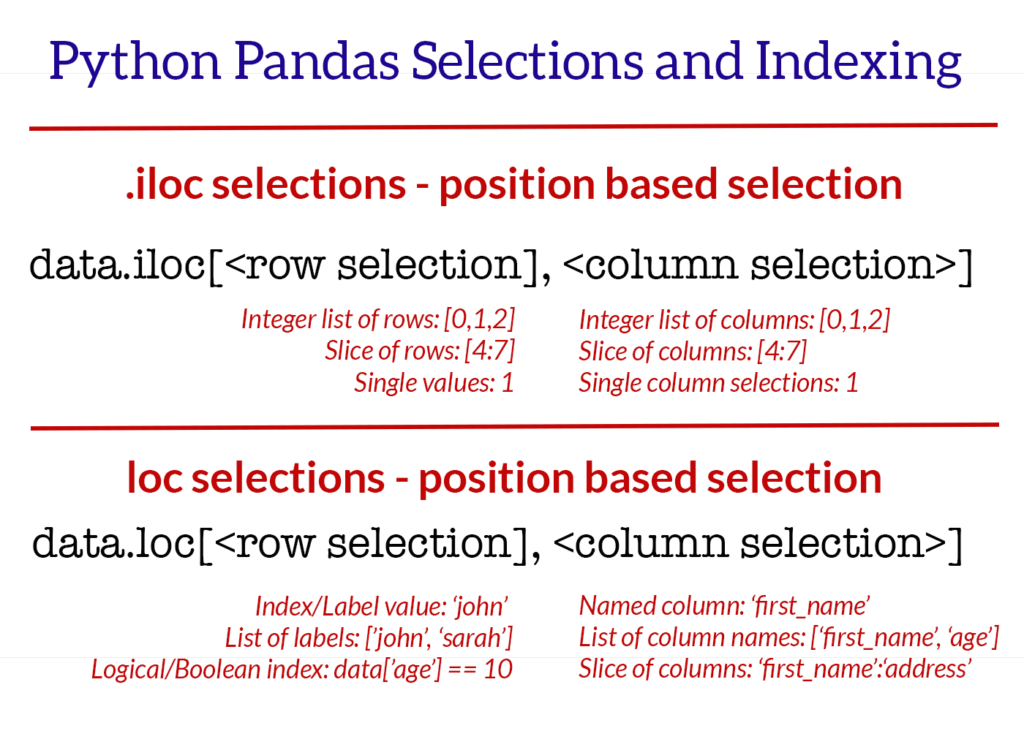
行列选择 iloc 通过索引定位行,列,输入参数是 整数类型
iloc
Selecting data by row numbers (.iloc)
The iloc indexer syntax is data.iloc[, ],
data.iloc[0 ] data.iloc[1 ] data.iloc[-1 ] data.iloc[:,0 ] data.iloc[:,1 ] data.iloc[:,-1 ] data.iloc[0 :5 ] data.iloc[:, 0 :2 ] data.iloc[[0 ,3 ,6 ,24 ], [0 ,5 ,6 ]] data.iloc[0 :5 , 5 :8 ]
行列选择 loc a.) Selecting rows by label/index, ]
data.loc[['Andrade' , 'Veness' ], 'city' :'email' ] data.loc['Andrade' :'Veness' , ['first_name' , 'address' , 'city' ]] data.set_index('id' , inplace=True ) data.loc[487 ]
替换值 df.replace(-2147483645.0 ,0 ,True ) df.replace({-2147483645.0 :0 ,-2147483648.0 :0 },inplace=True )
读写文件 csv 文件 df = pd.read_csv(r'成都西菱凸轮轴升程表FT2.5L-EX-H闭到开.txt' , dtype=float ,sep='\t' ,header=None ,names=['t1' ,'t2' ]) df_csv = pd.read_csv('csv_example' ,dtype=float ,header=None ) print (s.dtypes)df.to_csv('csv_example' , index=False ) df.to_csv('refine.csv' , index=False ,header=False ) bytes_data = shm.buf.tobytes() s = str (bytes_data[:data_size], 'utf-8' ) data = StringIO(s) df = pd.read_csv(data)
写 csv 权限问题 file = open (msg_json["Param" ], "w" ) df_all.to_csv(file, index=False ) file.close()
f = open (os.path.join(root, name)) datas = f.read() data = StringIO(datas) df = pd.read_csv(data,header=None )
from string from io import StringIOs = str (bytes_data, 'utf-8' ) data = StringIO(s) df = pd.read_csv(data) df = pd.read_csv(StringIO(s),delimiter=',' , delim_whitespace=False , names=cols) header_list = ["Name" , "Dept" , "Start Date" ] df = pd.read_csv("sample_file.csv" , names=header_list) df = pd.read_csv("sample_file.csv" , header=None ) print (df)
ndarray 转 dataframe my_array = np.array([[11 ,22 ,33 ],[44 ,55 ,66 ]]) df = pd.DataFrame(my_array, columns = ['Column_A' ,'Column_B' ,'Column_C' ]) xlist = x.tolist() ylist = y.tolist() datas = pd.DataFrame(list (zip (xlist, ylist)), columns=['x' ,'y' ], dtype=float )
series to dataframe df = my_series.to_frame() df = pd.DataFrame(my_series)
列操作 列数 添加列 df = pd.DataFrame(columns=['A' , 'B' ], data = [[1 ,2 ],[3 ,4 ]]) df['C' ] = None pd.concat([df, pd.DataFrame(columns=['D' ,'E' ])]) df.reindex(columns=['A' ,'B' ,'C' ,'D' ,'E' ])
修改列名 df = df.rename(columns={'t1' : 'x' })
删除列 df.drop(col_names_list, axis=1 , inplace=True )
获取某一列 col = df["YY" ] col = df[["YY" ]]
过滤列 [] 是 boolean 操作符,保留 true 的数据
aqicsv[aqicsv["predictaqi_norm1" ]>100 ] aqicsv[(aqicsv["FID" ]>37898 ) & (aqicsv["FID" ]<38766 ) ]
列是否存在 if 'ma5' not in datas or 'ma60' not in datas: datas = calc_ma(datas, ["5", "10", "25", "43", "60"])
行操作 行数 行变列 df_row.T df_t_copy = df_.T.copy() df_tr = df.transpose()
删除行 获取第一行索引 df_idx = df.loc[[0 ]].index.tolist()[0 ] dd = df_calc.iloc[0 :1 ]
遍历行 counts = len (df) for idx in range (0 ,counts): if df.at[idx,'code' ] > x1 and sindex == 0 : sindex = df.loc[[idx]].index.tolist()[0 ] elif df.at[idx,'code' ] >= x2 and sindex != 0 : eindex = df.loc[[idx]].index.tolist()[0 ] df = df.loc[sindex:eindex] df = df.reset_index(drop=True ) return df for index, row in df.iterrows(): print (index, row['ts_code' ], row['trade_date' ]) df_row = df[index:index + 1 ] print (df_row)
获取一行 df.iloc[0 ] df.iloc[[0 ]] dd = df_calc.iloc[-1 :] data.iloc[-1 ] data.iloc[-1 :]
获取连续多行 选取特定行的数据 df_name.loc[["Ivysaur" ,"VenusaurMega Venusaur" ,"Charizard" ,"Squirtle" ]] df_name.iloc[[1 ,3 ,6 ,9 ]]
添加一行数据 df_result.loc[0 ] = angle new_row = {'name' :'Geo' , 'physics' :87 , 'chemistry' :92 , 'algebra' :97 } df_marks = df_marks.append(new_row, ignore_index=True )
df = pd.DataFrame([[1 , 2 ], [3 , 4 ]], columns = ["a" , "b" ]) print (df)OUTPUT a b 0 1 2 1 3 4
删除行 list,dict to dataframe labels = ['date' ,'open' , 'high' , 'low' , 'close' , 'volume' , 'code' ] datas = pd.DataFrame([angle], columns=label, dtype=float ) datas.set_index('date' , inplace=True ) labels = ['角度' , '数值' ] datas = pd.DataFrame(list (zip (numbers[1 ], numbers[6 ]), columns=labels)) df = pd.DataFrame(data_arr) data = [['Geeks' , 10 ], ['for' , 15 ], ['geeks' , 20 ]] df = pd.DataFrame(data, columns = ['Name' , 'Age' ]) print (df )
dataframe to list of dict codes = df_codes.to_dict('records' )
判断空 nan None Null from numpy import NaNNaN是numpy\pandas下的,不是Python原生的,Not a Number的简称。 数据类型是float None 是一个python特殊的数据类型。None 不同于空列表和空字符串,是一种单独的格式。print (type (None ))NoneType if per_data.loc[0 , 'volume_ratio' ] is None : per_data.loc[0 , 'volume_ratio' ] = NaN isnull() notnull() dropna(): 过滤丢失数据 fillna(): 填充丢失数据
过滤nan df = df.dropna(axis=0 ) df = df.dropna(axis=1 ) df = df.dropna(axis=0 ,how='all' )
填充 NaN df_all = df_all.fillna(method='pad' )
重建索引 drop=True 就不会多出来一列了
datas = datas.reset_index(drop=True )
获取索引 sindex = df.loc[[idx]].index.tolist()[0 ]
判断是否相等 print ((chk_height == y_standard))print ((chk_height==y_standard).all ())
生成测试数据 x_standard_new = np.linspace(0 , 360 , 720 )
获取重复值 df_dup1 = df['value' ].duplicated() df_dup = df_value[df_value['value' ].duplicated()]
去除重复项 DataFrame.drop_duplicates(subset=None , keep='first' , inplace=False ) df_nodup = df.drop_duplicates(subset='data' ,keep='first' ,inplace=False )
去掉连续重复项 cols = ['code' , 'data' ] de_dup = it[cols].loc[(it[cols].shift() != it[cols]).any (axis=1 )]
修改数据精度 删除指定列中含有指定字符的行 datas = datas[~datas['name' ].str .contains('ST' )] codes = codes[~codes['ts_code' ].str .startswith('688' )]
合并 append 会创建新的对象,所以效率会差些
https://pandas.pydata.org/pandas-docs/stable/user_guide/merging.html#concatenating-using-append
df_all = pd.concat(df_list, ignore_index=True ) df_all = pd.concat(share_df_list,axis=1 )
排序 df.sort_values('trade_date' , ascending=True , inplace=True ) results = t_codes.find().sort('trade_date' , pymongo.DESCENDING).limit(1 ) inplace 表示是否修改当前的数据,false的话,当前数据不变,返回修改后的
打印属性设置 pd.set_option('display.width' , 5000 ) pd.set_option('display.max_rows' , 500 ) pd.set_option('display.max_columns' , 500 ) pd.set_option('display.width' , 1000 ) pd.options.display.float_format = '{:,.2f}' .format with pd.option_context('display.max_rows' , None , 'display.max_columns' , None , 'display.max_colwidth' , 500 , 'display.width' , 5000 ): print (df) pd.options.display.float_format = '{:.6f}' .format pd.set_option('precision' , 6 )
数据平移 df.shift print (df.shift(1 )) print ('\n' )print (df.shift(-2 )) print ('\n' )print (df.shift(1 ,axis=1 )) print ('\n' )print (df.shift(-2 ,axis=1 )) print ('\n' )
计算 df.loc[:, 'y' ] = df.loc[:, 'y' ] / 100 df = pd.DataFrame({'C1' : [1 , 1 , 1 ], 'C2' : [1 , 1 , 1 ], 'C3' : [1 , 1 , 1 ]}) df df + 1 df['C1' ] = df['C1' ] + np.array([1 , 2 , 3 ]) df df.iloc[2 , 2 ] += 5 df df[['C1' , 'C2' ]] -= 5 df
格式化输出 格式化输出 print tabulate(df.head(5 ), headers='keys' , tablefmt='psql' )pd.set_option('display.max_rows' , 500 ) pd.set_option('display.max_columns' , 500 ) pd.set_option('display.width' , 1000 ) pd.options.display.float_format = '{:,.2f}' .format
创建空的dataframe df_empty = pd.DataFrame(columns=['A' , 'B' , 'C' , 'D' ])
清空 dataframe df_tip = df_tip.iloc[0 :0 ]
获取指定行列数据 DataFrame.at Access a single value for a row/column label pair. print (data.at[0 , 'turnover_rate' ])print (data.at[1 , 'turnover_rate' ])data.irow(0 ) data.icol(0 ) df.iloc[[0 ]]['t1' ].to_list()[0 ] df.iloc[-1 :]['t1' ].to_list()[0 ]
行,列统计和 # 计算第5列的累加和 column_sum = lt100.iloc[:, 5].sum()
返回行数,列数 最大值,最小值,均值 print (datas.loc[:, "角度1" ].max ())print (datas.loc[:, "角度1" ].min ())highestLine = klines.ix[klines['close' ].idxmax()] lowestLine = klines.ix[klines['close' ].idxmin()] df.mean(axis=0 ) df.mean(axis=1 ) maxIdx = df_fourier['y' ].idxmax() maxRow = df_fourier.iloc[[maxIdx]]
差值 diff df_mean = df_row.diff(axis=1 ,periods=5 )
rolling df = pd.DataFrame({'B' : [0 , 1 , 2 , 3 , 4 ,5 ,6 ]}) print (df.rolling(2 ).sum ())df2.rolling(window=2 , min_periods=1 )["amount" ].agg([np.sum , np.mean]) sum mean 0 12000.0 12000.0 1 30000.0 15000.0 2 18000.0 18000.0 3 12000.0 12000.0 4 21000.0 10500.0 5 25000.0 12500.0 6 34000.0 17000.0 df_mean = df_row.rolling(window=5 , axis=1 ).mean()
切片 df1.loc[[0 , 1 ], :] df[0 :] df[:2 ] df[0 :1 ] df[1 :3 ] df[-1 :] df[-3 :-1 ] df.loc[0 ,'name' ] df.loc[0 :2 , ['name' ,'age' ]] df.loc[[2 ,3 ],['name' ,'age' ]] df.loc[df['gender' ]=='M' ,'name' ] df.loc[df['gender' ]=='M' ,['name' ,'age' ]] df.iloc[0 ,0 ] df.iloc[1 ,2 ] df.iloc[[1 ,3 ],0 :2 ] df.iloc[1 :3 ,[1 ,2 ]