ODBC usage
use ODBC by MFC
work with class CDatabase,the data source must be one that you have configured through Open Database Connectivity (ODBC) Administrator.
use ODBC connect MySql.
MySql ODBC driver
for now mysql-connector-odbc-8.0.15-winx64.msi
Configuring a Connector/ODBC DSN on Windows with the ODBC Data Source Administrator GUI
Open the ODBC Data Source Administrator.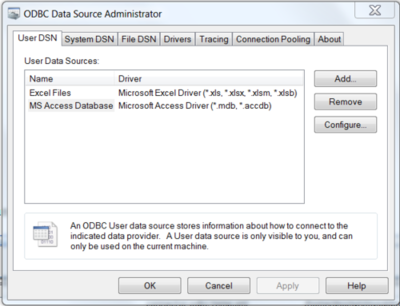
To create a System DSN (which will be available to all users), select the System DSN tab. To create a User DSN, which will be available only to the current user, click the Add… button to open the “Create New Data Source” dialog.
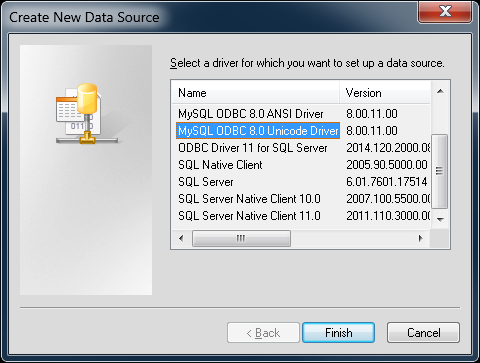
From the “Create New Data Source” dialog, select the MySQL ODBC 5.x ANSI or Unicode Driver, then click Finish to open its connection parameters dialog.
You now need to configure the specific fields for the DSN you are creating through the Connection Parameters dialog.
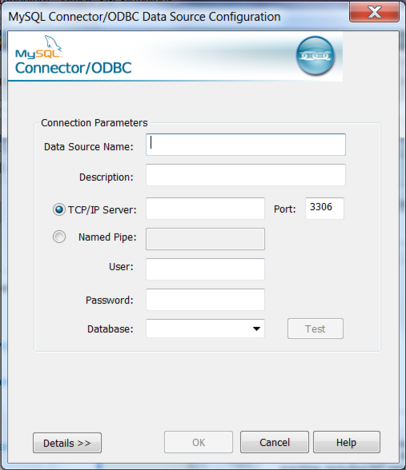
To verify the connection using the parameters you have entered, click the Test button. If the connection can be made successfully, you will be notified with a Connection Successful dialog; otherwise, you will be notified with a Connection Failed dialog.