git-搭建git私有仓库
Gitea 快捷方便
gogs vs gitea
Gogs and Gitea are Open Source, single-binary Go implementations of a Github-like git repository hosting system
Gitea is a fork of Gogs
https://docs.gitea.io/en-us/comparison/
Gitea 评价略微好于 gogs
Easy to install and setup. Can run on a VPS with 1 core CPU and 256MB RAM.
Gitblit
Pure Java Git solution for managing, viewing, and serving Git repositories.
Current Release 1.8.0 (2016-06-22)
综上所述,选择gitea
注册为Windows服务
以Administrator身份运行 cmd,然后执行以下命令:
sc create gitea start= auto binPath= "\"d:\gitea\gitea.exe\" web --config \"d:\gitea\custom\conf\app.ini\"" |
之后在控制面板打开 “Windows Services”,搜索 “gitea”,右键选择 “Run”。在浏览器打开 http://localhost:3000 就可以访问了。(如果你修改了端口,请访问对应的端口,3000是默认端口)。
从Windows服务中删除
以Administrator身份运行 cmd,然后执行以下命令:
sc delete gitea |
还真简单,就是个 exe 直接运行就可以了, localhost:3000 默认端口
第一次运行,点击 sing in 会出现配置界面
安装 postgreSQL 或者 sqlite
// 查看 postgreSQL 端口 |
配置
修改配置文件
D:\gitea\custom\conf\app.ini
把 server 下面的 localhost 替换成服务的ip。
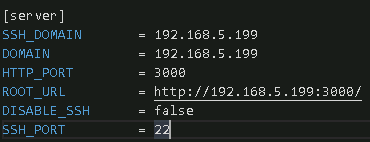
增加启用内部SSH服务器
START_SSH_SERVER = true