注意 win7 需要 Windows6.1-KB2533623-x64.msu 补丁
打包为可执行文件以便分发。
PyInstaller – 将 Python 程序转换成独立的执行文件(跨平台)。
dh-virtualenv – 构建并将 virtualenv 虚拟环境作为一个 Debian 包来发布。
Nuitka – 将脚本、模块、包编译成可执行文件或扩展模块。
py2app – 将 Python 脚本变为独立软件包(Mac OS X)。
py2exe – 将 Python 脚本变为独立软件包(Windows)。
pynsist – 一个用来创建 Windows 安装程序的工具,可以在安装程序中打包 Python本身。
Nuitka
website
Nuitka直接将python编译成C++代码 ,再编译C++代码产生可执行文件,完全不存在反向解析的问题,非常安全,而且由于可执行文件由C++编译而来,运行速度也会获得提升。
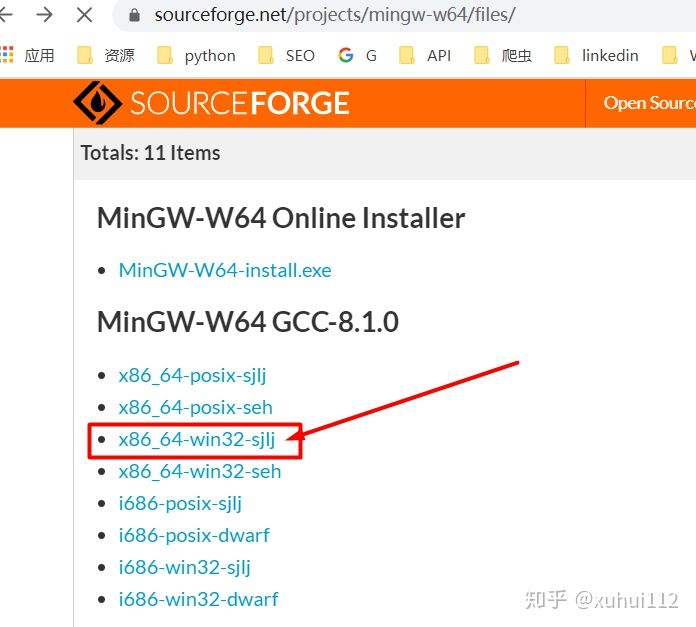
下载MinGW64 8.1(MinGW编译器比MSVS编译器要快,并且不需要下载一堆20多G的安装文件到C盘)
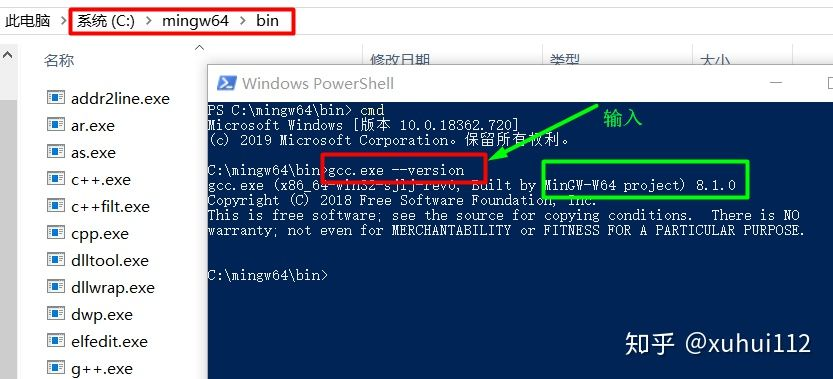
解压后放在C盘目录下,查询gcc.exe是否有效 gcc.exe –version
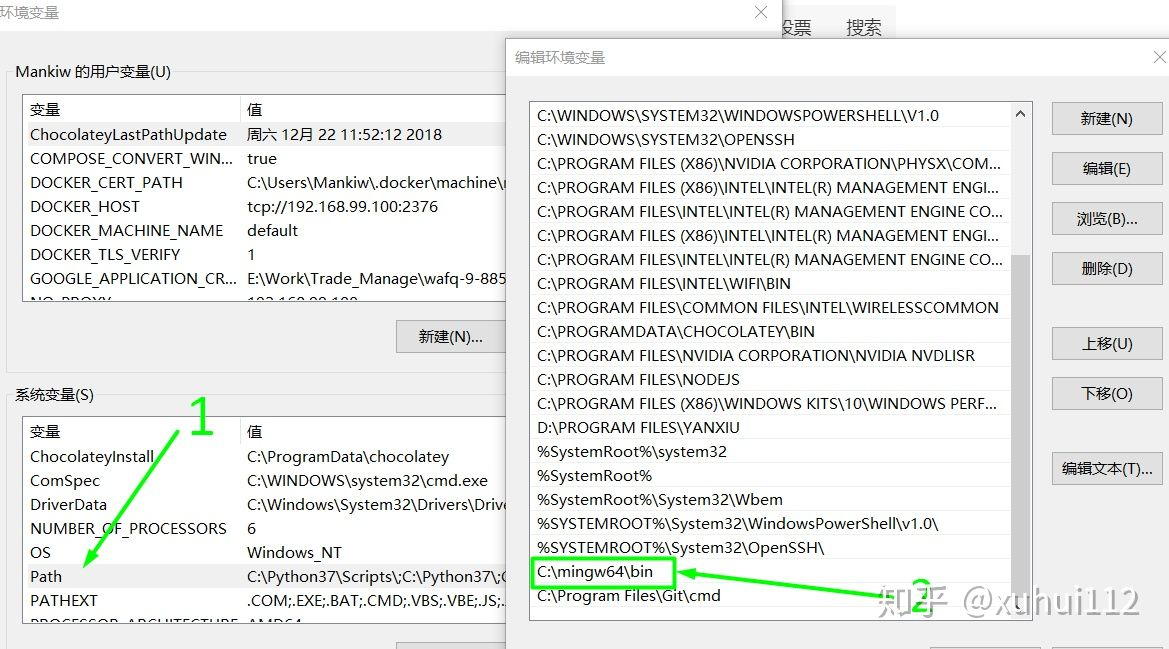
设置环境变量
查看相关信息
python -m nuitka –version
python -m nuitka –plugin-list
pip install nuitka
pip install -U nuitka

使用 anaconda 安装
conda install -c conda-forge nuitka

使用 anaconda 安装 mingw64 更方便
conda install m2w64-gcc libpython
setenv CC=<path_to_Anaconda>\Library\mingw-w64\bin\gcc.exe
set CC=D:\Anaconda3\envs\leastSquare\Library\mingw-w64\bin\gcc.exe

然后使用 提示模式 自动设置参数
python get-hints.py your.py
python nuitka-hints.py your.py


手动设置参数

setenv CC=C:\mingw64\bin\gcc.exe
python -m nuitka --mingw64 --standalone --output-dir=out --show-progress   --plugin-enable=numpy --follow-imports app.py

python nuitka --mingw64 --standalone  --show-modules  --show-progress --show-scons --plugin-enable=numpy --plugin-enable=tk-inter --plugin-enable=pylint-warnings  -j 8 main.py


python -m nuitka --mingw64 --standalone --windows-disable-console --python-flag=no_site --show-modules  --show-progress --show-scons --plugin-enable=numpy --plugin-enable=tk-inter --plugin-enable=pylint-warnings --assume-yes-for-downloads  --nofollow-import-to=numpy,jinja2,matplotlib,scipy,sqlalchemy,pandas,pygal,pyzbar --follow-import-to=tkArc -j 8 app.py


--show-scons

python -m nuitka --mingw64 --standalone  --show-progress --plugin-enable=numpy --plugin-enable=tk-inter --plugin-enable=pylint-warnings --plugin-enable=qt-plugins --assume-yes-for-downloads --nofollow-imports --follow-import-to=numpy,matplotlib app.py

遇到缺少库文件的就找到文件拷贝过去,有目录的考目录,有.py文件的拷文件


# 下面的编译时间非常的长超过8小时
nuitka --mingw64 --standalone --show-progress --plugin-enable=numpy --plugin-enable=tk-inter --plugin-enable=pylint-warnings --plugin-enable=qt-plugins --assume-yes-for-downloads  --recurse-all main.py


 --nofollow-imports --follow-import-to=numpy,matplotlib

--recurse-all  如同pyinstaller 的--onefile 将所有文件打包为一个可执行程序。
--output-dir=out
--windows-dependency-tool=pefile
--follow-imports
--python-flag=nosite
--file-reference-choice=original

--python-flag=no_site

--mingw64 #默认为已经安装的vs2017去编译,否则就按指定的比如mingw
--standalone 不依赖安装的python文件,这是必须的
--windows-dependency-tool=pefile 查找依赖库
--windows-disable-console 没有CMD控制窗口
--recurse-all 所有的资源文件 这个也选上
-recurse-not-to=numpy,jinja2 不编译的模块,防止速度会更慢
--output-dir=out 生成exe到out文件夹下面去
--show-progress 显示编译的进度,很直观
--show-memory 显示内存的占用
--plugin-enable=pylint-warnings 报警信息
--plugin-enable=qt-plugins 需要加载的PyQT插件

-o: 指定输出的文件名(需包含所在目录)
|
编译 pyd
如果 pyd 调用有问题,可以尝试一下 cpython 生成 pyd
nuitka --mingw64 --module --show-progress --output-dir=o 你的.py
|
pyinstaller
pip install pyinstaller
pyinstaller -y --upx-dir E:\green\upx-3.96-win64\ --clean --onefile MainWindow.py

pyinstaller -y --clean --onefile  --distpath ../dist --workpath ../build app.py
pyinstaller -y --clean  --distpath ../dist --workpath ../build app.py
|
问题
Could not find the matplotlib data files
当前版本 3.3.7 降级据说可以
pip install matplotlib==3.0.3 -i https://pypi.tuna.tsinghua.edu.cn/simple –user
pip install matplotlib==3.1.3
pip install matplotlib==3.2.2
No module named ‘TkTreectrl’
_tkinter.TclError: Can’t find a usable init.tcl