TextOutW

BOOL TextOutW(
HDC hdc,
int x,
int y,
LPCWSTR lpString,
int c
);

文字颜色

dc.SetBkMode(TRANSPARENT);
dc.SetTextColor(RGB(255, 0, 0));
dc.TextOut(40/*起始x坐标*/, rcClient.Height() - 25/*起始y坐标*/, _T("版本号:V1.0.0")/*需要显示的文字*/);

中间显示文字

BOOL TextOutW(
HDC hdc,
int x,
int y,
LPCWSTR lpString,
int c
);

m_memDC.SetTextAlign(TA_BASELINE | TA_CENTER);
m_memDC.TextOutW(block_left + 48, block_top + 52, L"T1");

获取文字宽度

// 第一行状态文字 宽度
SIZE sizeFont;
GetTextExtentPoint32(m_memDC, L"超下公差", (int)wcslen(L"超下公差"), &sizeFont);
// 宽度 sizeFont.cx;

画线,颜色

CPen penDot(PS_DOT, 1, RGB(0x46, 0x3F, 0x3F));
auto old_obj = m_memDC.SelectObject(penDot);
m_memDC.MoveTo(x_left, y - 1);
m_memDC.LineTo(x_left, 10);
m_memDC.SelectObject(old_obj);
CPen(Int style,int width ,COLORREF color);

style:画笔样式,可以为以下样式:

PS_SOLID 实线
PS_DASH 虚线,该值只有当画笔宽度等于1个设备单位或更小时才有效
PS_DOT 点线,该值只有当画笔宽度等于1个设备单位或更小时才有效
PS_DASHDOT 点和虚线交替,该值只有当画笔宽度等于1个设备单位或更小时才有效
PS_DASHDOTDOT 双点线和虚线交替,该值只有当画笔宽度等于1个设备单位或更小时才有效
PS_NULL 空画笔
PS_GEOMETRIC 几何画笔
.......

width:画笔宽度。
color:画笔颜色。

使用gdi+显示GIF动画

用了ImageEx类,文件在handyLib项目里面。

CiPcPayTesterApp file

private:
ULONG_PTR m_gdiplusToken;

//use GDIplus begin
Gdiplus::GdiplusStartupInput gdiplusStartupInput;
Gdiplus::GdiplusStartup(&m_gdiplusToken, &gdiplusStartupInput, NULL);
//use GDIplus end

int CiPcPayTesterApp::ExitInstance()
{
//close gdiplus environment
Gdiplus::GdiplusShutdown(m_gdiplusToken);
return CWinApp::ExitInstance();
}

CDlgWaite file

// GDI+
ImageEx* m_image;

CDlgWaite::CDlgWaite(CWnd* pParent /*=NULL*/)
: CDialog(IDD_DLGWAITE, pParent)
{
// GDI+
m_image = NULL;
}

CDlgWaite::~CDlgWaite()
{
// GDI+
delete m_image;
}

// GDI+
m_image = new ImageEx(strModule);
CRect rc;
GetClientRect(rc);

::SetWindowPos(this->m_hWnd, HWND_NOTOPMOST, 0, 0, 200, 200, SWP_NOMOVE);
// int cx = (rc.Width() - m_image->GetWidth()) / 2;
m_image->InitAnimation(m_hWnd, CPoint(0, 0));

The problem is that GetTickCount64 doesn’t exists in XP system.
It’s necessary to compile your application (and any library which uses GetTickCount64) with correct windows version define

targetver.h

#define WINVER 0x0501
#define _WIN32_WINNT 0x0501

#include < WinSDKVer.h>

#include <SDKDDKVer.h>

在预处理设置中

WINVER=0x0501
_WIN32_WINNT=0x0501

InitializeCriticalSectionEx not located in KERNEL32.dll

The “InitializeCriticalSectionEx” function does not exist in the XP version of Kernel32.dll, even with SP3 installed. It was not introduced until Vista.

驾驶中判断后车车距

通过外后视镜,如果外后视镜看到的后车影像占外后视镜的比例为1,也就是说占满整个外后视镜了,此时距离大约3-5米。占比1/2时,距离大约7-10米,占比1/3时,距离大约10米以上。

判断前车车距

通过前机盖可以看到前车的轮胎底沿,刚好重合时,距离大约3米左右。
通过前机盖可以看到前车的保险杠下沿,刚好重合时,距离大约2米左右。
通过前机盖可以看到前车的保险杠上沿,刚好重合时,距离大约1米左右。

前轮位置

左前灯的边沿角,沿着分道线的虚线行驶,距离左侧分道线大约30公分。
发动机盖中间靠右的位置,沿着分道线行驶,距离右侧分道线大约30公分。

MFC

COleDateTime   curTime;
curTime = COleDateTime::GetCurrentTime();

CString strDate = curTime.Format(_T("%Y-%m-%d")) + " 00:00:00";
COleDateTime ole_time;
ole_time.ParseDateTime(strDate, VAR_DATEVALUEONLY);
COleDateTime work_ole_time = ole_time + COleDateTimeSpan(1, 0, 0, 0);
CString date1 = work_ole_time.Format(_T("%Y-%m-%d %H:%M:%S"));


CTime curTime = CTime::GetCurrentTime();
CString date = curTime.Format("%Y-%m-%d %H:%M:%S %W-%A");

时间计算

COleDateTime dt = COleDateTime::GetCurrentTime();

COleDateTime to string

1. COleDateTime --> string
COleDateTime::Format()

2. string --> COleDateTime
COleDateTime::ParseDateTime()

COleDateTime dt = COleDateTime::GetCurrentTime();
COleDateTime dtStart = dt - COleDateTimeSpan(0,0,0,startTime);
COleDateTime dtEnd = dt + COleDateTimeSpan(0, 0, 0, endTime);
wstring strTmp = dtStart.Format(L"%Y-%m-%d %H:%M:%S").GetBuffer();

windows平台的时间操作

SYSTEMTIME t;
GetLocalTime(&t);
char a[30] = { '\0' };
sprintf_s(a, 30, "%04d%02d%02d%02d%02d%02d%03d", t.wYear, t.wMonth, t.wDay, t.wHour, t.wMinute, t.wSecond, t.wMilliseconds);

typedef struct _SYSTEMTIME {
WORD wYear;
WORD wMonth;
WORD wDayOfWeek;
WORD wDay;
WORD wHour;
WORD wMinute;
WORD wSecond;
WORD wMilliseconds;
} SYSTEMTIME, *PSYSTEMTIME;

wDayOfWeek: 0 sunday 1-6 周一到周六

毫秒时间戳

#include <sys/timeb.h>

//since 1970.1.1 millisecond
static wstring getTimestemp();

std::wstring HDateTime::getTimestemp()
{
struct timeb tp;
ftime(&tp);
return to_wstring(tp.time) + to_wstring((long long)tp.millitm);
}

时间戳转日期格式

time_t tt = atoll(json["UpdateTime"].asString().c_str());

char now[64];
struct tm ttime;
errno_t err = localtime_s(&ttime,&tt);
if (err)
{
assert(false);
}
strftime(now, 64, "%Y-%m-%d %H:%M:%S", &ttime);

// now = 2019-10-14 17:17:51

c++ 11 std::chrono

std::chrono 是 C++11 引入的日期时间处理库,其中包含3种时钟:
system_clock
对于system_clock,其起点是epoch,即1970-01-01 00:00:00 UTC,其刻度是1个tick,也就是_XTIME_NSECS_PER_TICK纳秒。

steady_clock
steady_clock的刻度是1纳秒,起点并非1970-01-01 00:00:00 UTC,一般是系统启动时间
steady_clock的作用是为了得到不随系统时间修改而变化的时间间隔

high_resolution_clock
high_resolution_clock实际上和steady_clock一样。

线程休眠时间

this_thread::sleep_for(chrono::seconds(5));

获取当前时间

// TODO token 超时,开始计算有效期 24 小时, 先保持记录,暂不做实际处理
system_clock::time_point curDatetime = system_clock::now();
std::time_t expDatetime = system_clock::to_time_t(curDatetime + std::chrono::hours(24));
std::tm ptm2;
localtime_s(&ptm2, &expDatetime);
std::stringstream ssTp;
ssTp << std::put_time(&ptm2, "%Y-%m-%d %H:%M:%S");
pwnd->m_mapFrontConnInfo[token].tokenExpiration = ssTp.str();

字符串转时间类型

#include <chrono>
#include <ctime>

// 获取当前时间
string getCurTime()
{
auto tp = system_clock::now();
milliseconds ms = duration_cast<milliseconds>(tp.time_since_epoch());
std::time_t expDatetime = system_clock::to_time_t(tp);
std::tm ptm2;
localtime_s(&ptm2, &expDatetime);
std::stringstream ssTp;
ssTp << std::put_time(&ptm2, "%Y-%m-%d %H:%M:%S")<<"."<<to_string(ms.count() % 1000);
return ssTp.str();
}

// 默认 2019.07.01
std::tm tm;
ZeroMemory(&tm, sizeof(std::tm));
tm.tm_mday = 1;
tm.tm_mon = 7;
tm.tm_year = 2019;

std::time_t tt = mktime(&tm);
std::chrono::system_clock::time_point tpCustom = std::chrono::system_clock::from_time_t(tt);

std::tm tm = {};
std::stringstream ss("2019-07-01 00:00:00");
ss >> std::get_time(&tm, "%Y-%m-%d %H:%M:%S");
auto tp = std::chrono::system_clock::from_time_t(std::mktime(&tm));
auto timestamp = std::chrono::time_point_cast<std::chrono::milliseconds>(std::chrono::high_resolution_clock::now()).time_since_epoch().count();

std::time_t in_time_t = std::chrono::system_clock::to_time_t(tp);
std::tm ptm2;
::localtime_s(&ptm2, &in_time_t);
std::stringstream ssTp;
ssTp << std::put_time(&ptm2, "%Y-%m-%d %H:%M:%S");
string tpStr = ssTp.str();
#include <iostream>
#include <chrono>
using namespace std;

int main()
{
cout << chrono::high_resolution_clock::period::den << endl;
auto start_time = chrono::high_resolution_clock::now();
int temp;
for (int i = 0; i< 242000000; i++)
temp+=temp;
auto end_time = chrono::high_resolution_clock::now();
cout << chrono::duration_cast<chrono::seconds>(end_time - start_time).count() << ":";
cout << chrono::duration_cast<chrono::microseconds>(end_time - start_time).count() << ":";
return 0;
}

std::this_thread::sleep_for(std::chrono::seconds(3)); //休眠三秒
std::this_thread::sleep_for(std::chrono:: milliseconds (100)); //休眠100毫秒

// Reduce verbosity but let you know what is in what namespace
namespace C = std::chrono;
namespace D = date;
namespace S = std;

auto tp = C::system_clock::now(); // tp is a C::system_clock::time_point
{
// Need to reach into namespace date for this streaming operator
using namespace date;
S::cout << tp << '\n';
}
auto dp = D::floor<D::days>(tp); // dp is a sys_days, which is a
// type alias for a C::time_point
auto ymd = D::year_month_day{dp};
auto time = D::make_time(C::duration_cast<C::milliseconds>(tp-dp));
S::cout << "year = " << ymd.year() << '\n';
S::cout << "month = " << ymd.month() << '\n';
S::cout << "day = " << ymd.day() << '\n';
S::cout << "hour = " << time.hours().count() << "h\n";
S::cout << "minute = " << time.minutes().count() << "min\n";
S::cout << "second = " << time.seconds().count() << "s\n";
S::cout << "millisecond = " << time.subseconds().count() << "ms\n";

计时

#include <chrono>   
using namespace std;
using namespace chrono;

auto start = system_clock::now();
// do something...
auto end = system_clock::now();
auto duration = duration_cast<microseconds>(end - start);
cout << "耗时"
<< double(duration.count()) * microseconds::period::num / microseconds::period::den
<< "秒" << endl;

MFC

COleDateTime   curTime;
curTime = COleDateTime::GetCurrentTime();

CString strDate = curTime.Format(_T("%Y-%m-%d")) + " 00:00:00";
COleDateTime ole_time;
ole_time.ParseDateTime(strDate, VAR_DATEVALUEONLY);
COleDateTime work_ole_time = ole_time + COleDateTimeSpan(1, 0, 0, 0);
CString date1 = work_ole_time.Format(_T("%Y-%m-%d %H:%M:%S"));


CTime curTime = CTime::GetCurrentTime();
CString date = curTime.Format("%Y-%m-%d %H:%M:%S %W-%A");

时间计算

COleDateTime dt = COleDateTime::GetCurrentTime();

COleDateTime to string

1. COleDateTime --> string
COleDateTime::Format()

2. string --> COleDateTime
COleDateTime::ParseDateTime()

COleDateTime dt = COleDateTime::GetCurrentTime();
COleDateTime dtStart = dt - COleDateTimeSpan(0,0,0,startTime);
COleDateTime dtEnd = dt + COleDateTimeSpan(0, 0, 0, endTime);
wstring strTmp = dtStart.Format(L"%Y-%m-%d %H:%M:%S").GetBuffer();

windows平台的时间操作

SYSTEMTIME t;
GetLocalTime(&t);
char a[30] = { '\0' };
sprintf_s(a, 30, "%04d%02d%02d%02d%02d%02d%03d", t.wYear, t.wMonth, t.wDay, t.wHour, t.wMinute, t.wSecond, t.wMilliseconds);

typedef struct _SYSTEMTIME {
WORD wYear;
WORD wMonth;
WORD wDayOfWeek;
WORD wDay;
WORD wHour;
WORD wMinute;
WORD wSecond;
WORD wMilliseconds;
} SYSTEMTIME, *PSYSTEMTIME;

wDayOfWeek: 0 sunday 1-6 周一到周六

毫秒时间戳

#include <sys/timeb.h>

//since 1970.1.1 millisecond
static wstring getTimestemp();

std::wstring HDateTime::getTimestemp()
{
struct timeb tp;
ftime(&tp);
return to_wstring(tp.time) + to_wstring((long long)tp.millitm);
}

时间戳转日期格式

time_t tt = atoll(json["UpdateTime"].asString().c_str());

char now[64];
struct tm ttime;
errno_t err = localtime_s(&ttime,&tt);
if (err)
{
assert(false);
}
strftime(now, 64, "%Y-%m-%d %H:%M:%S", &ttime);

// now = 2019-10-14 17:17:51

c++ 11 std::chrono

std::chrono 是 C++11 引入的日期时间处理库,其中包含3种时钟:
system_clock
对于system_clock,其起点是epoch,即1970-01-01 00:00:00 UTC,其刻度是1个tick,也就是_XTIME_NSECS_PER_TICK纳秒。

steady_clock
steady_clock的刻度是1纳秒,起点并非1970-01-01 00:00:00 UTC,一般是系统启动时间
steady_clock的作用是为了得到不随系统时间修改而变化的时间间隔

high_resolution_clock
high_resolution_clock实际上和steady_clock一样。

线程休眠时间

this_thread::sleep_for(chrono::seconds(5));

获取当前时间

// TODO token 超时,开始计算有效期 24 小时, 先保持记录,暂不做实际处理
system_clock::time_point curDatetime = system_clock::now();
std::time_t expDatetime = system_clock::to_time_t(curDatetime + std::chrono::hours(24));
std::tm ptm2;
localtime_s(&ptm2, &expDatetime);
std::stringstream ssTp;
ssTp << std::put_time(&ptm2, "%Y-%m-%d %H:%M:%S");
pwnd->m_mapFrontConnInfo[token].tokenExpiration = ssTp.str();

字符串转时间类型

#include <chrono>
#include <ctime>

// 获取当前时间
string getCurTime()
{
auto tp = system_clock::now();
milliseconds ms = duration_cast<milliseconds>(tp.time_since_epoch());
std::time_t expDatetime = system_clock::to_time_t(tp);
std::tm ptm2;
localtime_s(&ptm2, &expDatetime);
std::stringstream ssTp;
ssTp << std::put_time(&ptm2, "%Y-%m-%d %H:%M:%S")<<"."<<to_string(ms.count() % 1000);
return ssTp.str();
}

// 默认 2019.07.01
std::tm tm;
ZeroMemory(&tm, sizeof(std::tm));
tm.tm_mday = 1;
tm.tm_mon = 7;
tm.tm_year = 2019;

std::time_t tt = mktime(&tm);
std::chrono::system_clock::time_point tpCustom = std::chrono::system_clock::from_time_t(tt);

std::tm tm = {};
std::stringstream ss("2019-07-01 00:00:00");
ss >> std::get_time(&tm, "%Y-%m-%d %H:%M:%S");
auto tp = std::chrono::system_clock::from_time_t(std::mktime(&tm));
auto timestamp = std::chrono::time_point_cast<std::chrono::milliseconds>(std::chrono::high_resolution_clock::now()).time_since_epoch().count();

std::time_t in_time_t = std::chrono::system_clock::to_time_t(tp);
std::tm ptm2;
::localtime_s(&ptm2, &in_time_t);
std::stringstream ssTp;
ssTp << std::put_time(&ptm2, "%Y-%m-%d %H:%M:%S");
string tpStr = ssTp.str();
#include <iostream>
#include <chrono>
using namespace std;

int main()
{
cout << chrono::high_resolution_clock::period::den << endl;
auto start_time = chrono::high_resolution_clock::now();
int temp;
for (int i = 0; i< 242000000; i++)
temp+=temp;
auto end_time = chrono::high_resolution_clock::now();
cout << chrono::duration_cast<chrono::seconds>(end_time - start_time).count() << ":";
cout << chrono::duration_cast<chrono::microseconds>(end_time - start_time).count() << ":";
return 0;
}

std::this_thread::sleep_for(std::chrono::seconds(3)); //休眠三秒
std::this_thread::sleep_for(std::chrono:: milliseconds (100)); //休眠100毫秒

// Reduce verbosity but let you know what is in what namespace
namespace C = std::chrono;
namespace D = date;
namespace S = std;

auto tp = C::system_clock::now(); // tp is a C::system_clock::time_point
{
// Need to reach into namespace date for this streaming operator
using namespace date;
S::cout << tp << '\n';
}
auto dp = D::floor<D::days>(tp); // dp is a sys_days, which is a
// type alias for a C::time_point
auto ymd = D::year_month_day{dp};
auto time = D::make_time(C::duration_cast<C::milliseconds>(tp-dp));
S::cout << "year = " << ymd.year() << '\n';
S::cout << "month = " << ymd.month() << '\n';
S::cout << "day = " << ymd.day() << '\n';
S::cout << "hour = " << time.hours().count() << "h\n";
S::cout << "minute = " << time.minutes().count() << "min\n";
S::cout << "second = " << time.seconds().count() << "s\n";
S::cout << "millisecond = " << time.subseconds().count() << "ms\n";

计时

#include <chrono>   
using namespace std;
using namespace chrono;

auto start = system_clock::now();
// do something...
auto end = system_clock::now();
auto duration = duration_cast<microseconds>(end - start);
cout << "耗时"
<< double(duration.count()) * microseconds::period::num / microseconds::period::den
<< "秒" << endl;

下午试题 5道试题(15分*5)75分

一、数据流图
  概要:本题主要考察的数据流图的知识,主要是让写出实体、数据存储、缺失数据流。做好这个题,要利用父图子图平衡,数据流有输入必定有输出,加工的分解。
  答题技巧:
   1)读题。阅读一遍说明,宏观把控整道题描述的是一个什么样的系统,然后用数据流图中的符号画出说明中的外部实体、加工、数据存储,例如看到一个学生实体,用长方形圈出来,问题1和问题2迎刃而解。
   2)对比和标记。找缺失数据流,首先看父图子图的数据项是否对应,然后再去说明中找对应关系。尽量把找到的实体、数据存储名称标记在图中,这样就不用每次看都要解释一遍。只要细心认真,一定能找出来。
  注意:一定要使用文章中给的词,数据流起点和终点如果可以写编号的就不要写文字。
  结构化分析设计
考点:
补充和完善数据流:

  1. 首先要想到分层数据流图的平衡原则,即父图和子图的输入/输出流一致,这是找出遗漏数据流非常重要的技巧。
  2. 每个加工至少有一个输入和一个输出数据流。
  3. 找出遗漏的数据流,最根本的依据还是说明。


阅读全文 »

error RC2104:undefined keyword or keyname:SS_REALSIZECONTROL 错误解决

这个解决方法似乎并不是正常的方式因为rc文件是自动生成的

编辑RC文件代码,头文件加入 #include <windows.h>

uafxcwd.lib new already defined

1>uafxcwd.lib(afxmem.obj) : error LNK2005: "void * __cdecl operator new(unsigned int)" (??2@YAPAXI@Z) already defined in LIBCMTD.lib(new_scalar.obj)
1>uafxcwd.lib(afxmem.obj) : error LNK2005: "void __cdecl operator delete(void *)" (??3@YAXPAX@Z) already defined in LIBCMTD.lib(delete_scalar.obj)
1>uafxcwd.lib(afxmem.obj) : error LNK2005: "void __cdecl operator delete[](void *)" (??_V@YAXPAX@Z) already defined in LIBCMTD.lib(delete_array.obj)
1>D:\project\videoHelper\Debug\videoHelper.exe : fatal error LNK1169: one or more multiply defined symbols found

处理方法
做如下改动,注意顺序

debug版本
附加依赖库:uafxcwd.lib;LIBCMTD.lib;
忽略特定默认库:LIBCMTD.lib;uafxcwd.lib

release版本
附加依赖库:uafxcw.lib;LIBCMT.lib;
忽略特定默认库:LIBCMT.lib;uafxcw.lib

错误原因是由于这二个库有各自的new和delete,这是冲突的,需要指定顺序。正确加载库的顺序是uafxcw.lib Libcmtd.lib,而默认的是Libcmtd.lib uafxcw.lib。

__CRT_RTC_INIT 已经在 libcmtd.lib(init.obj) 中定义

libvcruntimed.lib(chkesp.obj) : error LNK2005: __CRT_RTC_INIT 已经在 libcmtd.lib(init.obj) 中定义

解决方案3:

在项目属性页-》连接器-》命令行-》附加选项中 添加/force

error RC2104:undefined keyword or keyname:SS_REALSIZECONTROL 错误解决

这个解决方法似乎并不是正常的方式因为rc文件是自动生成的

编辑RC文件代码,头文件加入 #include <windows.h>

uafxcwd.lib new already defined

1>uafxcwd.lib(afxmem.obj) : error LNK2005: "void * __cdecl operator new(unsigned int)" (??2@YAPAXI@Z) already defined in LIBCMTD.lib(new_scalar.obj)
1>uafxcwd.lib(afxmem.obj) : error LNK2005: "void __cdecl operator delete(void *)" (??3@YAXPAX@Z) already defined in LIBCMTD.lib(delete_scalar.obj)
1>uafxcwd.lib(afxmem.obj) : error LNK2005: "void __cdecl operator delete[](void *)" (??_V@YAXPAX@Z) already defined in LIBCMTD.lib(delete_array.obj)
1>D:\project\videoHelper\Debug\videoHelper.exe : fatal error LNK1169: one or more multiply defined symbols found

处理方法
做如下改动,注意顺序

debug版本
附加依赖库:uafxcwd.lib;LIBCMTD.lib;
忽略特定默认库:LIBCMTD.lib;uafxcwd.lib

release版本
附加依赖库:uafxcw.lib;LIBCMT.lib;
忽略特定默认库:LIBCMT.lib;uafxcw.lib

错误原因是由于这二个库有各自的new和delete,这是冲突的,需要指定顺序。正确加载库的顺序是uafxcw.lib Libcmtd.lib,而默认的是Libcmtd.lib uafxcw.lib。

__CRT_RTC_INIT 已经在 libcmtd.lib(init.obj) 中定义

libvcruntimed.lib(chkesp.obj) : error LNK2005: __CRT_RTC_INIT 已经在 libcmtd.lib(init.obj) 中定义

解决方案3:

在项目属性页-》连接器-》命令行-》附加选项中 添加/force

电吉他连接mac book pro:

连接MBP设备Apogee Jam With Guitar Rig & Garage Band

IK Multimedia iRig HD 2 吉他和贝斯接口 RMB 890

需要注意的是,使用的时候不要把gain调得过高,那里是有指示灯的,如果闪红色,说明过载了,得调低一些,绿色就是正常。
连USB之前请把gain和音量都调到最低,连上后再进行调整,用完后也是一样,调到最低,再拔USB。这样可以保护自己的设备。

吉他40%,效果器10%,音箱50%

4d7ef135.png

琴颈:

  1. 握把后上下滑动,检查边缘是否平滑
  2. 厚度是否适合手型,薄些的适合速弹
  3. 从尾部向琴头方向检查琴颈是否有变形,弯曲的情况

音色:
拾音器 单,双线圈
单: 清脆,有杂音 fender
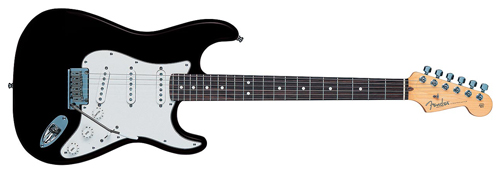
双: 杂音小,浑厚 Gipson

Fender的美产标准款Telecaster和Stratocaster,应该是体验标准Fender音色最好的选择。

PRS Guitar:
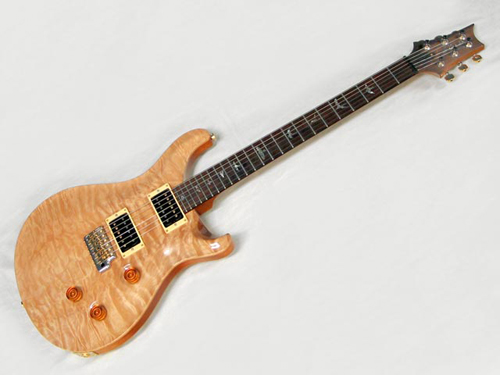
Paul Reed Smith(簡稱 PRS)指的是美國電吉他廠牌及其創始人(Paul Reed Smith, 1956年2月18日 - )創立於西元 1985 年。
PRS 融合了電吉他界中的二大巨頭:Gibson Les Paul 及 Fender Stratocaster 的特長,將它們合而為一。在 PRS 上面你可以透過不同段數的切換得到 Gibson 的雙線圈溫暖厚實 tone 與 Fender 的單線圈清亮 tone,可以說是非常實用划算的電吉他。
Gibson Les Paul
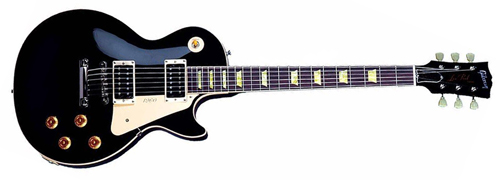
4d412917.png
Fender Stratocaster
f3b2eed9.png
主力型號 Custom 系列,琴身由桃花心木背板 + 楓木面板製成,並可依需求選擇有/無搭載搖座的款式。
PRS Custom 24 韩产比印尼产要好些
48f6521b.png
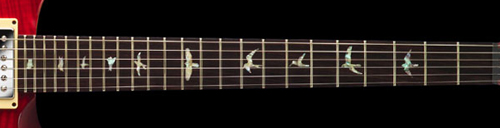
PRS 外觀上最大的特色就是指板上的飛鳥雕刻(Bird inlay)每一格的品種皆不同,表列如下:
Custom、Standard、ME、CE、McCarty、Singlecut、Santana 等等型號的 Bird inlay 上基本上都是這種
dc31a6c8.png
513代表5个拾音器与13种音色。513桃花心木版本则是紫檀木“原版”513的升级版本。它采用新的桃花心木琴颈,紫檀木指板,改良的硬件以及PRS专利的拾音器系统利用五个单线圈拾音器(双单双)提供包括从现代和到古典的各种音色共计13种。其他配置包括25 1/4英寸的尺寸,特殊的琴颈接合,新的513“小鸟”品记,新的更易使用的电路控制系统,包括Volume,Tone控制和两个刀口切换开关,一个是5向的拾音器切换开关,一个3向的模式切换开关,让您可以选择单线圈,干净的双线圈或者是重型双线圈模式。这是PRS最全面的型号,从尖叫的双线圈,到轻声吟唱的单线圈,只需要操作一个3向切换开关即可。
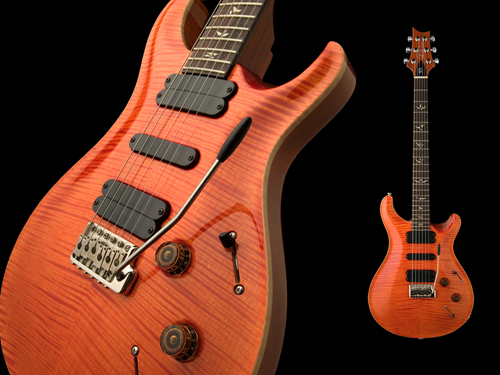
e6840039.png
PRS 513 (玫瑰木琴颈+单片枫木贴面)

PRS 513 Artist(巴西玫瑰木限量款)
此款513是仅次于PRS private stock系列的最高配置,首先是艺术家标志性的极品贴面和渐变颜色搭配,无处不彰显着华丽气息。琴颈使用单片虎皮枫木纹路整齐,选料考究。最后就是富有传奇色彩的巴西玫瑰木指板,使音色更加均衡,延音很出色,枫木和玫瑰木的搭配使音色更加富有动态,更具有现代感。一句话总结:一琴在手,别无所求!