#include <QtEndian>

T qToBigEndian(T src)
T qToLittleEndian(T src)

部分内容引用该文章

香农采样定理是这样描述的:采样频率fs至少为被采集信号最高频率的2倍。少于 2 倍会出现 混叠

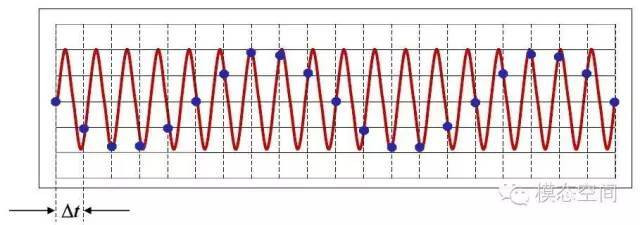
采样频率少于2倍的信号频率时,会导致原本的高频信号被采样成低频信号,如下图所示。红色信号是原始的高频信号,但是由于采样频率不满足采样定理的要求,导致实际采样点如图中蓝色实点表示,将这些蓝色点连成曲线,可以明显的看出这是一个低频信号。在图示的时间长度内,红色信号有18个周期,但采样后的蓝色信号只有2个周期。也就是采样后的信号频率成分为原始信号频率成分的1/9。

这就是所谓的混叠。对连续信号进行等间隔采样时,如果采样频率不满足采样定理,采样后信号的频率就会发生混叠,即高于奈奎斯特频率的频率成分将被重构成低于奈奎斯特频率的信号。这种频谱的重叠导致的失真称为混叠,也就是高频信号被混叠成了低频信号。
20201015_092037.png
阅读全文 »

相关概念

未压缩音频
数字音频处理大多使用采样率和位深这两种技术直接存储音频数据。脉冲编码调制(即 PCM)是最流行的数字音频技术(在使用光盘时较为普及)之一。音频按设定的时间间隔进行采样,采样波在采样点的振幅使用样本的位深存储为数字值。

线性 PCM(表明振幅响应在采样中线性一致)是 CD 内以及 Speech-to-Text API 的 LINEAR16 编码内使用的标准。两种编码均会生成一个与音频数据直接对应的未压缩字节流,两个标准均包含 16 位的位深。线性 PCM 在 CD 中使用 44100 Hz 的采样率,适合改编音乐;然而 16000 Hz 的采样率更适合改编语音。

线性 PCM (LINEAR16) 就是一个未压缩的音频例子,因为数字数据完全按照上述标准的规定进行存储。读取使用线性 PCM 编码的单通道字节流时,您可以每隔 16 位(2 字节)计数一次以实现某种目的,例如获得波形的另一个振幅值。几乎所有设备都可以在本地处理此类数字数据,您甚至可以使用文本编辑器裁切线性 PCM 音频文件,但(显然)未压缩音频并不是传输或存储数字音频的最高效方式。因此,大多数音频采用了数字压缩技术。

阅读全文 »

关机代码

import os
os.system('shutdown -s -t 00')
阅读全文 »

split to lines

a = b'asdf\nasdf'
a.split(b'\n')
[b'asdf', b'asdf']

datas = line.strip().split(b',')[6:3200 + 6]

这个 MX Component 组件 是 32 位的。要注意
需要安装 MELSOFT 官方提供的 MX Component 组件,并确保 PLC 设备已经使用 Communication Setup Utility 工具设置好站点号

project-add reference 选择 MITSUBISHI ActUtlType Controls

MELSECHelper.cs

阅读全文 »

需要添加下面的引用

project-add reference-com -windows script Host Object Model

public static bool ShortcutProc(bool isEnable, string shortcutName, string targetPath, string description = null)
{
try
{
// 获取全局 开始 文件夹位置
string start_folder = Environment.GetFolderPath(Environment.SpecialFolder.CommonStartup);
// 获取当前登录用户的 开始 文件夹位置
//Environment.GetFolderPath(Environment.SpecialFolder.Startup);

//添加引用 Com 中搜索 Windows Script Host Object Model
string shortcutPath = System.IO.Path.Combine(start_folder, string.Format("{0}.lnk", shortcutName));
if (isEnable)
{
IWshRuntimeLibrary.WshShell shell = new IWshRuntimeLibrary.WshShell();
IWshRuntimeLibrary.IWshShortcut shortcut = (IWshRuntimeLibrary.IWshShortcut)shell.CreateShortcut(shortcutPath);//创建快捷方式对象
shortcut.TargetPath = targetPath;//指定目标路径
shortcut.WorkingDirectory = System.IO.Path.GetDirectoryName(targetPath);//设置起始位置
shortcut.WindowStyle = 1;//设置运行方式,默认为常规窗口
shortcut.Description = description;//设置备注
shortcut.IconLocation = targetPath;//设置图标路径
shortcut.Save();//保存快捷方式

}
else
{
try
{
System.IO.File.Delete(shortcutPath);
}
catch (System.IO.IOException e)
{
Console.WriteLine(e.Message);
Log.Error($"delete shortcut failed. msg={e.Message}");
return false;
}
}

return true;
}
catch (Exception e)
{
Log.Error($"operate shortcut failed. msg={e.Message}");
}
return false;
}

private void chk_autoStart_Click(object sender, RoutedEventArgs e)
{
if (App.db.m_config[0].AutoStart)
{
ShortcutProc(true, "SPCAssist", App.appPath + "/ScanAssist.exe", "PLC导出工具");
}
else
{
ShortcutProc(false, "SPCAssist", App.appPath + "/ScanAssist.exe", "PLC导出工具");
}
App.db.Update_model<ModelConfig>(App.db.m_config[0]);
}

IWorkbook workbook = new XSSFWorkbook();
ISheet sheet1 = workbook.CreateSheet("data");

// 填写标题 固定部分
var row = sheet1.CreateRow(0);
iColIdx = 0;
for (; iColIdx < titls.Length; ++iColIdx)
{
var cell1 = row.CreateCell(iColIdx);
cell1.SetCellType(CellType.Blank);
cell1.SetCellValue(titls[iColIdx]);
}
// 数据行
var rowData = sheet1.CreateRow(j);

设置文本格式

IDataFormat dataformat = workbook.CreateDataFormat();
ICellStyle styleText = workbook.CreateCellStyle();
styleText.DataFormat = dataformat.GetFormat("@");//文本格式

//时间 必须按照格式:year-mon-day HH:MM:SS 如 2020-07-01 10:10:10
var cell1 = rowData.CreateCell(iColIdx);
cell1.SetCellType(CellType.String);
cell1.CellStyle = styleText;
cell1.SetCellValue(strDate);

userControl

这样就有了 只执行一次 的 构造函数和析构函数

public UCMeasureDisplay()
{
InitializeComponent();
/* init code */
Dispatcher.ShutdownStarted += Dispatcher_ShutdownStarted;
}

private void Dispatcher_ShutdownStarted(object sender, EventArgs e)
{
}