website

<link rel="stylesheet" href="{{ url_for('static', filename='css/ext/toastr.min.css') }}">
<script src="{{ url_for('static', filename='js/ext/toastr.min.js') }}"></script>

toastr["error"](data['msg'], "信息")

安装下面的顺序操作就可以了

更换源

备份 /etc/apt/sources.list

sudo cp /etc/apt/sources.list /etc/apt/sources.list_backup

输入

sudo gedit /etc/apt/sources.list

将下面的源复制到文件中,注销一下在执行,问题少些。

sudo apt-get update
sudo apt-get upgrade
阅读全文 »

#ifdef _WIN32
//windows x86 or x68
#ifdef _WIN64 //x64
typedef uint64_t point_t;
#else //x86
typedef uint32_t UPoint;
#endif //_WIN64
#else //unix
#ifdef __x86_64__ //x64
#elif __i386__ //x86
#endif
#endif //_WIN32

现在的版本是 jquery-easyui-1.7.0

<!--引入所有的图标-->
<link rel="stylesheet" href="{{ url_for('static', filename='css/ext/easyui/themes/icon.css') }}">
<link rel="stylesheet" href="{{ url_for('static', filename='css/ext/easyui/themes/color.css') }}">
<!--引入所有的样式-->
<link rel="stylesheet" href="{{ url_for('static', filename='css/ext/easyui/themes/bootstrap/easyui.css') }}">


<script src="{{ url_for('static', filename='js/ext/jquery.min.js') }}"></script>
<script src="{{ url_for('static', filename='js/ext/jquery.easyui.min.js') }}"></script>
<script src="{{ url_for('static', filename='js/ext/easyui-lang-zh_CN.js') }}"></script>

网上上看到的一篇文章。感觉挺好的,记录一下。
原文链接

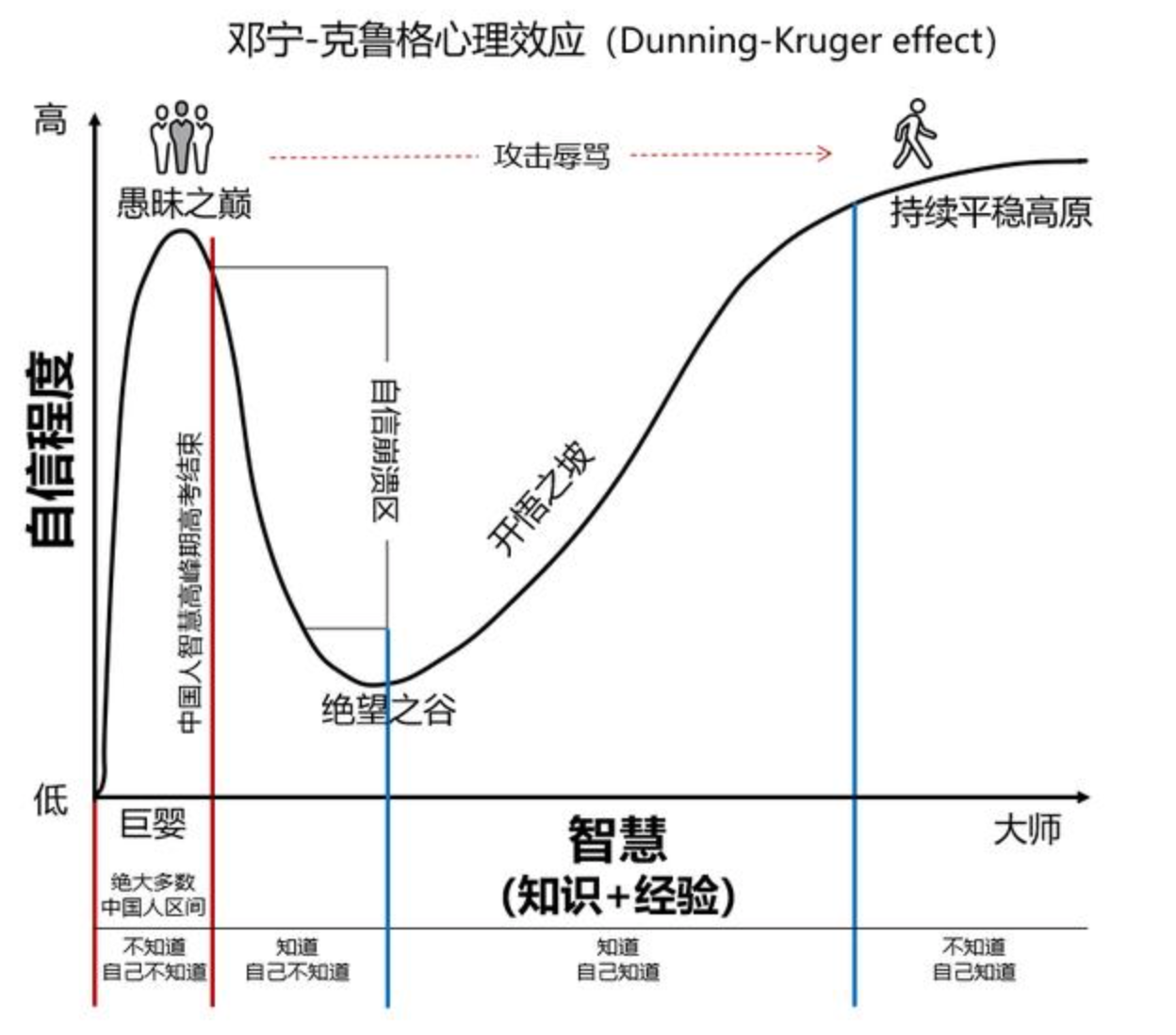
美团王慧文的一个朋友圈图片

20200425_114513.png

邓宁-克鲁格效应(The Dunning-Kruger Effect),也称达克效应(D-K Effect)。

大意是说:
自我认知水平越低的人,认知偏差就越大,越容易自我膨胀(站在愚昧之巅);
反过来,自我认知水平越高的人,认知偏差就越小,越容易自我超越(走上开悟之坡)。

邓宁更一针见血地说:
如果你没有能力,你就不会知道自己没有能力。

阅读全文 »

vs2019 wxWidget 3.1.3

解压路径是 E:\wxWidgets-3.1.3

设置系统环境变量:$(WXWIN) = E:\wxWidgets-3.1.3

编译

  1. Open a “Visual Studio Command Prompt” window
  2. Change directory to %WXWIN%\build\msw and type nmake /f makefile.vc to build debug static version
    or nmake /f makefile.vc BUILD=release to build release static version
    or nmake /f makefile.vc BUILD=release SHARED=1 release DLL version
    or TARGET_CPU=X64 for 64bit version
  3. to verify your build, change the directory to %WXWIN%\samples\minimal and
    run the same nmake command (with the same parameters there), this
    should create a working minimal wxWidgets sample.
  4. If you need to rebuild, use “clean” target first or “nmake /a”.
    nmake /f makefile.vc clean

新建项目

  1. vs2019 新建空白项目
  2. 添加 include 和 lib 路径
$(WXWIN)\include\
$(WXWIN)\include\msvc\

$(WXWIN)\lib\vc_lib\mswud
$(WXWIN)\lib\vc_lib
  1. Linker 里面子系统改成 windows
  2. property manager 里面添加 $(WXWIN)\wxwidgets.props
  3. 添加代码

MainApp.h

#include <wx/wx.h>

class MyProjectApp : public wxApp
{
public:
MyProjectApp();
virtual ~MyProjectApp();
virtual bool OnInit() override;
};

MainApp.cpp

#include "MainApp.h"

#include <wx/wx.h>

MyProjectApp::MyProjectApp()
{
}

MyProjectApp::~MyProjectApp()
{
}

bool MyProjectApp::OnInit()
{
wxFrame* mainFrame = new wxFrame(nullptr, wxID_ANY, L"MyProject");
mainFrame->Show(true);
return true;
}

wxIMPLEMENT_APP(MyProjectApp);

// 参数化个数默认是999个,一条语句可以插入的记录个数=999/参数个数
int iRet = sqlite3_limit((sqlite3*)m_pDb, SQLITE_LIMIT_VARIABLE_NUMBER, 2000);
iRet = sqlite3_limit((sqlite3*)m_pDb, SQLITE_LIMIT_VARIABLE_NUMBER, -1);

#ifdef _DEBUG
#include "conio.h"
#endif

#ifdef _DEBUG
AllocConsole();
_cprintf("Debuging....\r\n");
#endif

_cwprintf(L"Debuging....\r\n");

int i = -16,
h = 29;
unsigned u = 62511;
char c = 'A';
char s[] = "Test";

// Note that console output does not translate \n as
// standard output does. Use \r\n instead.
//
_cprintf( "%d %.4x %u %c %s\r\n", i, h, u, c, s );

#ifdef _DEBUG
// 退出时释放
FreeConsole();
#endif

// use runtime_error throw information
if (SQLITE_OK != iRet)
{
string strErr = fmt::format("statement has exception. errCode={}.errMsg={}", iRet, sqlite3_errmsg(m_pDb));
throw std::runtime_error(strErr);
}
else
{
m_flag |= FLAG_STMT_PREPARED;
return 0;
}

// catch information write to log file
try
{
m_spSqlite->statement(L"SELECT * FROM t_geometric_coeff;");
while (0 == m_spSqlite->execStep())
{
int id = m_spSqlite->getColumn(0);
wstring name = m_spSqlite->getColumn(1);
wstring notes = m_spSqlite->getColumn(2);
double dbValue = m_spSqlite->getColumn(3);
}
}
catch (std::exception& e)
{
g_logger->error("save geometric coeff failed. err={}", e.what());
}

github

新建

std::unique_ptr<SQLite::Database> m_spDb;
std::unique_ptr <SQLite::Statement> m_spQuery;

try
{
// Open a database file
m_spDb = make_unique<SQLite::Database>(SQLite::Database(utils::w2s(str),SQLite::OPEN_CREATE|SQLite::OPEN_READWRITE));

// Begin transaction
SQLite::Transaction transaction(*m_spDb);

// 几何系数表
string sql = "CREATE TABLE IF NOT EXISTS main.t_geometric_coeff( \
f_id INTEGER NOT NULL ON CONFLICT ROLLBACK PRIMARY KEY AUTOINCREMENT, \
f_name TEXT NOT NULL DEFAULT '', \
f_notes TEXT DEFAULT '', \
f_value REAL NOT NULL);\
CREATE UNIQUE INDEX idx_t_g_c_f_id ON t_geometric_coeff (f_id ASC);";
m_spDb->exec(sql);

// 测量工步表
sql = " CREATE TABLE IF NOT EXISTS t_measure_step ( \
f_id INTEGER NOT NULL ON CONFLICT ROLLBACK PRIMARY KEY AUTOINCREMENT, \
f_notes TEXT DEFAULT '', \
f_measure_type TEXT DEFAULT '', \
f_operate_type TEXT DEFAULT '', \
f_samples_count TEXT DEFAULT '', \
f_preelabration_samples_count TEXT DEFAULT '', \
f_samples_time TEXT DEFAULT '', \
f_delay_time TEXT DEFAULT '');\
CREATE UNIQUE INDEX idx_m_s_f_id ON t_measure_step (f_id ASC); ";
m_spDb->exec(sql);

// 预处理表
sql = "CREATE TABLE IF NOT EXISTS t_preelaboration (\
f_id INTEGER NOT NULL ON CONFLICT ROLLBACK PRIMARY KEY AUTOINCREMENT,\
f_notes TEXT DEFAULT '',\
f_step TEXT DEFAULT '',\
f_sub_step TEXT DEFAULT '',\
f_measure_type TEXT DEFAULT '',\
f_unit TEXT DEFAULT '',\
f_decimals TEXT DEFAULT '',\
f_abs_unit TEXT DEFAULT '',\
f_abs_decimals TEXT DEFAULT '',\
f_display_position TEXT DEFAULT '',\
f_nominal_value real,\
f_upper_limit real,\
f_lower_limit real,\
f_formula TEXT DEFAULT '',\
f_elaboration TEXT DEFAULT '',\
f_zero TEXT DEFAULT '',\
f_zero_step TEXT DEFAULT '',\
f_zero_sub_step TEXT DEFAULT '',\
f_zero_elaboration TEXT DEFAULT '',\
f_mean_master TEXT DEFAULT '',\
f_mean_master_character TEXT DEFAULT '',\
f_initial_zero_upper real,\
f_initial_zero_lower real); \
CREATE UNIQUE INDEX idx_preela_f_id ON t_preelaboration (f_id ASC);";
m_spDb->exec(sql);

// Commit transaction
transaction.commit();

}
catch (std::exception& e)
{
g_logger->error("create new db failed. err={}", e.what());
}

插入