命令(CMD) 命令码 目标设备
DEVICE READ “0” X,Y,M,S,T,C,D
DEVICE WRITE “1” X,Y,M,S,T,C,D
FORCE  ON “7” X,Y,M,S,T,C
FORCE  OFF “8” X,Y,M,S,T,C
扩展命令 命令码
读配置 “E00”
写配置 “E10”
读程序 “E01”
写程序 “E11”
命令 16进制代码 命令解释
ENQ 05H 通信请求
ACK 06H PLC正确响应
NAK 15H PLC错误响应
STX 02H 报文开始
ETX 03H 报文结束

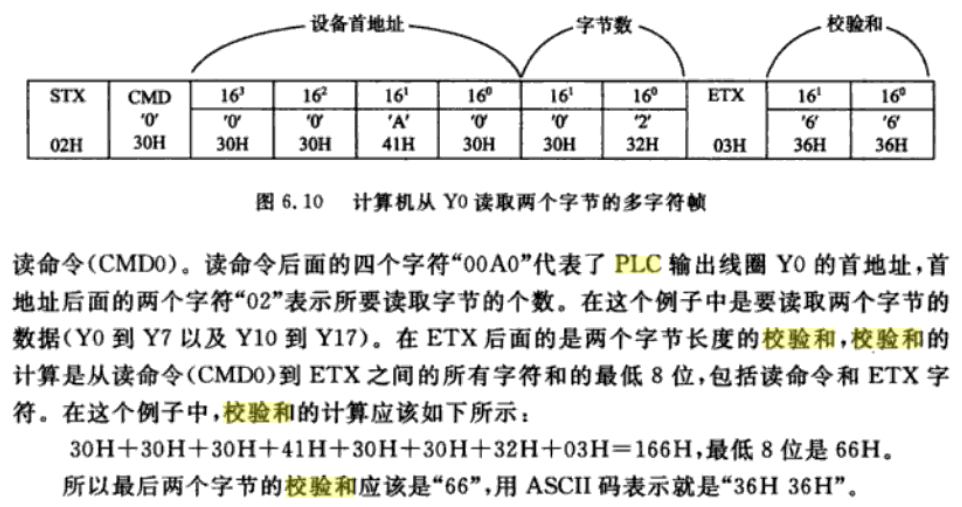
帧格式:
STX CMD DATA …… DATA ETX SUM(upper) SUM(lower)
SUM=CMD+……+ETX

ACK(06H) 接受正確
NAK(15H) 接受錯誤

校验和计算
20200526_131708.png

open

Baud Rate: 115200 StopBits: 1, Parity: Even, DataBits: 7

write:05
read :00

发送 05 连接测试 返回 06 表示正常,其他失败

关闭使用 9600 重新打开

write:02 30 30 45 30 32 30 32 03 36 43
读取 0E02 处 02 字节 (PLC型号)

read :02 30 31 35 46 03 44 46
015F

write:02 30 30 45 43 41 30 32 03 38 45
读取 0ECA 处 02 字节
read :02 43 31 33 46 03 46 30
返回 C13F

write:02 45 30 30 30 45 45 38 30 34 03 46 45
读配置 E00 0EE8 04
read :02 36 30 32 36 38 34 35 43 03 42 35
返回 6026845C

write:02 45 31 30 30 45 45 43 30 34 41 33 34 37 39 32 38 34 03 43 30
写配置 E10 0EEC 04 A3479284

write:02 41 35 03 37 39
read :06

write:A5
read :06

重新打开串口 115200
write:05
read :06

write:02 30 30 45 30 32 30 32 03 36 43
读取 0E02 处 02 字节
read :31 30 31 35 46 03 44 46
1015F ? 这个回复有异常

write:02 30 30 45 43 41 30 32 03 38 45
read :02 43 31 33 46 03 46 30

读取 0ECA 处 02 字节
返回 C13F

write:02 30 30 45 30 32 30 32 03 36 43
read :02 30 31 35 46 03 44 46

读取 0E02 处 02 字节
返回 015F

read :02 43 31 33 46 03 46 30
返回 C13F

write:02 45 30 31 38 30 30 30 30 32 03 44 33
read :02 31 30 30 30 03 43 34
读程序 E01 8000 02
返回 1000

write:02 45 30 31 38 30 34 34 30 43 03 45 43
read :02 30 30 30 30 30 30 30 30 30 30 30 30 30 30 30 30 30 30 30 30 30 30 30 30 03 38 33
读程序 E01 80440C
返回 000000000000000000000000

write:02 45 30 30 38 30 30 30 46 45 03 46 42
read :02 43 38 30 30 30 31 35 46 30 30 41 30 30 30 30 30 30 30 33 30 30 30 33 30 30 30 38 30 30 31 33 30 30 33 41 30 30 30 44 30 30 31 34 30 30 30 35 30 30 31 34 30 30 30 33 30 30 30 41 30 30 30 30 30 30 31 38 30 30 30 30 30 30 30 30 30 30 30 30 30 30 30 30 30 30 30 30 30 30 30 30 30 30 30 30 30 30 30 30 30 30 30 30 30 30 30 30 30 30 30 30 30 30 30 30 30 30 30 30 30 30 30 30 30 30 30 30 30 30 30 30 30 30 30 30 30 30 46 46 46 46 46 46 46 46 46 46 46 46 46 46 46 46 46 46 46 46 46 46 46 46 46 46 46 46 46 46 46 46 30 30 30 30 46 46 46 46 30 30 30 30 30 30 30 30 30 30 30 30 30 30 30 30 30 30 30 30 30 30 30 30 30 30 30 30 30 30 30 30 30 30 30 30 30 30 30 30 30 30 30 30 30 30 30 30 33 39 31 38 30 30 30 30 30 30 30 30 30 30 30 30 30 30 30 30 30 30 30 30 30 30 30 30 30 30 30 30 46 34 30 31 30 30 30 30 30 30 30 30 30 30 30 30 30 30 30 30 30 30 30 30 30 30 30 30 30 30 30 30 30 30 30 30 30 30 30 30 30 30 30 30 30 30 30 30 30 30 30 30 30 30 30 30 30 30 30 30 30 30 30 30 30 30 30 30 30 30 30 30 30 30 30 30 30 30 30 30 30 30 30 30 30 30 30 30 30 30 30 30 30 30 30 30 30 30 30 30 30 30 30 30 30 30 30 30 30 30 30 30 30 30 30 30 30 30 30 30 30 31 31 35 43 31 33 46 34 30 30 30 30 30 30 30 30 30 30 30 30 30 30 30 30 30 30 30 30 30 30 30 30 30 30 30 30 30 30 30 30 30 30 30 30 30 30 30 30 30 30 30 30 30 30 30 30 30 30 30 30 30 30 30 36 30 32 36 38 34 35 43 41 33 34 37 39 32 38 30 41 36 30 30 30 30 30 30 30 30 30 30 30 30 30 30 30 32 30 30 30 33 30 30 30 30 30 30 03 31 34

读配置 E00 8000 FE
返回 C800015F00A00000003000300080013003A000D0014000500140003000A000000180000000000000000000000000000000000000000000000000000000000000000000000FFFFFFFFFFFFFFFFFFFFFFFFFFFFFFFF0000FFFF00000000000000000000000000000000000000000000000039180000000000000000000000000000F401000000000000000000000000000000000000000000000000000000000000000000000000000000000000000000000000000000000000000000000115C13F400000000000000000000000000000000000000000000000000000006026845CA3479280A600000000000000020003000000

write:02 45 30 30 38 30 46 45 30 32 03 46 44
read :02 30 30 30 30 03 43 33
读配置 E00 80FE 02
返回 0000

write:02 30 30 45 30 32 30 32 03 36 43
read :02 30 31 35 46 03 44 46
读取 0E02 处 02 字节
返回 015F

write:02 30 30 45 43 41 30 32 03 38 45
read :31 43 31 33 46 03 46 30
读取 0ECA 处 02 字节
返回 1 C13F

获取 CPU 类型

write:02 30 30 45 30 32 30 32 03 36 43
read :02 30 31 35 46 03 44 46

write 解析:
0 DEVICE READ 
0E02 地址 0E02H 处 PLC型号和系统版本号
02 02H 字节数据

read 解析:
返回 015F (FX3UC)

write:02 30 30 45 43 41 30 32 03 38 45
read :02 43 31 33 46 03 46 30

读取 0ECA 处 02 字节
返回 C13F 序列器机种名/版本

FX3UC
F3

读取 D0

write:02 46 35 30 31 31 30 34 30 30 30 03 30 34
read :02 39 37 33 35 03 44 42
write:F5 0110 4000

02 30 42 30 30 03 44 35

写 D0
write:02 45 31 30 34 30 30 30 30 32 30 43 30 30 03 41 32
read :06
E10 4000 02 0C00
命令-地址-长度-数值(小端模式)

读 D1
write:02 46 35 30 31 31 30 34 30 30 32 03 30 36

F5 0110 4002

02 46 35 30 31 31 30 34 30 43 38 03 31 46
F5 0110 40C8

写 D1
write:02 45 31 30 34 30 30 32 30 32 30 42 30 30 03 41 33
E10 4002 02 0B00
read : 06

读 D0-D9 10个字节
write:02 45 30 30 34 30 30 30 31 34 03 44 31

E00 4000 14

write:02 45 30 30 34 30 30 30 31 34 03 44 31
E00 4000 14

02 45 30 30 34 30 30 30 32 38 03 44 36

写多条

02 45 31 30 34 30 30 32 31 34 30 30 30 30 30 30 30 30 30 30 30 30 30 30 30 30 30 30 30 30 30 30 30 30 30 30 30 30 30 30 30 30 30 30 30 30 30 30 30 30 03 35 34
E10 4002 14 0000000000000000000000000000000000000000

D0 写入 20个字节
write:02 45 31 30 34 30 30 30 32 38 31 34 31 34 31 34 31 34 31 34 43 44 43 44 43 44 43 44 43 44 43 44 43 44 43 44 43 44 43 44 43 44 43 44 43 44 43 44 43 44 43 44 43 44 43 44 43 44 43 44 43 44 43 44
E10 4000 28 1414141414CDCDCDCDCDCDCDCDCDCDCDCDCDCDCDCDCDCDCDCDCDCD

02 45 31 30 34 30 30 30 32 38 30 39 30 39 30 39 30 39 30 39 30 39 30 39 30 39 30 39 30 39 30 39 30 39 30 39 30 39 30 39 30 39 30 39 30 39 30 39 30 39 30 39 30 39 30 39 30 39 30 39 30 39 30 39

E10 4000 28 090909090909090909090909090909090909090909090909090909

D1 写入 10个字节
02 45 31 30 34 30 30 32 31 34 30 39 30 39 30 39 30 39 30 39 30 39 30 39 30 39 30 39 30 39 30 39 30 39 30 39 30 39 30 39 30 39 30 39 30 39 30 39 30 39 03 30 38
E10 4002 14 0909090909090909090909090909090909090909

读 10 个字节
02 45 30 30 34 30 30 32 31 34 03 44 33
E00 4002 14

02 30 39 30 39 30 39 30 39 30 39 30 39 30 39 30 39 30 39 30 39 30 39 30 39 30 39 30 39 30 39 30 39 30 39 30 39 30 39 30 39 03 33 37
0909090909090909090909090909090909090909

读 20 个字节
02 45 30 30 34 30 30 30 32 38 03 44 36

02 34 38 30 39 30 39 30 39 30 39 30 39 30 39 30 39 30 39 30 39 30 39 30 39 30 39 30 39 30 39 30 39 30 39 30 39 30 39 30 39 30 39 30 39 30 39 30 39 30 39 30 39 30 39 30 39 30 39 30 39 30 39 30 39 30 39 30 39 30 39 30 39 30 39 30 39 30 39 30 39 03 36 45

48 090909090909090909090909090909090909090909090909090909090909090909090909090909

write:02 45 31 30 34 30 30 32 30 32 30 39 30 30 03 39 41

E10 4002 02 0900

write:02 45 31 30 34 30 30 34 30 32 30 38 30 30 03 39 42

E10 4004 02 0800

write:02 45 31 30 34 30 30 36 30 32 30 37 30 30 03 39 43

E10 4006 02 0700
命令行注册

# 把所有需要注册的DLL放到一个文件夹下面,然后在该文件夹下建一个批处理RGE.BAT,内容如下:
For %%a in (*.dll) do regsvr32.exe /s %%a

# 如果要全部反注册的话就把改成这一句编一个批处理:
For %%a in (*.dll) do regsvr32.exe /s /u %%a

格式

regsvr32 [/u] [/s] [/n] [/i[:cmdline]] DLL文件名

/u:反注册DLL文件;
/s:安静模式(Silent)执行命令,即在成功注册/反注册DLL文件前提下不显示结果提示框。
/c:控制端口;
/i:在使用/u反注册时调用DllInstall;
/n:不调用DllRegisterServer,必须与/i连用。
# 单独运行regsvr32.exe程序,可以看到弹出一“No DLL name specified”的错误提示框.

使用 python 来辅助金融分析,目前主要是实现股票市场的盘后分析工作。

计划如下:

  1. 获取数据,盘后分析
  2. 选股,评测
  3. 模拟炒股训练

安装 python3

website

安装 anaconda

website

新建虚拟环境

conda create -n stock_service python=3.7 anaconda

寄存器

PLC在进行输入输出处理、模拟量控制、位置控制时,需要许多数据寄存器存储数据和参数。数据寄存器为16位,最高位为符号位。可用两个数据寄存器来存储32位数据,最高位仍为符号位。数据寄存器有以下几种类型:

1.通用数据寄存器(D0~D199)共200点。当M8033为ON时,D0~D199有断电保护功能;当M8033为OFF时则它们无断电保护,这种情况PLC由RUN →STOP或停电时,数据全部清零。

2.断电保持数据寄存器(D200~D7999)共7800点,其中D200~D511(共12点)有断电保持功能,可以利用外部设备的参数设定改变通用数据寄存器与有断电保持功能数据寄存器的分配;D490~D509供通信用;D512~D7999的断电保持功能不能用软件改变,但可用指令清除它们的内容。根据参数设定可以将D1000以上做为文件寄存器。

3.特殊数据寄存器(D8000~D8255)共256点。特殊数据寄存器的作用是用来监控PLC的运行状态。如扫描时间、电池电压等。未加定义的特殊数据寄存器,用户不能使用。具体可参见用户手册。

4.变址寄存器(V/Z)三菱FX2N系列PLC有V0~V7和Z0~Z7共16个变址寄存器,它们都是16位的寄存器。变址寄存器V/Z实际上是一种特殊用途的数据寄存器,其作用相当于微机中的变址寄存器变,用于改变元件的编号(变址),例如V0=5,则执行D20V0时,被执行的编号为D25(D20+5)。变址寄存器可以象其它数据寄存器一样进行读写,需要进行32位操作时,可将V、Z串联使用(Z为低位,V为高位)。

这个工具包意义不大,因为必须在客户机安装才行。400多M,安装时间较长,还要重启机器。

安装 MX Component 工具包,

三菱 PLC 通讯库
MX Component 4.18
Software2019-05-21
MX Component 4.18 05/2019

官网下载地址

先要安装 MX Component 4.18\EnvMEL
然后在

安装过程中需要个 product ID 570-986818410, 安装完毕后有 3 个工具

20200515_163224.png
  • Communication Setup Utility(通讯设置)
  • Label Utility(标签管理)
  • PLC Monitor Utility(可编程控制器监视)

MX Component 是三菱PLC官方上位机通讯中间件,通过使用该工具,可以在无需具备通信协议及模块知识的状况下实现从计算机至可编程控制器的通信。通过使用 MX Component 提供的一些属性和方法,可以使复杂的串行通信和以太网通信的协议程序开发变得简单方便。

MX Component 的功能:

  • 不用考虑通信协议即能与指定的PLC通信;
  • 支持计算机与PLC的所有通信路径;
  • 可实现软元件监视功能,访问特殊功能模块的缓冲存储器;
  • 根据通信设置向导进行配置并能保存为一个逻辑站编号;
  • 支持 Visual Basic、Visual C++、VB Script 和 VBA 编程语言;
  • 可由ASP功能通过 Internet/intranet 监视;

MX Component 支持的路径:

  • CPU编程口(COM或USB)
  • GX Simulator PLC仿真程序;
  • 串行通信;
  • 总线连接;
  • 电话线路;
  • MELSECNET/H,10,II;
  • Ethernet;
  • CC-Link;

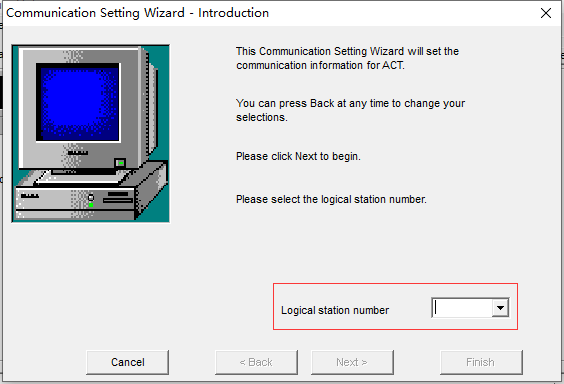
Communication Setup Utility 连接 PLC

20200515_162528.png

手动输入编号,点击下一步。

阅读全文 »

website

固定长度的数组,传递给函数时不会无效

#include <array>

std::array<int, 3> myArray; // declare an integer array with length 3

std::array<int, 5> myArray = { 9, 7, 5, 3, 1 }; // initializer list
std::array<int, 5> myArray2 { 9, 7, 5, 3, 1 }; // uniform initialization

// c++ 17 可以忽略类型和长度
std::array myArray { 9, 7, 5, 3, 1 }; // The type is deduced to std::array<int, 5>
std::array myArray { 9.7, 7.31 }; // The type is deduced to std::array<double, 2>

//You can also assign values to the array using an initializer list
std::array<int, 5> myArray;
myArray = { 0, 1, 2, 3, 4 }; // okay
myArray = { 9, 8, 7 }; // okay, elements 3 and 4 are set to zero!
myArray = { 0, 1, 2, 3, 4, 5 }; // not allowed, too many elements in initializer list!

//Accessing std::array values using the subscript operator works just like you would expect:
std::cout << myArray[1] << '\n';
myArray[2] = 6;

//std::array supports a second form of array element access (the at() function) that does bounds checking:
std::array myArray { 9, 7, 5, 3, 1 };
myArray.at(1) = 6; // array element 1 valid, sets array element 1 to value 6
myArray.at(9) = 10; // array element 9 is invalid, will throw an error

/*
In the above example, the call to array.at(1) checks to ensure array element 1 is valid, and because it is, it returns a reference to array element 1. We then assign the value of 6 to this. However, the call to array.at(9) fails because array element 9 is out of bounds for the array. Instead of returning a reference, the at() function throws an error that terminates the program (note: It’s actually throwing an exception of type std::out_of_range -- we cover exceptions in chapter 15). Because it does bounds checking, at() is slower (but safer) than operator[].
*/

//std::array will clean up after itself when it goes out of scope, so there’s no need to do any kind of manual cleanup.

std::array myArray { 9.0, 7.2, 5.4, 3.6, 1.8 };
std::cout << "length: " << myArray.size() << '\n';

//
for (int element : myArray)
std::cout << element << ' ';

use as parameter

// use as parameter
#include <array>
#include <iostream>

void printLength(const std::array<double, 5> &myArray)
{
std::cout << "length: " << myArray.size() << '\n';
}

int main()
{
std::array myArray { 9.0, 7.2, 5.4, 3.6, 1.8 };

printLength(myArray);

return 0;
}

sort

#include <algorithm> // for std::sort
#include <array>
#include <iostream>

int main()
{
std::array myArray { 7, 3, 1, 9, 5 };
std::sort(myArray.begin(), myArray.end()); // sort the array forwards
// std::sort(myArray.rbegin(), myArray.rend()); // sort the array backwards

for (int element : myArray)
std::cout << element << ' ';

std::cout << '\n';

return 0;
}

Array of struct

#include <array>
#include <iostream>

struct House
{
int number{};
int stories{};
int roomsPerStory{};
};

int main()
{
std::array<House, 3> houses{};

houses[0] = { 13, 4, 30 };
houses[1] = { 14, 3, 10 };
houses[2] = { 15, 3, 40 };

for (const auto& house : houses)
{
std::cout << "House number " << house.number
<< " has " << (house.stories * house.roomsPerStory)
<< " rooms\n";
}

return 0;
}
#include <iostream>

struct House
{
int number{};
int stories{};
int roomsPerStory{};
};

struct Array
{
House value[3]{};
};

int main()
{
// With braces, this works.
Array houses{
{ { 13, 4, 30 }, { 14, 3, 10 }, { 15, 3, 40 } }
};

for (const auto& house : houses.value)
{
std::cout << "House number " << house.number
<< " has " << (house.stories * house.roomsPerStory)
<< " rooms\n";
}

return 0;
}
#include <string>
#include <iterator>
#include <iostream>
#include <algorithm>
#include <array>

int main()
{
// construction uses aggregate initialization
std::array<int, 3> a1{ {1, 2, 3} }; // double-braces required in C++11 prior to the CWG 1270 revision
// (not needed in C++11 after the revision and in C++14 and beyond)
std::array<int, 3> a2 = {1, 2, 3}; // never required after =
std::array<std::string, 2> a3 = { std::string("a"), "b" };

// container operations are supported
std::sort(a1.begin(), a1.end());
std::reverse_copy(a2.begin(), a2.end(),
std::ostream_iterator<int>(std::cout, " "));

std::cout << '\n';

// ranged for loop is supported
for(const auto& s: a3)
std::cout << s << ' ';
}

时间过得好快,2019年过去啦,书读得不多,还要加油。

20200510_221800.png 20200510_221812.png 20200510_221819.png

github

website

图片

包含 css

<link href="{{ url_for('admin.static', filename='css/ext/fileinput.min.css') }}" media="all" rel="stylesheet" type="text/css" />

<script src="{{url_for('admin.static', filename='js/ext/fileInput/plugins/piexif.min.js')}}" type="text/javascript"></script>
<!-- sortable.min.js is only needed if you wish to sort / rearrange files in initial preview.
This must be loaded before fileinput.min.js -->
<script src="{{url_for('admin.static', filename='js/ext/fileInput/plugins/sortable.min.js')}}" type="text/javascript"></script>
<!-- purify.min.js is only needed if you wish to purify HTML content in your preview for
HTML files. This must be loaded before fileinput.min.js -->
<script src="{{url_for('admin.static', filename='js/ext/fileInput/plugins/purify.min.js')}}" type="text/javascript"></script>
<!-- popper.min.js below is needed if you use bootstrap 4.x. You can also use the bootstrap js
3.3.x versions without popper.min.js. -->
<script src="{{url_for('admin.static', filename='js/ext/popper.min.js')}}"></script>
<!-- the main fileinput plugin file -->
<script src="{{url_for('admin.static', filename='js/ext/fileInput/fileinput.min.js')}}"></script>
<!-- optionally if you need a theme like font awesome theme you can include it as mentioned below -->
<script src="{{url_for('admin.static', filename='js/ext/fileInput/themes/fa/theme.js')}}"></script>
<!-- optionally if you need translation for your language then include locale file as mentioned below -->
<script src="{{url_for('admin.static', filename='js/ext/fileInput/locales/zh.js')}}"></script>

ajax 方式

需要在 js 中初始化

<input type="file" name="file" id="upload_name"  class="file-loading" data-browse-on-zone-click="true">
// initialize with defaults
$("#upload_name").fileinput({
theme: "fa",
uploadUrl: "/admin/api/v1.0/upload"
});

form 方式

<input type="file" name="file" id="upload_name"  class="file" data-browse-on-zone-click="true">

获取多个文件名

$('#input-id').on('filelock', function(event, filestack, extraData) {
var fstack = [];
$.each(filestack, function(fileId, file) {
if (file) {
fstack.push(file);
}
});
console.log('Files selected - ' + fstack.length);
});

sqlcipher

一个 sqlite 加密扩展库

windows 编译

安装方法

  1. 安装 vcpkg
git clone https://github.com/Microsoft/vcpkg.git
cd vcpkg
PS> .\bootstrap-vcpkg.bat

# Then, to hook up user-wide integration, run (note: requires admin on first use)
PS> .\vcpkg integrate install

PS> .\vcpkg install openssl:x64-windows-static
# or x86
PS> .\vcpkg install openssl:x86-windows-static

# This will take a bit of time, but once done, you can find the resulting include and lib files at Downloads\vcpkg\packages\openssl-windows_x64-windows-static (for x64, Downloads\vcpkg\packages\openssl-windows_x86-windows-static for 32-bit).

# extra command
# To remove the integration for your user, you can use .\vcpkg integrate remove.

# CMake projects should use: "-DCMAKE_TOOLCHAIN_FILE=D:/vcpkg/scripts/buildsystems/vcpkg.cmake"

# Install any packages with
PS> .\vcpkg install sdl2 curl

  1. 编辑 sqlcipher
git clone https://github.com/sqlcipher/sqlcipher.git
cd sqlcipher

# copying the openssl-windows_x64-windows-static and openssl-windows_x86-windows-static folders into the SQLCipher folder

# Now open Makefile.msc in a text editor and replace the lines:

# Flags controlling use of the in memory btree implementation
#
# SQLITE_TEMP_STORE is 0 to force temporary tables to be in a file, 1 to
# default to file, 2 to default to memory, and 3 to force temporary
# tables to always be in memory.
#
TCC = $(TCC) -DSQLITE_TEMP_STORE=1
RCC = $(RCC) -DSQLITE_TEMP_STORE=1

# into
# Flags controlling use of the in memory btree implementation
#
# SQLITE_TEMP_STORE is 0 to force temporary tables to be in a file, 1 to
# default to file, 2 to default to memory, and 3 to force temporary
# tables to always be in memory.
#
TCC = $(TCC) -DSQLITE_TEMP_STORE=2
RCC = $(RCC) -DSQLITE_TEMP_STORE=2

TCC = $(TCC) -DSQLITE_HAS_CODEC
RCC = $(RCC) -DSQLITE_HAS_CODEC

!IF "$(PLATFORM)"=="x64"
TCC = $(TCC) -I"openssl-windows_x64-windows-static\include"
RCC = $(RCC) -I"openssl-windows_x64-windows-static\include"
!ELSEIF "$(PLATFORM)"=="x86"
TCC = $(TCC) -I"openssl-windows_x86-windows-static\include"
RCC = $(RCC) -I"openssl-windows_x86-windows-static\include"
!ENDIF

!IF "$(PLATFORM)"=="x64"
LTLIBPATHS = $(LTLIBPATHS) /LIBPATH:"openssl-windows_x64-windows-static\lib"
LTLIBS = $(LTLIBS) libcrypto.lib libssl.lib
!ELSEIF "$(PLATFORM)"=="x86"
LTLIBPATHS = $(LTLIBPATHS) /LIBPATH:"openssl-windows_x86-windows-static\lib"
LTLIBS = $(LTLIBS) libcrypto32.lib libssl32.lib
!ENDIF

# for OpenSSL: https://github.com/openssl/openssl/blob/3d362f190306b62a17aa2fd475b2bc8b3faa8142/NOTES.WIN#L112
LTLIBS = $(LTLIBS) WS2_32.Lib Gdi32.Lib AdvAPI32.Lib Crypt32.Lib User32.Lib

Basically, what this replacement does is: it changes SQLITE_TEMP_STORE to default to store temporary files in memory rather than files (a requirement for SQLCipher); it tells SQLite that there is a codec (again, a requirement for SQLCipher); and then includes the OpenSSL static libraries we obtained earlier. The additional librares (WS2_32.Lib, etc) are included because OpenSSL requires them, see OpenSSL / Linking your application for more details.

  1. Compile SQLCipher

With our additions to the makefile we can now compile SQLCipher. To do so, launch the Visual Studio Native Tools command prompt from your start menu: either VS2019 x64 Native Tools Command Prompt (for 64-bit) or VS2019 x86 Native Tools Command Prompt (for 32-bit), then navigate to the SQLCipher folder. Finally, make it:

nmake /f Makefile.msc