Statically Linked to MFC

Pros

  1. It own private copy of MFC library code.
  2. No need distribute the shared DLLs Mfcxx.dll and Msvcrxx.dll

Cons

  1. Build static linked DLL takes more time. Becuase, it should link with MFC libraries.
  2. It takes more disk space and memory usage

Dynamically Linked to MFC

Pros

  1. Minimize memory usage
  2. Load only once and increment the reference count for each call. The new process mapped the memory with already loaded DLL.
  3. Save disk space

Cons

  1. distribute the shared DLLs Mfcxx.dll and Msvcrxx.dll ( Should not distribute debug version )

延时调用函数(Deferred Function Calls)
当一个函数调用前有关键字 defer 时, 那么这个函数的执行会推迟到包含这个 defer 语句的函数即将返回前才执行.
需要注意的是, defer 调用的函数参数的值 defer 被定义时就确定了.
有多个defer 调用, 则调用的顺序是和栈顺序一样的。

defer func_name(param-list)

nn_shutdown vs nn_close

nn_shutdown closes just one endpoint and prevents that endpoint from
forming new connections.

nn_close closes the entire socket.

A socket can have many endpoints.

多个服务端支持多个客户端 nn_device

a single socket can be connected to multiple endpoints at the same time.

device framework

s = nn_socket(AF_SP_RAW, NN_REQ);
nn_bind(s, "tcp://server1:5556");
nn_bind(s, "tcp://server2:5556");
nn_bind(s, "tcp://server3:5556");

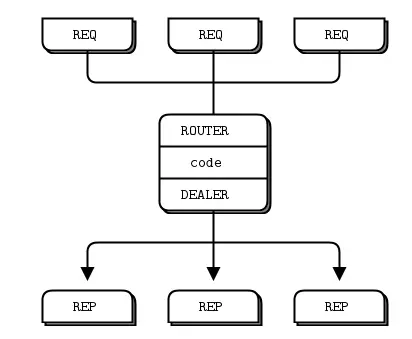
This means you get three underlying TCP connections load balanced by a single outgoing REQ socket. You can use that with a device framework to get the DEALER logic you're trying to achieve.

You can even omit it to listen on all interfaces - e.g.
tcp://:5556 will cause the server to listen on every network interface on
TCP port 5556.

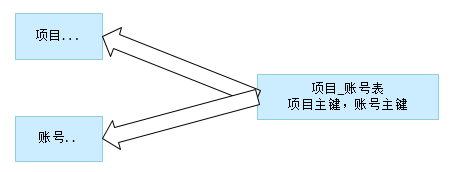
多对多关系

通常使用中间表,转化为两个1对多

20190715_104404.png

var datas=[];

var data = {};
data["id"] = 1;
data["name"] = "test" + 1;
data["age"] = 1 * 2;
datas.push(data);
var jsonString = JSON.stringify(datas); //[{"id":1,"name":"test1","age":2}]
alert(jsonString);

GOPATH

这里面的 src 目录就是主要的工作目录,在这里面,一个项目创建一个目录。

Release 0.1 alpha (20,08,2013)
MIT licensed

协议模式

目前可用的可扩展性协议有:

  • PAIR - 简单的一对一沟通
  • BUS - 简单的多对多通信
  • REQREP - 允许构建无状态服务集群来处理用户请求
  • PUBSUB - 将消息分发给订阅消息的用户
  • PIPELINE - 汇总来自多个来源的消息,并在许多目的点之间进行负载平衡
  • SURVEY - 允许一次查询多个应用程序的状态

对于pull/push,客户端为push,其send数据后,server端会立即接收到

对于rep/req,客户端为req,其send数据后,客户端并不会立即发送给client,客户端必须再执行recv调用后,才会真正send数据

可扩展性协议分层在传输层之上的网络堆栈中,目前nanomsg library支持以下传输机制:

  • INPROC - 进程内的传输(线程,模块等之间)
  • IPC - 在单个机器上的进程间传输
  • TCP - 通过TCP的网络传输

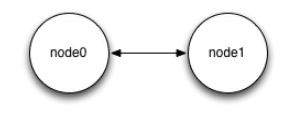
One-to-one protocol

只能一对一通信,为通讯双向。 NN_PAIR

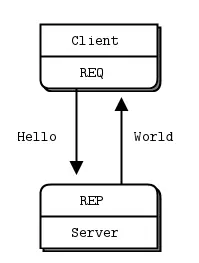
REQREP (Request/reply) protocol

请求/回复协议,由请求端发起请求,然后等待回应端应答,一般是一个REP多个REQ;关键字:NN_REP,NN_REQ。
发送后必须等待接收,是阻塞的
允许构建集群的无状态服务来处理用户请求。每个req请求都需要rep响应,类似http协议(一应一答)。

特点:

  1. 和pair模式不同的是这种模式下客户端socket可以连接多个server
  2. 客户端请求会被交替发送到server组的server

要注意的2个地方:

  1. 客户端的 socket zmq.REQ 发送后会被阻塞直到新消息到来
  2. 服务端的 socket zmq.REP 会阻塞直到新请求到来

然后保证:Each Request/Reply is paired and has to be successful.

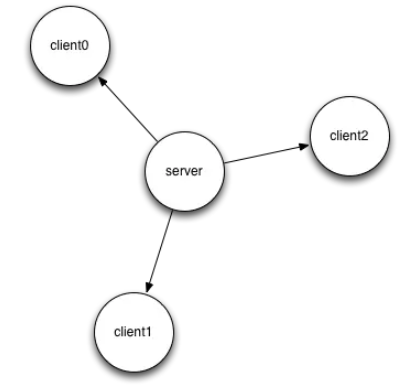
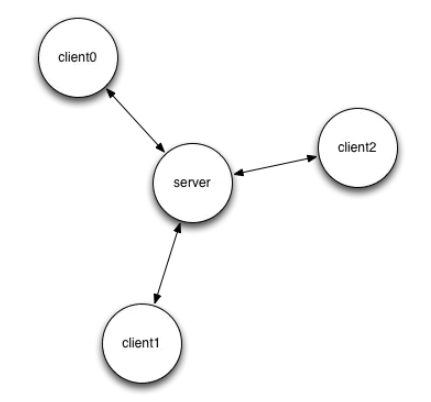
一对一的场景:

20190711_160614.png 20190712_173604.png

多对多的场景:
Broker
引入broker后,之前的问题解决了,当增加server端时,不需要修改所有的client端,只需要更新一下broker就好了。

20190711_160702.png

Publish/subscribe protocol

发布订阅协议,将消息广播到多个目的地,消息从NN_PUB发送,并且只会由订阅了匹配主题的NN_SUB接收;这种模式只会发布给在线的订阅端,如果发布端开始发布消息时,订阅端尚未连接,则这些消息会被直接丢弃;同时订阅端只负责接收不能反馈;关键字:NN_PUB,NN_SUB。

20190712_173447.png

Survey protocol

allows to query state of multiple applications in a single go。

调查协议,允许向多个地点广播调查并收集响应,关键字:NN_SURVEYOR,NN_RESPONDENT。

20190712_173517.png

Pipeline protocol

通过一系列步骤传递任务的的协议,这个协议是可扩展的(官方原文:scalability protocol for passing tasks through a series of processing steps.);它可以公平的对来自先前的处理步骤的消息进行排队,并在下一个处理步骤的实例中对它进行负载均衡;关键字,NN_PUSH,NN_PULL。
Message bus protocol

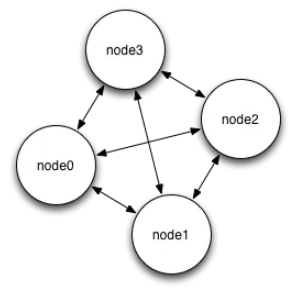
simple many-to-many communication。

消息总线(message bus),将消息从任何节点广播到拓扑中的所有其他节点,自身不会收到自己发出去的消息;这种模式只能缩放到本地级别(单个机器或者单个局域网),如果尝试进一步扩展可能会导致单个节点消息过载;关键字:NN_BUS。

20190712_173539.png

Polyamorous Pair (nng only)

Star (mangos only)

Advantages

  1. Aims POSIX full-compliance
  2. Written in C
  3. API for integrating new protocols and transports
  4. command-line tools (nanocat)

Goodbye context !

/* with zeromq */
void *ctx = zmq_ctx_new ();
void *s = zmq_socket (ctx, ZMQ_PUSH);
zmq_connect (s, "tcp://192.168.0.111:5555");
zmq_send (s, "ABC", 3, 0);
zmq_close (s);
zmq_ctx_destroy (ctx);
/* with nanomsg */
int s = nn_msg(AF_SP, NN_PUSH);
nn_connect(s, "tcp://192.168.0.111:5555");
nn_send(s, "ABC", 3, 0);
nn_close(s); /* attention, appel désormais bloquant */

Performances and safety ?

  1. In C
  2. Use intrusive containers instead of STL
  3. Use IOCP on Windows
  4. Level-triggered polling
  5. Objects are no more tied to a thread
  6. Interactions are now associated to state machines
  7. Asynchronous DNS calls

Really zero-copy

void *buf = nn_allocmsg(12, 0);
memcpy(buf, "Hello world!", 12);
nn_send(s, &buf, NN_MSG, 0);
nn_recv(s, &buf, NN_MSG, 0);
nn_freemsg(buf);

nanocat

  1. command line tool for testing and debugging purpose
  2. provides many symlinks to simplify user interface
  3. supports msgpack
# server-side
nanocat --rep --bind tcp://127.0.0.1:8000 --format ascii --data pong
# client side
nanocat --req --connect tcp://127.0.0.1:8000 --format ascii --data ping

!bash nanocat --pub --connect tcp://darthsidious --data "My liege !" --interval 10

transport://address

调用流程

服务端:

char buf[10];
int s = nn_socket(AF_SP, NN_REP);
nn_bind(s, "tcp://*:5555");
nn_recv(s, buf, 10, 0);
nn_send(s, "World", 5, 0);
nn_close(s);

客户端:

char buf[10];
int s = nn_socket(AF_SP, NN_REQ);
nn_connect(s, "tcp://localhost:5555");
nn_send(s, "Hello", 5, 0);
nn_recv(s, buf, 10, 0);
printf("Hello %sn", buf);
nn_close(s);

github

NNG 是 nanomsg 的继任版本,而 nanomsg 则是流行的 ZMQ 的 C 重写版。

整体上看,NNG 的 API 很简约,主要是 4 个,open/recv/send/close,open 根据协议不同使用的函数会不同。配置则是 setopt/getopt,与 UNIX API 类似。API 中没有上下文环境(context-less)依赖,只需要一个 nng_socket,

使用 CMAKE 构建项目

nng_recvmsg() does describe NNG_FLAG_NONBLOCK. nng_recv() just calls nng_recvmsg() under the hood.

NNG 支持的通信协议主要有以下几种:

PAIR 一对一双向通信。
PIPELINE(PUSH/PULL) 单向通信,类似与生产者消费者模型的消息队列。
PUB/SUB 单向广播。
REQ/REP 请求-应答模式,类似于 RPC 模式。
BUS 网状连接通信,每个加入节点都可以发送/接受广播消息。
SURVEY 用于多节点表决或者服务发现。

阅读全文 »

右键菜单

void CChildView::OnContextMenu(CWnd* /*pWnd*/, CPoint point)
{
if (point.x == -1 && point.y == -1)
{
//keystroke invocation
CRect rect;
GetClientRect(rect);
ClientToScreen(rect);

point = rect.TopLeft();
point.Offset(5, 5);
}

CMenu menu;
VERIFY(menu.LoadMenu(IDR_RMENU));

CMenu* pPopup = menu.GetSubMenu(0);
ASSERT(pPopup != NULL);
CWnd* pWndPopupOwner = this;

while (pWndPopupOwner->GetStyle() & WS_CHILD)
pWndPopupOwner = pWndPopupOwner->GetParent();

pPopup->TrackPopupMenu(TPM_LEFTALIGN | TPM_RIGHTBUTTON, point.x, point.y,
pWndPopupOwner);
}

显示,隐藏菜单

// hide
this->SetMenu(NULL);
this->DrawMenuBar();

// show
CMenu m_Menu;
m_Menu.LoadMenuW(IDR_MENU1);
SetMenu(&m_Menu);
this->DrawMenuBar();

修改系统菜单

已经有代码了,直接添加自定义菜单就可以了。
需要在 Resource.h 里面手动添加一个菜单 ID #define IDM_SYSCOMMAND_CUSTOM 32771
别忘了修改一下下面的下一个可用 id 序号,

// Next default values for new objects
//
#ifdef APSTUDIO_INVOKED
#ifndef APSTUDIO_READONLY_SYMBOLS
#define _APS_NEXT_RESOURCE_VALUE 135
#define _APS_NEXT_COMMAND_VALUE 32772
#define _APS_NEXT_CONTROL_VALUE 1005
#define _APS_NEXT_SYMED_VALUE 104
#endif
#endif
BOOL CMRLGaugerDlg::OnInitDialog()
{
CDialogEx::OnInitDialog();
...

CMenu* pSysMenu = GetSystemMenu(FALSE);
if (pSysMenu != nullptr)
{
BOOL bNameValid;
CString strAboutMenu;
bNameValid = strAboutMenu.LoadString(IDS_ABOUTBOX);
ASSERT(bNameValid);
if (!strAboutMenu.IsEmpty())
{
pSysMenu->AppendMenu(MF_SEPARATOR);
pSysMenu->AppendMenu(MF_STRING, IDM_ABOUTBOX, strAboutMenu);
}
// 设置系统菜单
// 设置系统菜单 第一个参数可以设置选中,未选中 MF_UNCHECKED
// m_pSysMenu->AppendMenu(MF_CHECKED, IDM_SYSCOMMAND_CUSTOM, _T("Custom Menu"));
// pSysMenu->AppendMenu(0, IDM_SYSCOMMAND_CUSTOM, _T("Custom Menu"));
pSysMenu->InsertMenuW(0,MF_CHECKED| MF_BYPOSITION, IDM_SYSCOMMAND_CUSTOM, _T("菜单栏"));

}
...


void CMRLGaugerDlg::OnSysCommand(UINT nID, LPARAM lParam)
{
if ((nID & 0xFFF0) == IDM_ABOUTBOX)
{
CAboutDlg dlgAbout;
dlgAbout.DoModal();
}else if (nID == IDM_SYSCOMMAND_CUSTOM)
{
// toggle menu
if (MF_CHECKED == m_pSysMenu->GetMenuState(IDM_SYSCOMMAND_CUSTOM,MF_BYCOMMAND))
{
m_pSysMenu->CheckMenuItem(IDM_SYSCOMMAND_CUSTOM, MF_UNCHECKED);
}
else
{
m_pSysMenu->CheckMenuItem(IDM_SYSCOMMAND_CUSTOM, MF_CHECKED);
}

}
else
{
CDialogEx::OnSysCommand(nID, lParam);
}
}