create static or dynamic library for other languages or platforms.

add to your project’s cargo.toml
and then compile with cargo build –lib (if you have bin together with your lib, I had it so so I could test it right away, there may be better ways though) or just cargo build if you have only lib. Your dll will be in target/(debug or release) folder.

The cargo build should just build everything, including a library.
Try using the same compiler options that produce a .so file on Linux and see what happens.

[lib]
name = "mylib"
crate-type = ["dylib"]

static build need define macro CURL_STATICLIB in use project

libcurl.lib ws2_32.lib winmm.lib wldap32.lib

struct MemoryStruct {
char *memory;
size_t size;
};

static size_t WriteMemoryCallback(void *contents, size_t size, size_t nmemb, void *userp)
{
size_t realsize = size * nmemb;
struct MemoryStruct *mem = (struct MemoryStruct *)userp;

mem->memory = (char*)realloc(mem->memory, mem->size + realsize + 1);
if(mem->memory == NULL) {
/* out of memory! */
OutputDebugString(_T("yGPC:not enough memory (realloc returned NULL)\n"));
return 0;
}

memcpy(&(mem->memory[mem->size]), contents, realsize);
mem->size += realsize;
mem->memory[mem->size] = 0;

return realsize;
}

/**
HTTP/1.1 200 OK
Server: Apache-Coyote/1.1
Content-Type: application/json;charset=UTF-8
Transfer-Encoding: chunked
Date: Fri, 30 Sep 2016 07:34:51 GMT

{"head":{"errorCode":"000000","errorMsg":"success"},"body":{"commands":null}

*/
int CMainDlg::httpPost(const std::string & strUrl, const std::string & strPostField, std::string & strRet)
{

std::wstring str = _T("yGPC: CMainDlg::httpPost strUrl:");
str += m_ut.s2w(strUrl) + _T(" postField: ");
str += m_ut.s2w(strPostField);
m_ut.strRemoveByParam(str, _T("\r\n"));
OutputDebugString(str.c_str());

CURL *curl;
CURLcode res;
struct curl_slist *http_header = NULL;
struct MemoryStruct chunk;
chunk.memory = (char*)malloc(1); /* will be grown as needed by realloc above */
chunk.size = 0; /* no data at this point */

curl_global_init(CURL_GLOBAL_ALL);
curl = curl_easy_init();
if (!curl)
{
OutputDebugString(_T("yGPC:curl init failed\n"));
return -1;
}

std::string strUrlEncode = boost::locale::conv::to_utf<char>(strUrl,"GBK");
curl_easy_setopt(curl,CURLOPT_URL,strUrlEncode.c_str()); //url地址
curl_easy_setopt(curl,CURLOPT_POSTFIELDS,strPostField.c_str()); //post参数
curl_easy_setopt(curl,CURLOPT_WRITEFUNCTION,WriteMemoryCallback); //对返回的数据进行操作的函数地址
curl_easy_setopt(curl,CURLOPT_WRITEDATA,(void *)&chunk); //这是write_data的第四个参数值
curl_easy_setopt(curl,CURLOPT_POST,1); //设置问非表示本次操作为post
curl_easy_setopt(curl,CURLOPT_VERBOSE,1); //打印调试信息
// curl_easy_setopt(curl,CURLOPT_HEADER,1); //将响应头信息和相应体一起传给write_data
curl_easy_setopt(curl,CURLOPT_FOLLOWLOCATION,1); //设置为非,响应头信息location
curl_easy_setopt(curl,CURLOPT_COOKIEFILE,"/curlposttest.cookie");
curl_easy_setopt(curl,CURLOPT_TIMEOUT,10);


res = curl_easy_perform(curl);

if (res != CURLE_OK)
{
switch(res)
{
case CURLE_UNSUPPORTED_PROTOCOL:
OutputDebugString(_T("yGPC:CURLE_UNSUPPORTED_PROTOCOL\n"));
break;
case CURLE_COULDNT_CONNECT:
OutputDebugString(_T("yGPC:CURLE_COULDNT_CONNECT\n"));
break;
case CURLE_HTTP_RETURNED_ERROR:
OutputDebugString(_T("yGPC:CURLE_HTTP_RETURNED_ERROR\n"));
break;
case CURLE_READ_ERROR:
OutputDebugString(_T("yGPC:CURLE_READ_ERROR\n"));
break;
default:
{
std::string str = ("yGPC:");
str += ("return code:");
str += m_ut.w2s(m_ut.number2str(res,_T("%x")));
OutputDebugString(_T("yGPC:CURLE_READ_ERROR\n"));
}
break;
}
return -1;
} else
{
strRet = chunk.memory;
}
curl_easy_cleanup(curl);
free(chunk.memory);
/* we're done with libcurl, so clean it up */
curl_global_cleanup();

return 0;

}

jo["signature"] = genSignature(strTimestamp,strRandom).c_str();
jo["timestamp"] = strTimestamp.c_str();
jo["requestTime"] = strTimestamp.c_str();
jo["nonce"] = strRandom.c_str();
jsonRoot["head"] = jo;

std::string param = "msg=";
param += jsonRoot.toStyledString();
std::string strUrlEncode = boost::locale::conv::to_utf<char>(param,"GBK");
std::string strRet;
pwnd->httpPost(url,strUrlEncode,strRet);


获取对话框控件句柄

HWND hWndBtn;
hWndBtn = GetDlgItem(hwndDlg, IDC_BTN_CONFIGDATACHANNEL);
EnableWindow(hWndBtn, FALSE);

判断HWND是否有效

// 通知配置对话框,完成设备信息初始化。
if (FALSE == IsWindow(*g_pParent->m_phwndConfigDlg))
{
OutputDebugString("HA360AMS: config dialog handle invalide");
}
else
{
::PostMessage(*g_pParent->m_phwndConfigDlg, MSG_GET_ALL_DEVINFO_DONE, 0, 0);
}

获取对话框控件句柄

HWND hWndBtn;
hWndBtn = GetDlgItem(hwndDlg, IDC_BTN_CONFIGDATACHANNEL);
EnableWindow(hWndBtn, FALSE);

判断HWND是否有效

// 通知配置对话框,完成设备信息初始化。
if (FALSE == IsWindow(*g_pParent->m_phwndConfigDlg))
{
OutputDebugString("HA360AMS: config dialog handle invalide");
}
else
{
::PostMessage(*g_pParent->m_phwndConfigDlg, MSG_GET_ALL_DEVINFO_DONE, 0, 0);
}

通常使用命令整理输出文件

DLL

项目路径下创建 Library 里面创建 lib 和 include
执行完自动复制过去

copy $(TargetPath) $(SolutionDir)Library\lib
copy $(TargetDir)$(TargetName).lib $(SolutionDir)Library\lib
copy $(ProjectDir)$(ProjectName).h $(SolutionDir)Library\include

copy $(OutDir)logmand.lib $(SolutionDir)lib
copy $(ProjectDir)logman.h $(SolutionDir)include

mkdir ..........\xxx$(Configuration)\xx
mkdir ..........\xx$(Configuration)\xx
copy $(OutDir)\xx.exe ........\Dll$(Configuration)\xx.exe

copy ........\Dll$(Configuration)\xx.exe ..........\xx$(Configuration)\xx.exe

website

简单注释

单行注释:///或者//!
多行注释:/**或者/*!

文件注释

/**
* @file BaseDevCommon.h
* @brief 设备接口定义
* @details 定义每个设备必须实现的接口,大部分设备可以继承 CBaseDevCommon 后开发
* @author Zheng Jun
* @email tylerwork@qq.com
* @version v2019.07.22beta
* @date 2019.07.22
* @par Copyright (c): 睿网电子有限公司
* @par History:
* version: author, date, desc\n
*/

类注释

/**
* @brief 测试类
* 主要用来演示Doxygen类的注释方式
*/
class Test{
};
20190722_142001.png

常量/变量的注释

常量/变量包括以下几种类型

全局常量变量
宏定义
类/结构体/联合体的成员变量
枚举类型的成员

/// 注释
常量/变量

/// 缓存大小
#define BUFSIZ 1024*4
20190722_142927.png

函数注释

简约注释
函数注释主要包含函数简介(@brief)、参数说明(‘@param’)、返回说明(@return)和返回值说明(@retval)四部分。

/**
* @brief 函数简介
*
* @param 形参 参数说明
* @param 形参 参数说明
* @return 返回说明
* @retval 返回值说明
*/

详细注释
可以根据需要添加详细说明(@detail)、注解(@note)、注意(@attention)、警告(@warning)或者异常(@exception)等。

/**
* @brief 函数简介
* @detail 详细说明
*
* @param 形参 参数说明
* @param 形参 参数说明
* @return 返回说明
* @retval 返回值说明
* @note 注解
* @attention 注意
* @warning 警告
* @exception 异常
*/
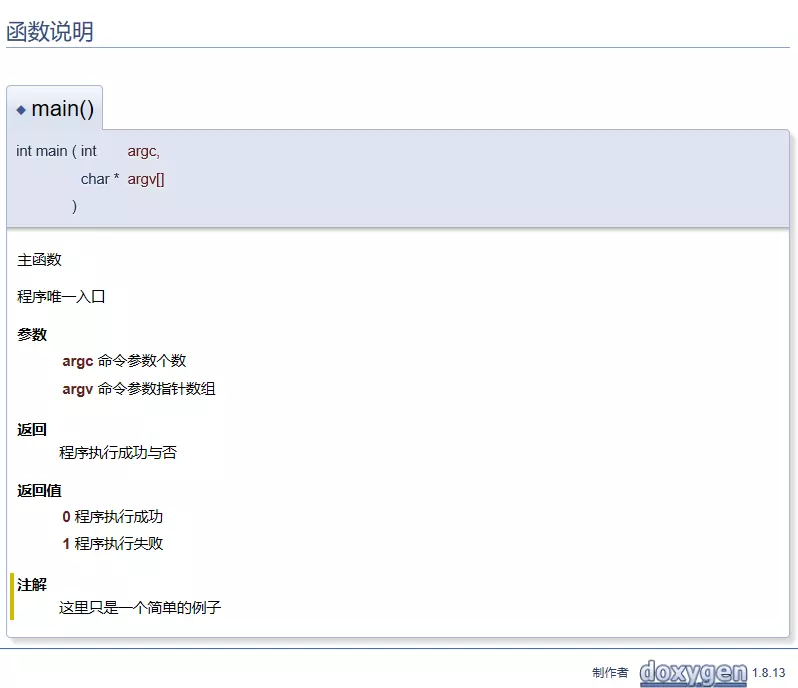
/**
* @brief 主函数
* @details 程序唯一入口
*
* @param argc 命令参数个数
* @param argv 命令参数指针数组
* @return 程序执行成功与否
* @retval 0 程序执行成功
* @retval 1 程序执行失败
* @note 这里只是一个简单的例子
*/
int main(int argc, char* argv[])
20190722_143046.png

其他

命令 生成字段名 说明
@see 参考
@class 引用类 用于文档生成连接
@var 引用变量 用于文档生成连接
@enum 引用枚举 用于文档生成连接
@code 代码块开始 与@endcode成对使用
@endcode 代码块结束 与@code成对使用
@bug 缺陷 链接到所有缺陷汇总的缺陷列表
@todo TODO 链接到所有TODO 汇总的TODO 列表
@example 使用例子说明
@remarks 备注说明
@pre 函数前置条件
@deprecated 函数过时说明

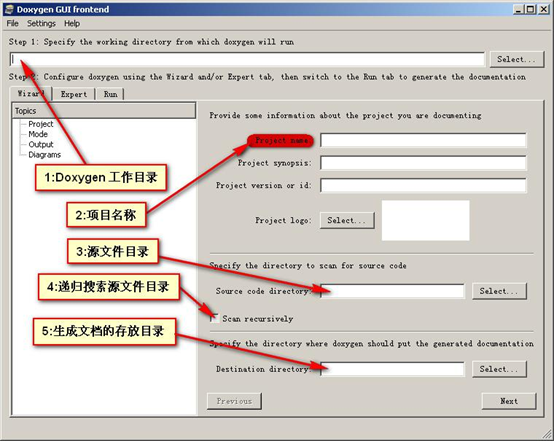
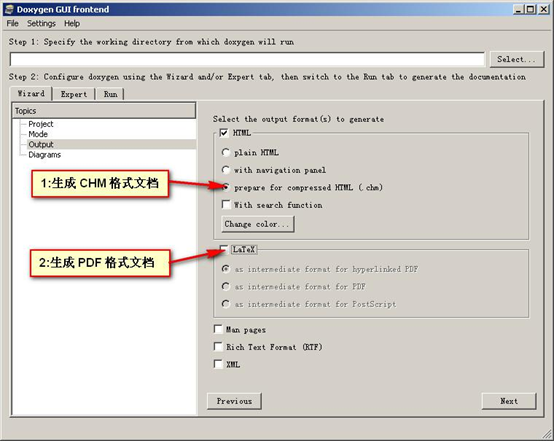
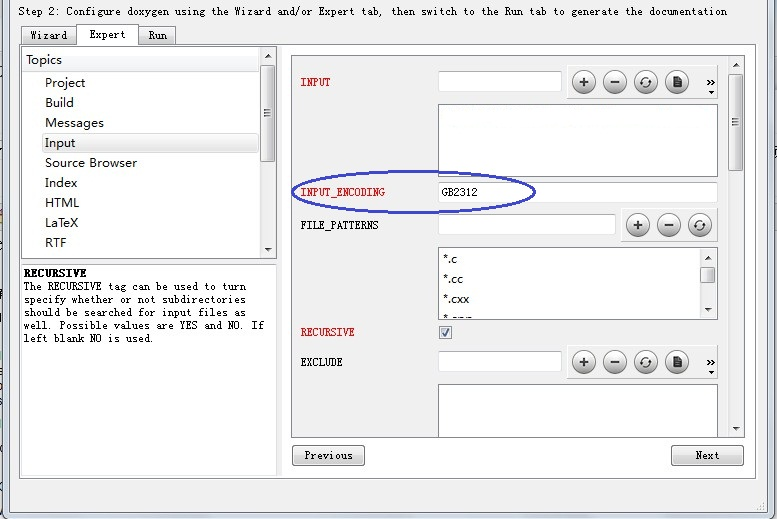
GUI 使用

20190722_144910.png 20190722_144924.png 20190722_145510.png

无法在宿主环境与虚拟环境之间复制粘贴

注意如果执行完 remove 后无法连接网络了。先处理网络问题

sudo apt-get autoremove open-vm-tools
sudo apt-get install open-vm-tools
sudo apt-get install open-vm-tools-desktop

重启就可以了

突然无法连接网络

将模式调整为“主机模式”

sudo service network-manager stop
sudo rm /var/lib/NetworkManager/NetworkManager.state
sudo service network-manager start

再次输入ifconfig ,之前的静态IP重新出现了。问题解决,可以联网了。

下面的处理没做,因为可以联网了,这里留着备用
修改NetworkManager.conf文件,然后重启网络

$sudo vi /etc/NetworkManager/NetworkManager.conf
[main]
NetworkingEnabled=false
WirelessEnabled=true
WWANEnabled=true

SDL website

编译SDL

cd SDL
mkdir build
cd build
CC=../SDL/build-scripts/gcc-fat.sh ../configure
make
sudo make install

编译 SDL2_image SDL2_ttf

./configure;make;sudo make install

安装依赖

apt-get install qemu-system-arm libncurses5-dev gcc-arm-linux-gnueabi build-essential bison flex

//获取kernel源码和busybox源码
Linux
busybox

编译 Linux 内核

xz -d linux-4.19.32.tar.xz
tar -xf linux-4.19.32.tar

export ARCH=arm
export CROSS_COMPILE=arm-linux-gnueabi-
make vexpress_defconfig
make zImage -j4


make modules -j4
make dtbs