use ODBC by MFC

website

work with class CDatabase,the data source must be one that you have configured through Open Database Connectivity (ODBC) Administrator.

use ODBC connect MySql.
MySql ODBC driver
for now mysql-connector-odbc-8.0.15-winx64.msi

Configuring a Connector/ODBC DSN on Windows with the ODBC Data Source Administrator GUI

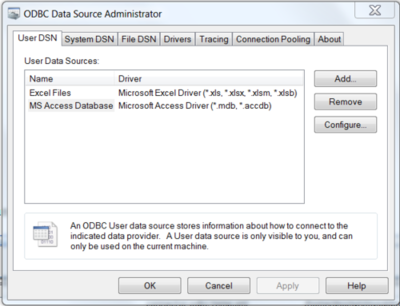
Open the ODBC Data Source Administrator.
9240a845.png

To create a System DSN (which will be available to all users), select the System DSN tab. To create a User DSN, which will be available only to the current user, click the Add… button to open the “Create New Data Source” dialog.

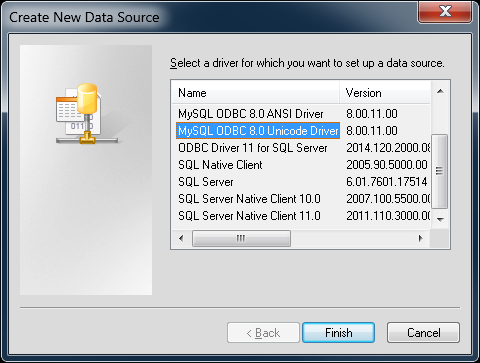
From the “Create New Data Source” dialog, select the MySQL ODBC 5.x ANSI or Unicode Driver, then click Finish to open its connection parameters dialog.
9e83225a.png

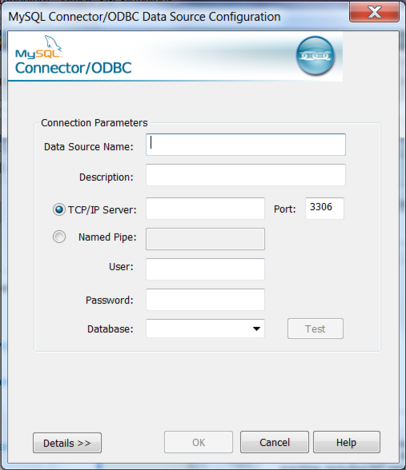
You now need to configure the specific fields for the DSN you are creating through the Connection Parameters dialog.
4bc71c97.png

To verify the connection using the parameters you have entered, click the Test button. If the connection can be made successfully, you will be notified with a Connection Successful dialog; otherwise, you will be notified with a Connection Failed dialog.
post event

复制 release 文件到bin目录

copy $(OutDir)$(TargetFileName) $(SolutionDir)bin
copy $(OutDir)$(TargetName).pdb $(SolutionDir)bin

查看 utf8 变量

默认的, VC调试器只能正常显示ANSI字符串及UNICODE字符串, 而UTF-8字符串及其他格式则无法显示
这里无需编写插件及修改配置文件,只需要将要显示的字符串拉到Watch中,并在变量后面添加,s8即可显示

同样类型的功能也应该很熟悉

,数字  将变量拆分为数组显示, 数字是要显示多少位, 此法对const char*这类原始字符串非常有用
,x 16进制查看
,hr  查看Windows HRESULT解释
,wm Windows消息,例如0x0010, wm 显示 WM_CLOSE
阅读全文 »

26c9b1c8.png 2009年4月15日星期三 哈哈,10年前的技术,目前我还在使用 Access Database method with VC++,按时间顺序排列目前最后的技术是ADO 1.ODBC API; 2.MFC ODBC类; 3.MFC DAO类;(数据访问对象) 访问access数据库性能最好 4.MFC的OLE/DB 5.ActiveX数据对象(ADO)
As of Visual C++ .NET, the Visual C++ environment and wizards no longer support DAO (although the DAO classes are included and you can still use them). Microsoft recommends that you use OLE DB Templates or ODBC for new projects. You should only use DAO in maintaining existing applications.

CString CApp1Set::GetDefaultConnect()
{
return "ODBC;DSN=afx;Trusted_Connection=Yes;";
}

ODBC

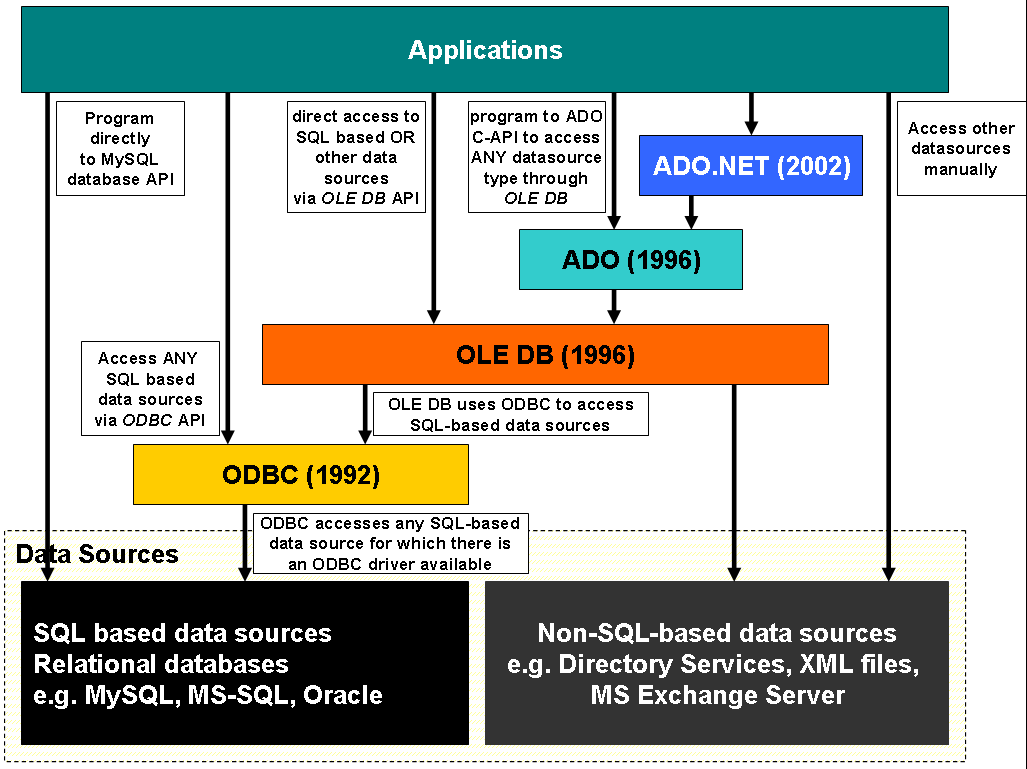
ODBC is an interface to access database management systems (DBMS). ODBC was developed by SQL Access Group in 1992 at a time, when there were no standard medium to communicate between a database and an application. It does not depend on a specific programming language or a database system or an operating system. Programmers can use ODBC interface to write applications that can query data from any database, regardless of the environment it is running on or the type of DBMS it uses.

ADO

ADO is a collection of COM (Component Object Mode) objects that act as an interface for accessing data in data sources. ADO was developed in 1996 by Microsoft as a part of the Microsoft Data Access Components (MDAC). ADO forms a middleware layer between applications written in some programming language and OLE DB (a data API developed by Microsoft and the successor to ODBC). Programmers can use ADO to access data without knowing the underlying implementation details of the database. Although you are not required to know any SQL to use ADO, you can certainly execute SQL statements using it.

OLEDB

ODBC vs ADO

ODBC is an open interface, which can be used by any application to communicate with any database system, while ADO is a wrapper around OLE DB (which is the successor to ODBC). If the database does not support OLE (non-OLE environments) then ODBC is the best choice. If the environment is non-SQL, then you have to use ADO (because ODBC works only with SQL). If interoperable database components are required, then ADO needs to be used instead of ODBC. However, for 16-bit data accessing ODBC is the only option (ADO does not support 16-bit). Finally, ADO is the best choice for connecting to multiple databases at once (ODBC can connect to only one database at a time).

Library

https://github.com/SOCI/soci

原文链接

下载OPENSSL
CMake GUI (cmake.org)

安装OpenSSL

下载32位版本:Win32 OpenSSL v1.1.1
这里下载

编译Paho C客户端

2.1 在paho.mqtt.c-master目录下新建build目录
2.2 运行cmake-gui
2.3 source code目录选择paho.mqtt.c-master目录,build目录选择C:\brixbot\paho.mqtt.c-master/build目录。
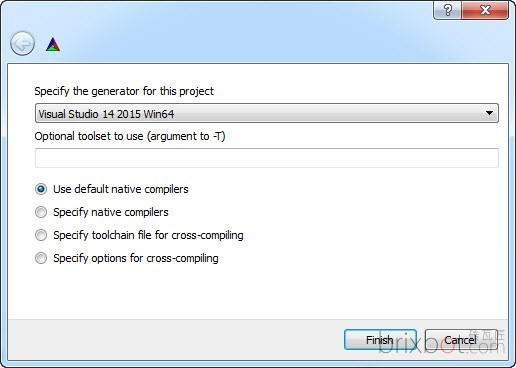
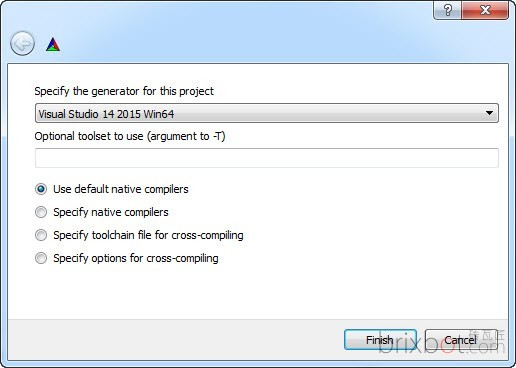
2.4 点击Configure按钮,在弹出的对话框中选择你要生成工程文件的Visual Studio版本。在本文中选择的是Visual Studio 14 2015 Win64。

20190418_185524.png

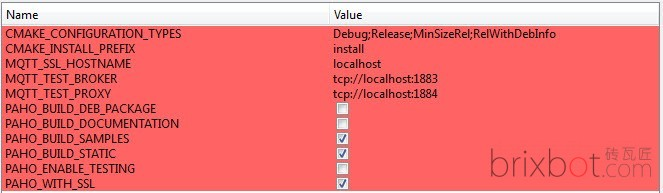
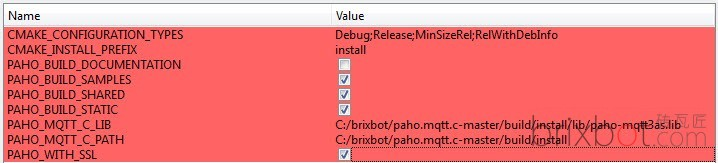
2.5 点击Finish按钮关闭上面的对话框。此时,cmake-gui会出现可设置的编译选项。按照下图进行设置。

20190418_185622.png

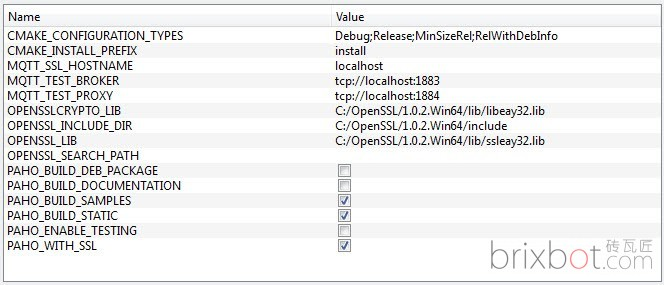
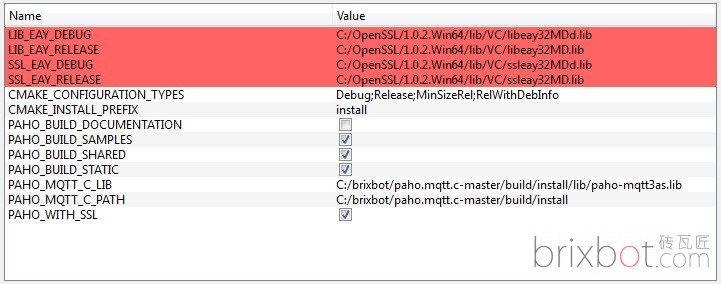
2.6 点击Configure按钮,此时会 弹出“Error in configuration process, project files may be invalid”的出错对话框。这是因为我们在刚刚的设置中要求把SSL支持编译进去,但SSL相关编译选项还未设置的原因。点Ok按钮关闭错误对话框。此时在编译选项列表中会多出SSL相关项目。按照下图进行设置:

20190418_185630.png

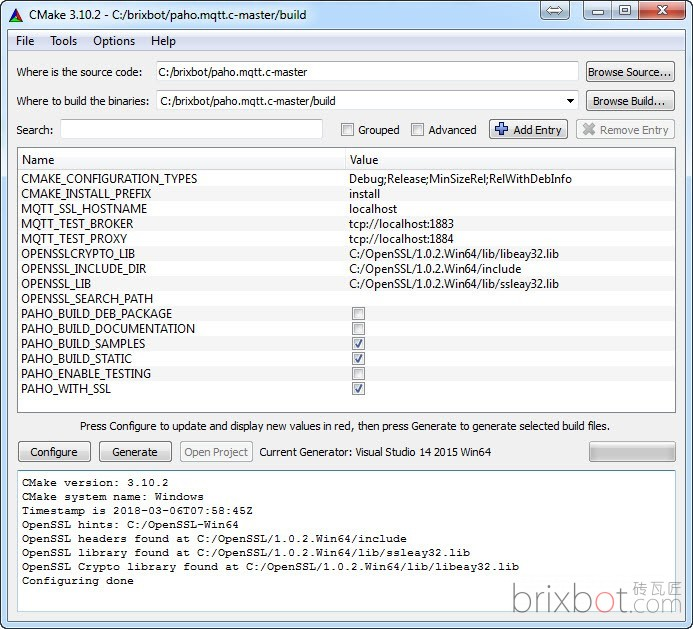
2.7 设置好后再次点击Configure按钮。这时输出框中应该再没有红色的错误信息。

20190418_185651.png

2.8 点击Generate按钮去生成Visual Studio的工程文件。这时,Open Project按钮应该变为允许状态。
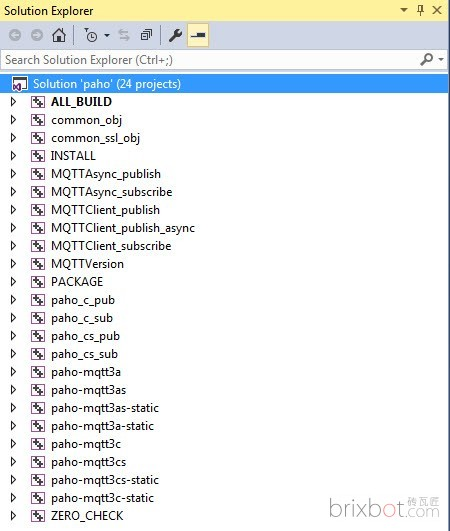
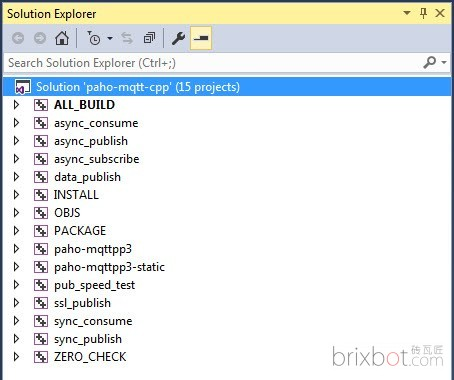
2.9 点击Open Project按钮去打开Visual Studio 2015的工程。打开的工程应该包含下图所示项目:

20190418_185702.png

完全编译ALL_BUILD工程。如果没有错误,编译INSTALL工程。编译成功后会在 C:\Program Files (x86)\Eclipse Paho C\ 目录下面生成所有文件

mqtt3a结尾的为异步版本
mqtt3as结尾的为支持SSL的异步版本
mqtt3c结尾的为同步版本
mqtt3cs结尾的为支持SSL的同步版本

编译 c++ 客户端

github

在paho.mqtt.cpp-master目录下新建build目录
运行cmake-gui
source code目录选择paho.mqtt.cpp-master目录,build目录选择C:\brixbot\paho.mqtt.cpp-master/build目录。
点击Configure按钮,在弹出的对话框中选择你要生成工程文件的Visual Studio版本。在本文中选择的是Visual Studio 14 2015 x86
20190418_190410.png

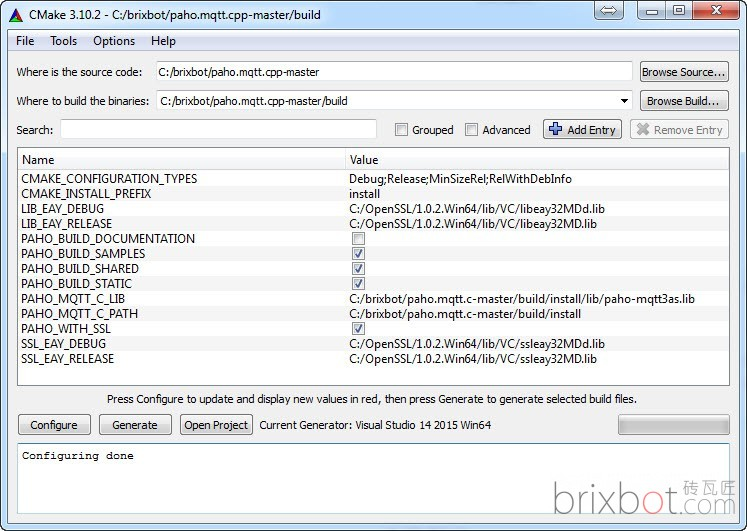
点击Finish按钮关闭上面的对话框此时,cmake-gui会弹出“Error in configuration process, project files may be invalid”的出错对话框。这是因为我们还未告诉CMake哪里去找Paho C的库文件。点击OK关闭对话框后cmake-gui会可设置的编译选项。按照下图进行设置。PAHO_MQTT_C_LIB选择上一讲编译出来的paho-mqtt3as.lib库文件已确保我们编译出来的Paho C++库也支持SSL。
20190418_190419.png

点击Configure按钮后cmake-gui会更新编译选项列表并列出和SSL相关的选项。检查SSL相关选项的文件名和路径是否正确。
20190418_190444.png
再次点击Configure按钮。这时输出框中应该没有红色的错误信息。

20190418_190458.png

点击Generate按钮去生成Visual Studio的工程文件。这时,Open Project按钮应该变为允许状态。

1.9 点击Open Project按钮去打开Visual Studio 2015的工程。打开的工程应该包含下图所示项目:

20190418_190624.png

1.10 和上一讲介绍的一样,我们需要修改所有工程的字符集选项为Use Unicode Character Set

使用问题

1>d:\library\include\mqtt\thread_queue.h(79): warning C4003: not enough actual parameters for macro ‘max’
1>d:\library\include\mqtt\thread_queue.h(79): error C2589: ‘(‘: illegal token on right side of ‘::’

解决方法:
Your problem is caused by the <Windows.h> header file that includes macro definitions named max and min

添加个() 防止宏展开
size_t maxValue_ = (std::numeric_limits::max)()
//

You need to link with both the Paho C (libpaho-mqtt3as.so) and the Paho C++ (libpaho-mqttpp3.so). It looks like maybe you remembered the C library but forgot the C++ one?
Try adding “-lpaho-mqttpp3” to the compile/link line.

问题

release 版本需要去掉依赖库 jemalloc 否则会有问题,提示 testxx 函数未找到。

http client demo

这个目前有问题,编译不过,稍后处理

#define HPSOCKET_STATIC_LIB
#include <HPSocket\HPSocket.h>
#include <HPSocket\SocketInterface.h>
#include <HPSocket\HPTypeDef.h>
#ifdef _DEBUG
#pragma comment(lib,"HPSocket\\HPSocket_D.lib")
#else
#pragma comment(lib,"HPSocket\\HPSocket.lib")
#endif

IHttpClient* m_pHttpClient;

常见的程序退出时,IDE显示的错误

Detected memory leaks!
Dumping objects ->
{98500} normal block at 0x05785AD0, 152 bytes long.
Data: << N N x 7 > 3C AC 4E 10 00 00 00 00 BC A4 4E 10 78 B6 37 00
Object dump complete.

在程序开始启动的地方(足够前的地方,只要在泄漏的内存分配的前面)使用代码:

_CrtSetBreakAlloc(1953); //98500为上面内存泄漏的块号,然后在stack窗口从上到下可定位内存泄漏代码

win32 方式

c++ 方式

CPP RunTime Library

_beginthreadex, _endthreadex
_endthreadex need calling the Win32 CloseHandle API

注意:在使用了MFC的程序中不能够使用该函数创建线程,而应该使用MFC提供的线程函数
MFC relies on some thread - local variables and state.AfxBeginThread
initializes those, then calls _beginthreadex for you.Just part of the
preconditions for using the library.If you don’t use AfxBeginThread some
of your calls to MFC functions could encounter uninitialized pointers.

阅读全文 »

Introduction

It is a very light weight and binary protocol
MQTT excels when transferring data over the wire in comparison to protocols like HTTP

“MQTT is a Client Server publish/subscribe messaging transport protocol. It is light weight, open, simple, and designed so as to be easy to implement. These characteristics make it ideal for use in many situations, including constrained environments such as for communication in Machine to Machine (M2M) and Internet of Things (IoT) contexts where a small code footprint is required and/or network bandwidth is at a premium.”

Citation from the official MQTT 3.1.1 specification

The MQTT protocol was invented in 1999 by Andy Stanford-Clark (IBM) and Arlen Nipper (Arcom, now Cirrus Link).
The two inventors specified several requirements for the future protocol:

  • Simple implementation
  • Quality of Service data delivery
  • Lightweight and bandwidth efficient
  • Data agnostic
  • Continuous session awareness
阅读全文 »

use vscode as ide.