spring boot mongodb
spring-boot-starter-data-mongodb
// https://mvnrepository.com/artifact/org.springframework.boot/spring-boot-starter-data-mongodb |
启动 mongodb
// 运行 |
spring-boot-starter-data-mongodb
// https://mvnrepository.com/artifact/org.springframework.boot/spring-boot-starter-data-mongodb |
// 运行 |
JUnit 5
java1.8
spring boot2
spring-boot-starter-test
h2database:
The H2 DB is our in-memory database. It eliminates the need for configuring and starting an actual database for test purposes.
// https://mvnrepository.com/artifact/org.springframework.boot/spring-boot-starter-test |
junit5 config
testImplementation 'org.junit.jupiter:junit-jupiter-api:5.3.2' |
如果引用的包是 jupiter 说明是使用的 junit5 了
import org.junit.jupiter.api.AfterEach; |
在测试类上面标注,指定测试的控制器包
@WebMvcTest(controllerUser.class) |
Junit常用注解:
@Before:初始化方法
@After:释放资源
@Test:测试方法,在这里可以测试期望异常和超时时间
@Ignore:忽略的测试方法
@BeforeClass:针对所有测试,只执行一次,且必须为static void
@AfterClass:针对所有测试,只执行一次,且必须为static void
@RunWith:指定使用的单元测试执行类
verify(mock, times(5)).someMethod("was called five times"); |
npm install -g yarn |
你应该按照以下的顺序进行学习, 而不是跳着学或者同时学习:
React
npm
JavaScript “打包工具”
ES6
Routing
Flux
https://github.com/petehunt/react-howto/blob/master/README-zh.md
Yarn和npm命令对比
npm install === yarn |
//安装指定版本,避免兼容性问题 |
组件间传数据
检查传入参数类型
prop-types
无状态组件:没有生命周期,输入固定,输出也固定
高阶组件 HOC
父组件传值给子组件比较简单,直接属性的方式即可
子组件传值给父组件,需要回调函数
兄弟组件传值,是通过父组件中转实现的
https://react-bootstrap.github.io/
处理文字
https://www.bobrosslipsum.com/
create-react-app react-bootstrap
yarn add react-bootstrap bootstrap react-router-dom |
yarn start
Starts the development server.
yarn build
Bundles the app into static files for production.
yarn test
Starts the test runner.
yarn eject
Removes this tool and copies build dependencies, configuration files
and scripts into the app directory. If you do this, you can’t go back!
We suggest that you begin by typing:
cd react-bootstrap
yarn start
springfox-demos
OpenAPI-Specification
注意,如果不指定请求的 Method 会把所有支持的 Method 都自动显示出来,GET,POST,HEAD,DELETE…等等
添加插件, 在这里获取 https://mvnrepository.com/
// https://mvnrepository.com/artifact/io.springfox/springfox-swagger2 |
在主应用同级目录下创建 swagger2Config.java 内容如下,根据实际情况修改
package com.example.demo; |
apis() 定义包含的类(controller and model classes)。这个是包括所有的 RequestHandlerSelectors.any(),可通过包名,类名来定制
paths() 通过路径映射来定制。
package com.example.demo; |
@Configuration 注解 让Spring来加载该类配置 |
Install OpenJDK 8 JDK
sudo yum install java-1.8.0-openjdk-devel
Java 1.8,IDEA 2018.1
gradle
Spring Boot 2.2 增加了对Java 13的支持 对于老版本的Java 11、Java 8依然支持良好。所以,对于还在使用Java 8的用户也可以安心的升级使用。
配置 VPN
我这里使用的是 shadowsocks。socks5 配置为 127.0.0.1:1086
配置 IDEAAppearance & Behavior > System Settings > Http Proxy
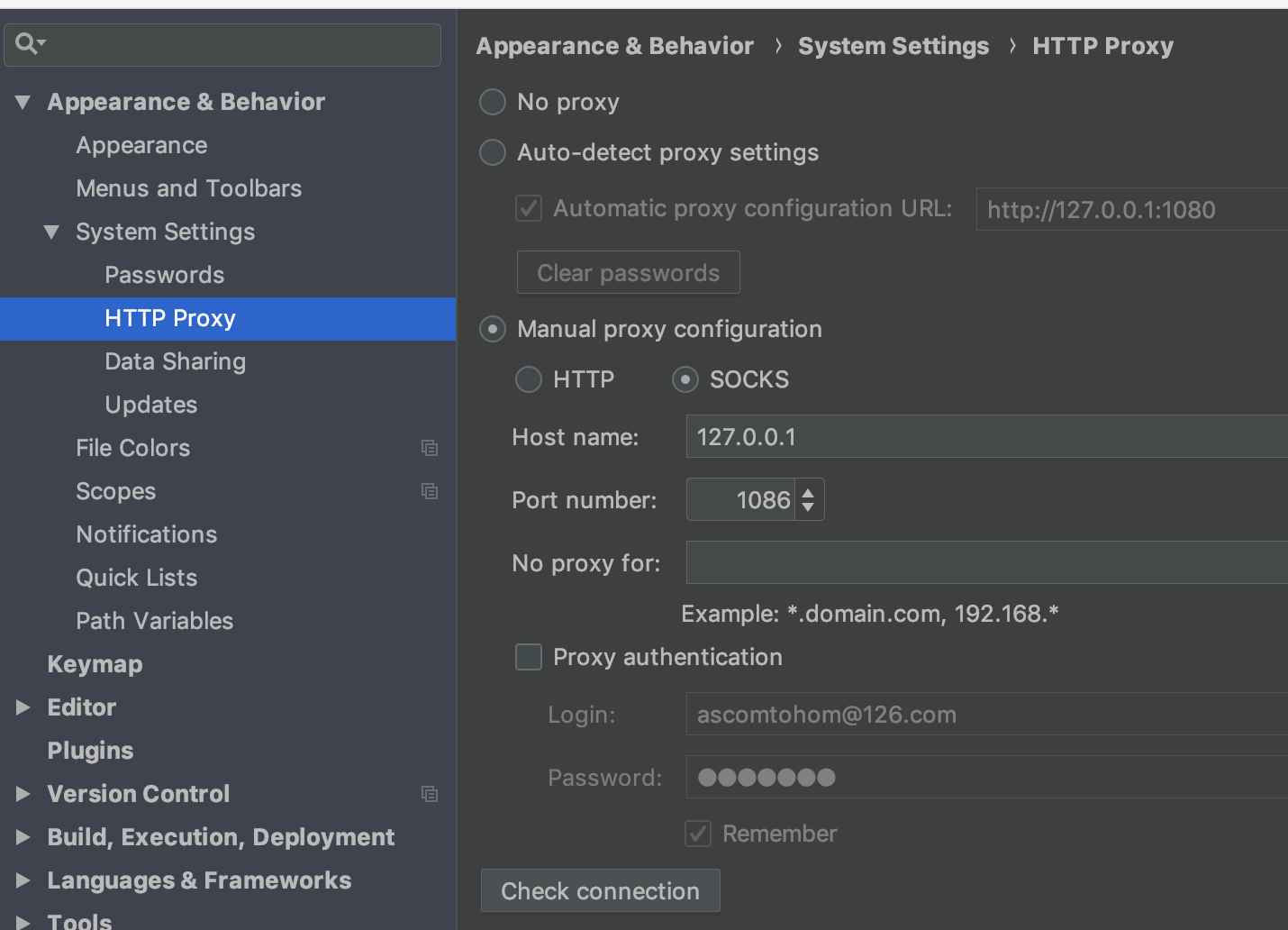 使用下面的 check connection 输入网址 `www.google.com` 可以正常访问就可以了。
File-New-Project-Spring Initializr 选择 Gradle 工程,JAR 包,JAVA 11
依赖选择 Web, thymeleaf,mongodb
如果之前装了 java 8, 需要修改一下配置,settings/build,execution,deployment/Gradle/ 修改 JVM 版本
创建基本目录结构:common,controller,model,repository,service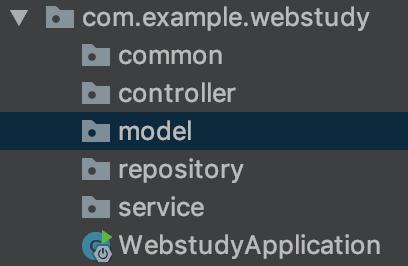
引入 bootstrap 4.3.1
<link rel="stylesheet" href="https://stackpath.bootstrapcdn.com/bootstrap/4.4.1/css/bootstrap.min.css" integrity="sha384-Vkoo8x4CGsO3+Hhxv8T/Q5PaXtkKtu6ug5TOeNV6gBiFeWPGFN9MuhOf23Q9Ifjh" crossorigin="anonymous"> |
在 resources/templates 下面创建 index.html
使用 webjars 引用公共静态资源
http://localhost:8080/webjars/jquery/3.4.1/jquery.js |
默认的静态资源存放路径 resources/static
<html lang="en" xmlns:th="http://www.thymeleaf.org"> |
在 css 里面配置时,出现小方块,不显示图标问题,在 html 里面配置时,正常
``` |
Logger logger = LoggerFactory.getLogger(getClass()); |
|
|
# 默认使用 application.properties |
// 使用 yaml |
激活配置文件
java -jar xxx.jar --spring.profiles.active=develop |
添加插件, 在这里获取 https://mvnrepository.com/
// https://mvnrepository.com/artifact/io.springfox/springfox-swagger2 |
运行后访问如下地址
http://localhost:8080/swagger-ui.html
创建 java class modelUser
model-modelUser
|
modelResult 作为返回对象
|
实现了简单的 CRUD 操作
IDEA 右边的 Gradle-build-bootJar 双击即可,然后部署上去 java -jar xx.jar 就可以启动了
如果右边没有发现 Gradle 选项,那么关闭 idea 再重新打开就应该有了。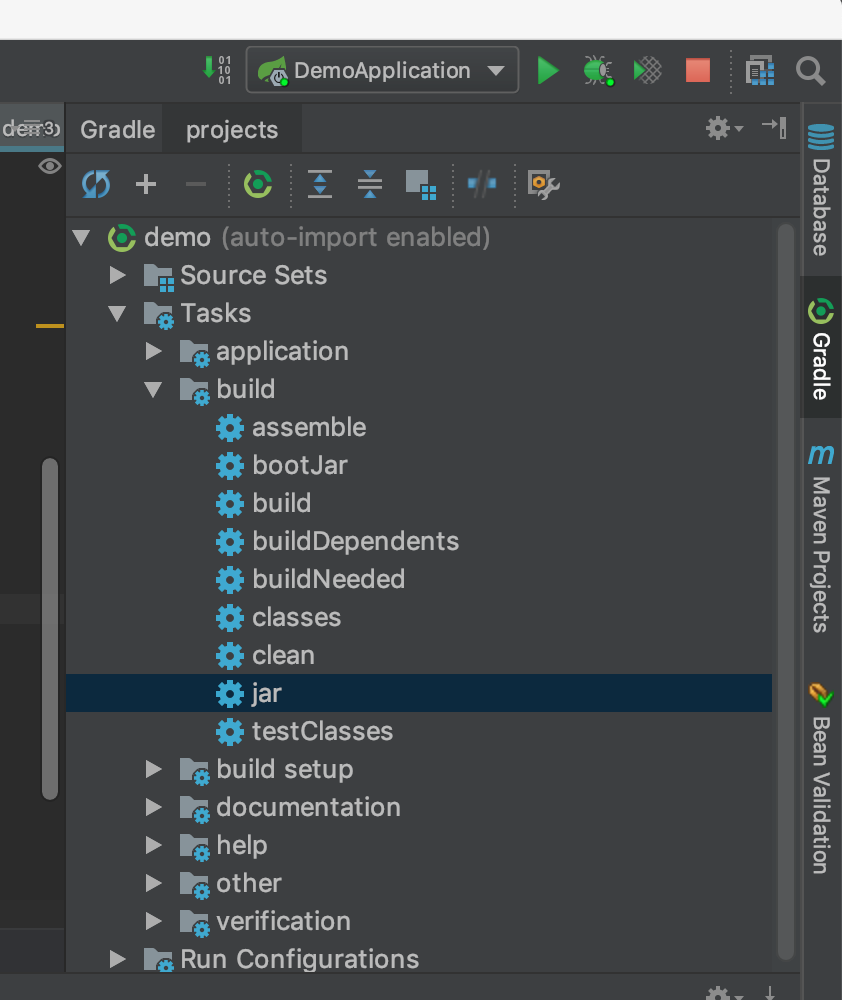
2018 年很忙。读书的速度提升了不少。



总体上分为 broker 和 brokerless 两种
broker 是需要安装中间服务的.
zmq 是属于 brokerless
activemq 两种都有
rabbitmq 是属于 broker
is one of the leading implementation of the AMQP protocol (along with Apache Qpid). Therefore, it implements a broker architecture, meaning that messages are queued on a central node before being sent to clients. This approach makes RabbitMQ very easy to use and deploy, because advanced scenarios like routing, load balancing or persistent message queuing are supported in just a few lines of code. However, it also makes it less scalable and “slower” because the central node adds latency and message envelopes are quite big.
is a very lightweight messaging system specially designed for high throughput/low latency scenarios like the one you can find in the financial world. Zmq supports many advanced messaging scenarios but contrary to RabbitMQ, you’ll have to implement most of them yourself by combining various pieces of the framework (e.g : sockets and devices). Zmq is very flexible but you’ll have to study the 80 pages or so of the guide (which I recommend reading for anybody writing distributed system, even if you don’t use Zmq) before being able to do anything more complicated than sending messages between 2 peers.
is in the middle ground. Like Zmq, it can be deployed with both broker and P2P topologies. Like RabbitMQ, it’s easier to implement advanced scenarios but usually at the cost of raw performance. It’s the Swiss army knife of messaging :-).
为了提高效率,避免复制构造函数的拷贝动作。
会保留参数的左右值类型
template <typename T> |
显示地使用shared_ptr构造函数来构造则至少需要两次内存分配。除了会产生额外的开销,还可能会导致内存泄漏。
使用make_shared就不会有这个问题了
// 下面两个是等价的 |
关键字 nullptr 是 std::nullptr_t 类型的值,用来指代空指针。nullptr 和任何指针类型以及类成员指针类型的空值之间可以发生隐式类型转换,同样也可以隐式转换为 bool 型(取值为 false)。但是不存在到整形的隐式类型转换。
NULL 的定义是
#ifdef __cplusplus |
比如f(char*)和f(int),参数传NULL的话到底该调用哪个?事实上,在VS下测试这样的函数重载会优先调用f(int),但是f(char *)也是正确的,因此C++引入nullptr来避免这个问题。 |
int arr[] = {1,2,3,4,5}; |
// 懒汉式单例模式 |
作用:
//定义变量 |