官网
github

编译

需要 boost 库支持 > 1.50

编译 boost 库1.64

Download source file from: http://www.boost.org/users/history/version_1_64_0.html
tar -xzvf boost_1_64_0.tar.gz
cd boost_1_64_0
./bootstrap.sh --prefix=/usr/local
./b2
./b2 install

编译 WT 4.0.4

cd wt-x.y.z
mkdir build; cd build
cmake ..
make
make -C examples

// To install wt in /usr/local
sudo make install
sudo ldconfig

使用全节点的 RPC 命令来获取模板和提交新块。使用中间件做服务。
基于 primecoin-core 0.16.1 版本。

需要修改一个地方就是,primecoin 限制每笔交易的 vout 数额不能小于 0.01xpm
Primecoin: minimul txout value.
static const CAmount MIN_TXOUT_AMOUNT = 1000000;

支持 segwit 不能有这个限制。看代码 segwit 会在 coinbase 里面创建一个 0 value 的 txout 交易输出。
具体原因和作用暂时没看。先弄 pool 实现。

tyler@ubuntu16:~/Documents/primecoin-core-desktop-src$ ./src/primecoin-cli -rpcuser=user -rpcpassword=password getblocktemplate '{"capabilities":["longpoll", "coinbasetxn", "coinbasevalue"]}'
{
"capabilities": [
"proposal"
],
"version": 536870912,
"rules": [
],
"vbavailable": {
},
"vbrequired": 0,
"previousblockhash": "47124348127fb1d00daf5f1a62c1115fe8fc8a6226f91c042211834459d06567",
"transactions": [
],
"coinbaseaux": {
"flags": ""
},
"coinbasevalue": 734000000,
"longpollid": "47124348127fb1d00daf5f1a62c1115fe8fc8a6226f91c042211834459d06567230",
"target": "0000000000000000000000000000000000000000002937b40000000000000000",
"mintime": 1539164867,
"mutable": [
"time",
"transactions",
"prevblock"
],
"noncerange": "00000000ffffffff",
"sigoplimit": 20000,
"sizelimit": 1000000,
"curtime": 1539224387,
"bits": "0ba937b4",
"height": 2875236
}

下面的作废,使用新思路

说明

参考 madMax 的代码实现,引用库的升级,primecoin 版本使用 0.16.1。

后面需要使用 bitcoin 的 depends 里面的 make 来编译。目前先手动操作。

Dependency

boost 1.64
WT 4.0.4
postgresql 10.5

zmq 4.2.2
czmq 4.1.1
lz4 1.8.3

Boost 1.64 requires CMake 3.8 or newer.

Compile

cmake 3.12.2

default directory: /usr/local/bin/

./bootstrap
make
sudo make install

need close current console and open another one, type cmake -version check result

阅读全文 »

为啥 zmq 的文档找起来这么费劲,4.0.x

zsocket_new

//  Create a new socket within our CZMQ context, replaces zmq_socket.
// Use this to get automatic management of the socket at shutdown.
// Note: SUB sockets do not automatically subscribe to everything; you
// must set filters explicitly.
CZMQ_EXPORT void * zsocket_new (zctx_t *self, int type);

zsocket_bind

//  Bind a socket to a formatted endpoint. If the port is specified as
// '*', binds to any free port from ZSOCKET_DYNFROM to ZSOCKET_DYNTO
// and returns the actual port number used. Otherwise asserts that the
// bind succeeded with the specified port number. Always returns the
// port number if successful.
CZMQ_EXPORT int zsocket_bind (void *self, const char *format, ...);

thread

zactor

//  This is a stable class, and may not change except for emergencies. It
// is provided in stable builds.
// This class has draft methods, which may change over time. They are not
// in stable releases, by default. Use --enable-drafts to enable.
// Actors get a pipe and arguments from caller
typedef void (zactor_fn) (
zsock_t *pipe, void *args);

// Create a new actor passing arbitrary arguments reference.
CZMQ_EXPORT zactor_t *
zactor_new (zactor_fn task, void *args);

// Destroy an actor.
CZMQ_EXPORT void
zactor_destroy (zactor_t **self_p);

// Send a zmsg message to the actor, take ownership of the message
// and destroy when it has been sent.
CZMQ_EXPORT int
zactor_send (zactor_t *self, zmsg_t **msg_p);

// Receive a zmsg message from the actor. Returns NULL if the actor
// was interrupted before the message could be received, or if there
// was a timeout on the actor.
// Caller owns return value and must destroy it when done.
CZMQ_EXPORT zmsg_t *
zactor_recv (zactor_t *self);

// Probe the supplied object, and report if it looks like a zactor_t.
CZMQ_EXPORT bool
zactor_is (void *self);

// Probe the supplied reference. If it looks like a zactor_t instance,
// return the underlying libzmq actor handle; else if it looks like
// a libzmq actor handle, return the supplied value.
CZMQ_EXPORT void *
zactor_resolve (void *self);

// Return the actor's zsock handle. Use this when you absolutely need
// to work with the zsock instance rather than the actor.
CZMQ_EXPORT zsock_t *
zactor_sock (zactor_t *self);

// Self test of this class.
CZMQ_EXPORT void
zactor_test (bool verbose);

#ifdef CZMQ_BUILD_DRAFT_API
// Function to be called on zactor_destroy. Default behavior is to send zmsg_t with string "$TERM" in a first frame.
//
// An example - to send $KTHXBAI string
//
// if (zstr_send (self, "$KTHXBAI") == 0)
// zsock_wait (self);
typedef void (zactor_destructor_fn) (
zactor_t *self);

// *** Draft method, for development use, may change without warning ***
// Change default destructor by custom function. Actor MUST be able to handle new message instead of default $TERM.
CZMQ_EXPORT void
zactor_set_destructor (zactor_t *self, zactor_destructor_fn destructor);

#endif // CZMQ_BUILD_DRAFT_API
Please add '@interface' section in './../src/zactor.c'.

zthread_fork

//  Create an attached thread. An attached thread gets a ctx and a PAIR
// pipe back to its parent. It must monitor its pipe, and exit if the
// pipe becomes unreadable. Do not destroy the ctx, the thread does this
// automatically when it ends.
CZMQ_EXPORT void * zthread_fork (zctx_t *ctx, zthread_attached_fn *thread_fn, void *args);

zsocket_wait

//  Wait on a signal. Use this to coordinate between threads, over
// pipe pairs. Returns -1 on error, 0 on success.
CZMQ_EXPORT int zsocket_wait (void *self);

zmq_proxy

在当前线程内开始ZMQ内置代理。
代理将一个前端socket连接到一个后端。一般来说,数据会从前端流向后端。根据socket的类型,数据可能向相反的方向流动。方向指示概念上的;代理是完全对称的,在技术上前端和后端没有什么区别。
zmq_proxy()函数在当前的线程空间中运行,并且只有在当前使用的context被关闭之后才会返回。

//  This port range is defined by IANA for dynamic or private ports
// We use this when choosing a port for dynamic binding.
#define ZSOCKET_DYNFROM 0xc000
#define ZSOCKET_DYNTO 0xffff

// Callback function for zero-copy methods
typedef void (zsocket_free_fn) (void *data, void *arg);


// Destroy a socket within our CZMQ context, replaces zmq_close.
CZMQ_EXPORT void
zsocket_destroy (zctx_t *ctx, void *self);


// Unbind a socket from a formatted endpoint.
// Returns 0 if OK, -1 if the endpoint was invalid or the function
// isn't supported.
CZMQ_EXPORT int
zsocket_unbind (void *self, const char *format, ...);

// Connect a socket to a formatted endpoint
// Returns 0 if OK, -1 if the endpoint was invalid.
CZMQ_EXPORT int
zsocket_connect (void *self, const char *format, ...);

// Disconnect a socket from a formatted endpoint
// Returns 0 if OK, -1 if the endpoint was invalid or the function
// isn't supported.
CZMQ_EXPORT int
zsocket_disconnect (void *self, const char *format, ...);

// Poll for input events on the socket. Returns TRUE if there is input
// ready on the socket, else FALSE.
CZMQ_EXPORT bool
zsocket_poll (void *self, int msecs);

// Returns socket type as printable constant string
CZMQ_EXPORT const char *
zsocket_type_str (void *self);

// Send data over a socket as a single message frame.
// Accepts these flags: ZFRAME_MORE and ZFRAME_DONTWAIT.
// Returns -1 on error, 0 on success
CZMQ_EXPORT int
zsocket_sendmem (void *self, const void *data, size_t size, int flags);

// Send a signal over a socket. A signal is a zero-byte message.
// Signals are used primarily between threads, over pipe sockets.
// Returns -1 if there was an error sending the signal.
CZMQ_EXPORT int
zsocket_signal (void *self);


// Self test of this class
CZMQ_EXPORT void
zsocket_test (bool verbose);

ubuntu 14.04 版本下编译,
ubuntu 16.04 compile linux version success
windows version use windows7 compile success

修改版本
primecoin-qt.pro
share/setup.nsi
share/genbuild.sh
src/clientversion.h (change CLIENT_VERSION_IS_RELEASE to true)
下面的文件是生成的地方。undefine 两个判断宏
src/version.cpp

阅读全文 »

cpp Singleton pattern

class Singleton {
public:
static Singleton* getInstance(){
if (m_sInstance == 0)
{
m_sInstance = new Singleton();
}
return m_sInstance;
}
static void releaseInstance(){
if(nullptr != m_sInstance)
{
delete m_sInstance;
m_sInstance = nullptr;
}
}

/* more (non-static) functions here */

private:
Singleton(); // ctor hidden
Singleton(Singleton const&); // copy ctor hidden
Singleton& operator=(Singleton const&){ return *m_sInstance; }; // assign op. hidden
~Singleton(); // dtor hidden

static Singleton* m_sInstance;
};

/* Null, because instance will be initialized on demand. */
Singleton* Singleton::m_sInstance = 0;

Singleton* Singleton::getInstance()
{
if (m_sInstance == 0)
{
m_sInstance = new Singleton();
}
return m_sInstance;
}

Singleton::Singleton()
{}

int main()
{
//new Singleton(); // Won't work
Singleton* s = Singleton::getInstance(); // Ok
Singleton* r = Singleton::getInstance();

/* The addresses will be the same. */
std::cout << s << std::endl;
std::cout << r << std::endl;
}

不要接近峨眉山的和尚
不要接近崂山的道士
不要买九寨沟的牦牛肉
不要买三峡船上的玉器珠宝
不要在西双版纳参加“抢亲”游戏
不要在西安的古玩一条街购买古物
不要在大理购买所谓“老乡”的便宜珠宝
不要在阳朔的酒吧里消费
不要招惹泰山景区的当地人
不要参观少林寺时走“捷径”
不要逛十三陵玉石店
不要单独去海南旅游
不要在坝上草原骑马
不要在吐鲁番买葡萄
不要在深圳中英街购买任何物品
不要参加北京当地的长城一日游
不要在张家界住便宜小旅馆
不要在井冈山为“老区建设”捐款
不要在杭州的娱乐场所消费
不要在苏州的茶楼喝茶
不要在丰都鬼城照“免费”像
不要在北海乘坐摩托艇
不要在北戴河吃海鲜
不要在三亚海边接近小商贩
不要随导游在呼伦贝尔草原上吃烤全羊
不要在庐山乘个体出租车上山
不要在宏村的路上坐出租车
不要去黄山让人“免费带路”
不要在千岛湖码头的排档吃鱼
不要参观乐山景区周边的付费景点
不要在郑州黄河游览区骑马
不要到恒山算命
不要随旅游团环游青海湖
不要买神农架的土特产
不要在敦煌的夜市吃地摊饭
不要在花果山的海鲜一条街吃饭
不要随导游逛清明上河园
不要在南京做“免费美容”
不要在上海外滩让人给你照数码像
不要买“便宜票”看黄果树瀑布
不要随导游在香港买名表和珠宝
不要投大钱在澳门赌博
不要在威海韩国城购买没经狠杀价的商品
不要在丽江洗桑拿浴
不要到五台山的五爷庙烧香
不要在平遥摸“鱼洗”
不要在武夷山景区买茶叶
不要在白洋淀景区买鸭蛋
不要在乌镇让道士“免费看相”
不要去太阳岛坐“热心人”介绍的船

祛湿

红豆薏米粥:非常适合夏季及体内湿气较重的人食用,是祛湿健脾的佳品,调节便秘、减肥、美白功效
但是注意一下,因为薏米是凉性食物,女性在经期内不要食用这款粥,孕妇也禁食。

补肾补血和健脾胃

山药小米枸杞粥:常吃山药小米粥能够补充人体需要的蛋白质和氨基酸,可以补肾补血和健脾胃。
把山药去皮切成小块,放入到洗净的小米中,放入冰糖。煮熟后,再加入十多粒枸杞即可。

whether database existence

SELECT u.datname  FROM pg_catalog.pg_database u where u.datname='rftDatabase';

表是否存在

if( (select 1 from pg_class where relname='test'::name and relkind='r') is null  ) then
/*你的代码*/
end if;

docker with postgreSQL

office docker

docker pull postgres

// start a postgres instance
docker run --name pool-postgres -p 5432:5432 -e POSTGRES_PASSWORD=password -d postgres

Postgres SQL server 9.6.9 源码编译

sudo apt-get install libreadline-dev
./configure
make
sudo make install
sudo adduser postgres
sudo mkdir /usr/local/pgsql/data
sudo chown postgres /usr/local/pgsql/data
su - postgres
/usr/local/pgsql/bin/initdb -D /usr/local/pgsql/data
/usr/local/pgsql/bin/postgres -D /usr/local/pgsql/data >logfile 2>&1 &
/usr/local/pgsql/bin/createdb test
/usr/local/pgsql/bin/psql test

设置开机自启动

PostgreSQL的开机自启动脚本位于PostgreSQL源码目录的contrib/start-scripts路径下
chmod a+x linux
cp linux /etc/init.d/postgresql
修改/etc/init.d/postgresql文件的两个变量
prefix设置为postgresql的安装路径:/xxx/pgsql
PGDATA设置为postgresql的数据目录路径:/xxx/pgsql/data

启动PostgreSQL服务
service postgresql start

设置postgresql服务开机自启动
sudo apt install sysv-rc-conf

sysv-rc-conf postgresql

常用命令

启动服务

su - postgres
/usr/local/pgsql/bin/pg_ctl -s -D /usr/local/pgsql/data start -w -t 120
阅读全文 »

如果你需要高效的随即存取,而不在乎插入和删除的效率,使用vector

原理

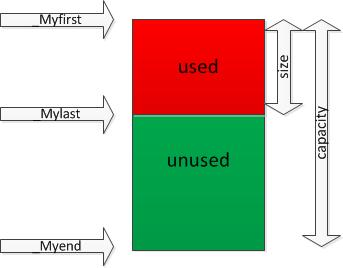
pointer _Myfirst;   // pointer to beginning of array
pointer _Mylast; // pointer to current end of sequence
pointer _Myend; // pointer to end of array
20190515_144147.png

大小:size=_Mylast - _Myfirst;
容量:capacity=_Myend - _Myfirst;
分别对应于resize()、reserve()两个函数。
size表示vector中已有元素的个数,容量表示vector最多可存储的元素的个数;为了降低二次分配时的成本,vector实际配置的大小可能比客户需求的更大一些,以备将来扩充,这就是容量的概念。即capacity>=size,当等于时,容器此时已满,若再要加入新的元素时,就要重新进行内存分配,整个vector的数据都要移动到新内存。二次分配成本较高,在实际操作时,应尽量预留一定空间,避免二次分配。

初始化

// 通过数组地址初始化
int a[5] = {1,2,3,4,5};
//通过数组a的地址初始化,注意地址是从0到5(左闭右开区间)
vector<int> b(a, a+5);

// 通过另一个 vector 初始化
v2.assign(v1.begin(),v1.end());

//c++ 11
vector<string> g_vResultKeyName = { "gisType", "source","nationality" };

二维数组初始化

std::vector<std::vector<int32_t>> vChess;

typeChess()
{
vChess.assign(vChess.size(), std::vector<int32_t>(vChess.size(), '.'));
}

查找

合并

AB.reserve( A.size() + B.size() ); // preallocate memory
AB.insert( AB.end(), A.begin(), A.end() );
AB.insert( AB.end(), B.begin(), B.end() );

插入

vector_name.insert (position, val)
vector_name.insert(position, size, val)
vector_name.insert(position, iterator1 , iterator2)

// program below illustrates the
// vector::insert() function

#include <bits/stdc++.h>
using namespace std;

int main()
{
// initialising the vector
vector<int> vec = { 10, 20, 30, 40 };

// inserts 3 at front
auto it = vec.insert(vec.begin(), 3);

// inserts 2 at front
vec.insert(it, 2);

cout << "The vector elements are: ";
for (auto it = vec.begin(); it != vec.end(); ++it)
cout << *it << " ";

return 0;
}

The vector elements are: 2 3 10 20 30 40

v[i]与v.at(i)的区别

void f(vector<int> &v)
{
v[0]; // A
v.at[0]; // B
}

如果 v 非空,A 行和 B 行没有任何区别。如果 v 为空,B行会抛出 std::out_of_range 异常,A 行的行为未定义。

c++ 标准不要求 vector::operator[] 进行下标越界检查,原因是为了效率,总是强制下标越界检查会增加程序的性能开销。
设计vector是用来代替内置数组的,所以效率问题也应该考虑。不过使用 operator[] 就要自己承担越界风险了。

如果需要下标越界检查,请使用 at。

emplace_back vs push_back

emplace_back not copy and move object to container
A similar member function exists, push_back, which either copies or moves an existing object into the container

string to vector

std::vector<BYTE> m_vCmdBuf
string cmd = getDevParam(m_counter++, param);
m_vCmdBuf.assign(cmd.begin(), cmd.end());

获取最后一个元素

声明:vector vec;
方法一: return vec.at(vec.size()-1);
方法二: return vec.back();
方法三: return vec.end()-1; 注意:end指向末尾元素的下一个元素。
方法四: return vec.rbegin();

复制

vector<int> temlist;
temlist.assign(list.begin(), list.end());