默认保存路径

  1. Windows
    WinKey+R 输入 %APPDATA%\Bitcoin
    通常会打开

    C:\Documents and Settings\YourUserName\Application data\Bitcoin (XP)
    C:\Users\YourUserName\Appdata\Roaming\Bitcoin (Vista and 7)
  2. Linux
    ~/.bitcoin/ 默认路径

  3. Mac
    默认路径 ~/Library/Application Support/Bitcoin/

数据目录结构

blocks/blk*.dat
区块数据,使用网络大端格式,直接保存在硬盘上。载入钱包时重新扫描缺失的交易,服务其他节点同步数据,识别区块的不同部分会用到。

blocks/index/:
这是一个 LevelDB 数据库,包括所有已知块的元数据,用来加速查找区块。

chainstate/:
这是一个 LevelDB 数据库,使用压缩形式保存当前的 UTXO 和交易来源的一些相关元数据。这里的数据是校验新交易块所必须的。
这些信息可以通过区块重建(参考 -reindex 参数),但是很耗时间。没有这些数据,也可以校验,但是意味着要扫描整个区块查找 UTXO

blocks/rev*.dat:
这里包括 “undo” 数据,对于回退 chainstate,重组区块是必要的数据。

一个块文件大约为128MB。每个块文件会有一个对应的撤销文件,比如文件 blocks/blk1234.dat 和 blocks/recv1234.dat 对应。
完整节点同步后的备份

  1. 安全退出程序:File -> Exit or ./bitcoin-cli stop
  2. 备份数据目录 blocks, chainstate
  3. 有问题时,恢复这两个目录即可
    注意:windows 下面同步后的文件,如果在 linux 上面使用,需要从新建立索引

bitcoin 0.16.2
docker run -it --name bitcoinNode1 -v /Users/zhengjun/project/docker/ubuntu16.04:/home/data --net=bridge 938 /bin/bash

Regtest Mode(regression test mode)

创建私有的链,类似于 testnet 但是可以自己选择创建新块。可以完全控制整个网络。
注意不同节点的 DATA 目录要分开,不能使用同一个目录。

./bitcoind -regtest -printtoconsole -rpcuser=user -rpcpassword=password -txindex=1 -addrindex=1 -datadir=/home/data/bin_bitcoin_0.16.2/regtestData

查看端口,默认监听 18444 端口

netstat -pant

使用 rpc 创建 101 个区块,只有在 regtest mode 才支持该命令,因为使用默认规则,所以产生速度很快,regtest mode 只有前 150 块奖励 50 bitcoin
,只有经过 100 个确认才可以消费奖励。所以我们创建 101 块,才能访问第一块的 coinbase transaction 交易

## Bitcoin Core 0.10.1 and earlier
./bitcoin-cli -regtest -rpcuser=user -rpcpassword=password setgenerate true 101
## Bitcoin Core master (as of commit 48265f3)
./bitcoin-cli -regtest -printtoconsole -rpcuser=user -rpcpassword=password generate 101
./bitcoin-cli -regtest -printtoconsole -rpcuser=user -rpcpassword=password getbalance
50.00000000

添加节点

docker run -it --name bitcoinNode2 -v /Users/zhengjun/project/docker/ubuntu16.04:/home/data --net=bridge 938 /bin/bash
// 下面是用于退出后,登录容器的命令
docker exec -e COLUMNS="`tput cols`" -e LINES="`tput lines`" -it d5 bash

查看 1 节点的 ip,启动 2 节点,增加参数 addnode=172.17.0.2

./bitcoind -regtest -printtoconsole -rpcuser=user -rpcpassword=password -txindex=1 -addrindex=1 -addnode=172.17.0.2  -datadir=/home/data/bin_bitcoin_0.16.2/regtestDataNode2
// 查看信息
./bitcoin-cli -regtest -printtoconsole -rpcuser=user -rpcpassword=password getblockchaininfo
// 获取地址
./bitcoin-cli -regtest -printtoconsole -rpcuser=user -rpcpassword=password getnewaddress
2N7nvzMfpAHR9675TPdWGJG1wDVh2783Uug
// 从节点 1 发送比特币
./bitcoin-cli -regtest -printtoconsole -rpcuser=user -rpcpassword=password sendtoaddress 2N7nvzMfpAHR9675TPdWGJG1wDVh2783Uug 20
252fd4d3af8839c0349b52653aee654722e680d1759f550302e474e291cf2695
// 在节点 1 产生 100 个新区块来确认交易
./bitcoin-cli -regtest -printtoconsole -rpcuser=user -rpcpassword=password generate 100
// 这时查看节点 2 应该看到余额 20 列出钱包的 UTXO
./bitcoin-cli -regtest -printtoconsole -rpcuser=user -rpcpassword=password listunspent

命令行方式

./src/bitcoin-cli -rpcuser=user -rpcpassword=password getaddressbalance 1BW18n7MfpU35q4MTBSk8pse3XzQF8XvzT

网络方式

curl --user bitcoin:local321 --data-binary '{"jsonrpc":"1.0", "id":"curltest", "method":"getaddressbalance","params":["1Ebb8NfVmKMoGuMJCAEbVMv2dX8GnzgxSa"]}' -H 'content-type: text/plain;' http://127.0.0.1:8332/

禁止 IP 节点

setban "ip(/netmask)" "add|remove" (bantime) (absolute)

Attempts add or remove a IP/Subnet from the banned list.

Arguments:
1. "ip(/netmask)" (string, required) The IP/Subnet (see getpeerinfo for nodes ip) with a optional netmask (default is /32 = single ip)
2. "command" (string, required) 'add' to add a IP/Subnet to the list, 'remove' to remove a IP/Subnet from the list
3. "bantime" (numeric, optional) time in seconds how long (or until when if [absolute] is set) the ip is banned (0 or empty means using the default time of 24h which can also be overwritten by the -bantime startup argument)
4. "absolute" (boolean, optional) If set, the bantime must be a absolute timestamp in seconds since epoch (Jan 1 1970 GMT)

Examples:
> bitcoin-cli setban "192.168.0.6" "add" 86400
> bitcoin-cli setban "192.168.0.0/24" "add"
> curl --user myusername --data-binary '{"jsonrpc": "1.0", "id":"curltest", "method": "setban", "params": ["192.168.0.6", "add" 86400] }' -H 'content-type: text/plain;' http://127.0.0.1:8332/

记录一下常用的命令

调试命令

r -printtoconsole -rpcuser=user -rpcpassword=password -txindex=1 -addrindex=1 -printtodebugger -connect=192.168.31.211 -maxconnections=1 -addnode=192.168.31.211

指定钱包目录和文件

./src/qt/primecoin-qt -printtoconsole -datadir="/mnt/blocks/primecoinMainData_addr" -wallet="wallet_backup_primecoin_test.dat" -walletdir="/home/tyler/Documents/wallet_primecoin/"

支持外网地址绑定

注意,这里绑定成功的是 ipv6 的地址,命令行会提示绑定 0.0.0.0/0 失败,也就是 ipv4 的,实际上没有影响

./primecoind -printtoconsole -rpcuser=user -rpcpassword=password -txindex=1 -addrindex=1 -rpcallowip="::/0" -datadir="/home/ubuntu/Document/primecoin-core-0.16.1_addr/mainDataAddr"

rpc web 请求方式访问

9912 端口

curl --user user:password --data-binary '{"jsonrpc":"1.0", "id":"curltest", "method":"getaddressbalance","params":["AUwoythQxMwt9qW32fcBvoAC716kg4mtGm"]}' -H 'content-type: text/plain;' http://103.84.87.82:9912/

curl --user user:password --data-binary '{"jsonrpc":"1.0", "id":"curltest", "method":"searchrawtransactions","params":["ATyjPcDsQgHgCjX5mi1U3xgrKp36QRiWVj"]}' -H 'content-type: text/plain;' http://103.84.87.82:9912/

命令行方式

./primecoind -printtoconsole -rpcuser=user -rpcpassword=password -txindex=1 -addrindex=1 -datadir="/mnt/blocks/primecoinMainData_addr"

./primecoind -printtoconsole -rpcuser=user -rpcpassword=password -txindex=1 -addrindex=1 -reindex -datadir="/mnt/blocks/primecoinMainData_addr"

searchrawtransactions

./primecoin-cli -rpcuser=user -rpcpassword=password searchrawtransactions AaigSgLkYT638VT7DswGGzLszUXdDexo4b
./src/primecoin-cli -rpcuser=user -rpcpassword=password getaddressbalance  '{"addresses":["AaigSgLkYT638VT7DswGGzLszUXdDexo4b"]}'
curl --user user:password --data-binary '{"jsonrpc":"1.0", "id":"curltest", "method":"getaddressbalance","params":["1Ebb8NfVmKMoGuMJCAEbVMv2dX8GnzgxSa"]}' -H 'content-type: text/plain;' http://127.0.0.1:9912/

挖矿

setgenerate true -1
取消
setgenerate false

引用

56f9e263.png

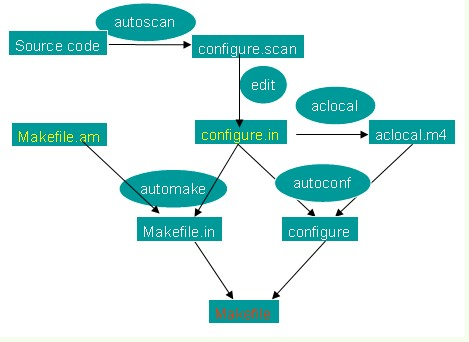
自动生成 makefile 的工具
GNU Automake,GNU Autoconf,GNU m4,perl,GNU Libtool

用 autoconf/automake/autoheader工具来处理各种移植性的问题,用这些工具完成系统配置信息的收集,制作Makefile文件。然后在打算编译源码时只需要通过 “./configure; make”这样简单的命令就可以得到干净利落的编译。

PIC

-fPIC 作用于编译阶段,告诉编译器产生与位置无关代码(Position-Independent Code),  则产生的代码中,没有绝对地址,全部使用相对地址,故而代码可以被加载器加载到内存的任意  位置,都可以正确的执行。这正是共享库所要求的,共享库被加载时,在内存的位置不是固定的。

制作 Makefile 步骤

  1. 建立源文件

Makefile.am

Makefile.am is a programmer-defined file and is used by automake to generate the Makefile.in file (the .am stands for automake). The configure script typically seen in source tarballs will use the Makefile.in to generate a Makefile.

The configure script itself is generated from a programmer-defined file named either configure.ac or configure.in (deprecated). I prefer .ac (for autoconf) since it differentiates it from the generated Makefile.in files and that way I can have rules such as make dist-clean which runs rm -f *.in. Since it is a generated file, it is not typically stored in a revision system such as Git, SVN, Mercurial or CVS, rather the .ac file would be.

Q&A

makefile:4: *** missing separator. Stop

makefile 使用 tab 做缩进,不能使用空格。

use concen

1. 文件名必须是_test.go结尾的,这样在执行go test的时候才会执行到相应的代码
2. 你必须import testing这个包
3. 所有的测试用例函数必须是Test开头
4. 测试用例会按照源代码中写的顺序依次执行
5. 测试函数TestXxx()的参数是testing.T,我们可以使用该类型来记录错误或者是测试状态
6. 测试格式:func TestXxx (t *testing.T),Xxx部分可以为任意的字母数字的组合,但是首字母不能是小写字母[a-z],例如Testintdiv是错误的函数名。
7. 函数中通过调用testing.T的Error, Errorf, FailNow, Fatal, FatalIf方法,说明测试不通过,调用Log方法用来记录测试的信息。

ref

Wallet Import Format (WIF, also known as Wallet Export Format)
is a way of encoding a private ECDSA key so as to make it easier to copy.

Private key to WIF

  1. Take a private key
    0C28FCA386C7A227600B2FE50B7CAE_SAMPLE_PRIVATE_KEY_DO_NOT_IMPORT_11EC86D3BF1FBE471BE89827E19D72AA1D
  2. Add a 0x80 byte in front of it for mainnet addresses or 0xef for testnet addresses. Also add a 0x01 byte at the end if the private key will correspond to a compressed public key
    800C28FCA386C7A227600B2FE50B7C_SAMPLE_PRIVATE_KEY_DO_NOT_IMPORT_AE11EC86D3BF1FBE471BE89827E19D72AA1D
  3. Perform SHA-256 hash on the extended key
    8147786C4D15106333BF278D71DADAF1079EF2D2440A4DDE37D747DED5403592
  4. Perform SHA-256 hash on result of SHA-256 hash
    507A5B8DFED0FC6FE8801743720CEDEC06AA5C6FCA72B07C49964492FB98A714
  5. Take the first 4 bytes of the second SHA-256 hash, this is the checksum
    507A5B8D
  6. Add the 4 checksum bytes from point 5 at the end of the extended key from point 2
    800C28FCA386C7A227600B2FE50B7CAE11EC8_SAMPLE_PRIVATE_KEY_DO_NOT_IMPORT_6D3BF1FBE471BE89827E19D72AA1D507A5B8D
  7. Convert the result from a byte string into a base58 string using Base58Check encoding. This is the Wallet Import Format
    5HueCGU8rMjxEXxiPuD5BDk_SAMPLE_PRIVATE_KEY_DO_NOT_IMPORT_u4MkFqeZyd4dZ1jvhTVqvbTLvyTJ
阅读全文 »

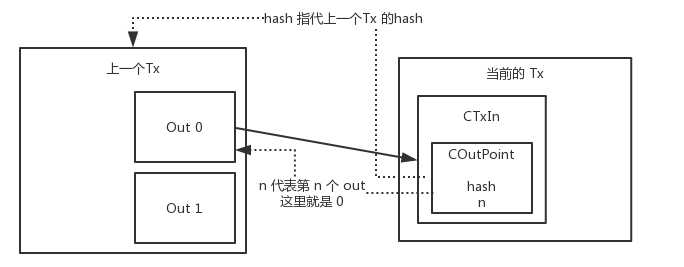
COutPoint
这个类含有两个属性

class COutPoint{
public:
uint256 hash;
unsigned int n;
};
025e8961.png

开发者模式

设置–更新和安全–针对开发人员–选中“开发人员模式”。

启用“适用于Linux的Windows子系统(Beta)”

控制面板–程序–启用或关闭Windows功能–勾选“适用于Linux的Windows子系统(Beta)”,点击确定等待开启成功,然后重启电脑。

下载linux系统

打开管理员模式命令提示符并输入 bash 回车,然后输入 Y 下载 Ubuntu。

挂载移动硬盘

插上后,直接通过 /mnt/盘符 就能看到