1. 关元穴
  2. 太溪穴
  3. 涌泉穴
  4. 肾腧穴

夏秋之交,一年之中这个时候是灸关元的最好时机
【艾灸方法】:用艾条温和灸关元穴5—10分钟,一天一次
【拔罐方法】:用气罐留罐关元穴10—15分钟,隔天一次

  1. 健脾益胃 调整胃肠
    艾灸关元有健脾益胃的作用,适用于:胃脘不适、胃痛胃寒、腹胀腹泻、五更泄(早晨5点或之前大便)、食物不消化、便秘、消瘦或肥胖等常见病症。
  2. 温阳补肾 固摄膀胱
    艾灸关元有温阳补肾的作用,适用于:尿频尿急、夜尿增多、小便淋漓不畅或小便失禁、尿潴留等病症。
  3. 补肾壮骨 强健腰膝
    艾灸关元有补肾壮骨的作用,适用于:腰膝酸软、腰腿疼痛、下肢浮肿、双腿沉重、膝痛肿胀、蹲起吃力等病症。多由膝骨关节病,腰椎骨质增生,腰椎间盘突出等病引起。
  4. 调任温督 协调阴阳
    艾灸关元有调任温督的作用,适用于:手足冰冷、肢体麻木、畏寒怕冷、痛经、月经不调等常见病症。多由神经末梢循环不良,周围神经病变,妇科病变引起。

取穴:采用仰卧的姿势,关元穴位于脐下三寸处,有培元固本、补益下焦之功,凡元气亏损均可使用。

8a967785.png

关元穴的主治病症:
第1步强壮穴:作为保健强身长寿穴,用灸法。
第2步诊生死:用指头按穴,如果指下感到无力空空,离手时,穴凹无弹力,胸下坚硬如石头,大限已到,活不久。
第3步助孕:子宫虚寒不孕者,要常灸此穴。
第4步补肾虚:脐下肾间之气藏于此穴。肾虚而腰酸或阳痿者,用灸法。
第5步治痛经:冰品引发的痛经,热敷或灸此穴。
第6步治虚喘:喘哮发作面色苍白,用灸法,特效。
第7步治小肠病:因为小肠募穴,所以治小肠各种疾病。
第8步治糖尿病:强肾可缓解糖尿病并发症,需配合足三里、三阴交穴。
第9步治排尿不顺:灸后尿排顺,也可以用拍法,五指并拢空拍,一次连续拍108下效果最好。
第10步治各种血症:本穴为血液循环的强壮剌激点,又为先天气海,元阴元阳在此交会,虚症用灸,平时多揉按拍可促进血液循环。

Can’t compile C program on a Mac after upgrade to Mojave

open /Library/Developer/CommandLineTools/Packages/macOS_SDK_headers_for_macOS_10.14.pkg

CMake not compiling after macOS 10.14 Mojave update

Problem solved: just download Command Line Tools (macOS 10.14) for Xcode 10. Hope that solves other people’s problems.

https://developer.apple.com/download/more/

clion 应该检测到这个路径
/Library/Developer/CommandLineTools/usr/bin/c++
/Library/Developer/CommandLineTools/usr/bin/cc

设置代理

git config --global http.proxy http://192.168.0.107:7890
git config --global https.proxy https://192.168.0.107:7890

git config --global http.proxy socks5://127.0.0.1:7890
git config --global https.proxy socks5://127.0.0.1:7890

git config --global --add remote.origin.proxy ""

git config --global --unset http.proxy
git config --global --unset https.proxy


// 只针对 github 网站设置代理
git config --global http.https://github.com.proxy https://127.0.0.1:1080
git config --global https.https://github.com.proxy https://127.0.0.1:1080

// 增加缓存
git config --global http.postBuffer 524288000

// 添加到 hosts 末尾
199.232.5.194 github.http://global.ssl.fastly.net
140.82.114.4 github.com
阅读全文 »

导致项目延期的问题:

  1. 业务逻辑+需求细节需要清晰。
  2. 原型图: 需要包含交互,关键点的说明。
  3. 整体业务流程图。
  4. 就要确定每个关键点的解决方案。
  5. 确保每个人知道自己的产出是什么,以及目标的ToDo List排序
  6. 确定关键输入,输出的结构,避免由于采用技术的问题导致无法插入数据

Could NOT find WASM (missing: WASM_CLANG WASM_LLC WASM_LLVM_LINK)

brew update
brew install git automake libtool boost openssl llvm@4 gmp ninja gettext
brew link gettext --force

安装binaryen

git clone https://github.com/WebAssembly/binaryen.git
cd binaryen
git checkout tags/1.37.14
cmake . && make

编译llvm支持WASM

mkdir  ~/wasm-compiler
cd ~/wasm-compiler
git clone --depth 1 --single-branch --branch release_40 https://github.com/llvm-mirror/llvm.git
cd llvm/tools
git clone --depth 1 --single-branch --branch release_40 https://github.com/llvm-mirror/clang.git
cd .. && mkdir -p build && cd build
cmake -G "Unix Makefiles" -DCMAKE_INSTALL_PREFIX=~/opt/wasm -DLLVM_TARGETS_TO_BUILD= -DLLVM_EXPERIMENTAL_TARGETS_TO_BUILD=WebAssembly -DCMAKE_BUILD_TYPE=Release ..
make -j$( sysctl -in machdep.cpu.core_count )
make install

echo “export WASM_LLVM_CONFIG=/opt/wasm/bin/llvm-config” >> ~/.bash_profile
echo “export WASM_ROOT=
/opt/wasm” >> ~/.bash_profile
echo “export LLVM_DIR=/usr/local/Cellar/llvm@4/4.0.1_1/lib/cmake/llvm” >> ~/.bash_profile

source ~/.bash_profile

N() and _n

N(active) and “active”_n.value is the same, it converts string into base32 string representation of unsigned 64-bit integer. However, the former is deprecated now and the latter is the new standard in the latest eosio.cdt. “active”_n is a little bit different, it is converting string into a name object.

INLINE_ACTION_SENDER

#define INLINE_ACTION_SENDER(…) BOOST_PP_OVERLOAD(INLINE_ACTION_SENDER,VA_ARGS)(VA_ARGS)

在编译阶段把 base32 编码的字符串转换为 uint64_t 数值
contracts/eosiolib/types.hpp
#define N(X) ::eosio::string_to_name(#X)
封装 uint64_t 数值,去掉数学计算,打印输出 base32 字符串
struct name {...}
contracts/eosiolib/types.h
typedef uint64_t account_name;

setup environment

  • install go 1.11.2
    office website
  • install gin
    github
    go get -u github.com/gin-gonic/gin
    go get -u github.com/gin-gonic/contrib/static

create website


Q&A

  1. “lldb-server”: executable file not found in $PATH
    preferences-debugger-Use Native Backend

  2. could not launch process: decoding dwarf section info at offset 0x0: too short。
    1、更新dlv,go get -u github.com/derekparker/delve/cmd/dlv
    2、修改Goland的配置,Help->Edit Custom Properties中增加新版dlv的路径配置:dlv.path=/path/go/bin/dlv

input command in term

// get help information
cleos push

Usage: cleos push SUBCOMMAND
Subcommands:
action Push a transaction with a single action
transaction Push an arbitrary JSON transaction
transactions Push an array of arbitrary JSON transactions

// get help information
cleos push action

Usage: cleos push action [OPTIONS] account action data

github
office site

tyleraccount
Description EOS Token Sale Claim Key
Public key EOS5p6VPhWXp6UBojRsYbimjuwWsBLth6aFTsMrnuFoX2f2oM4LGZ
Private key 5HubX63BtvNRnRKUuXNLNR9FD34FxnudQuGdmev8kA3c26NCW4y

common usage

cleos -u http://192.168.1.85:8888 get table astyler12312 astyler12312

cleos -u http://192.168.1.85:8888 get account astyler12312

// 调用方法
cleos -u http://192.168.1.85:8888 push action shine post '{"from":"joe","to":"alice","memo":"Thanks to painting"}' -p

compile contract

1.2.x 旧版本方式

#使用 -o 生成wast文件和wasm文件
eosiocpp -o ./app.wast ./app.cpp
#使用 -g 生成abi文件
eosiocpp -g ./app.abi ./app.cpp

1.3.x 新版本方式

eosio-cpp -abigen ./xx.cpp
eosio-cpp -abigen -contract=Players ./Players.cpp

deploy contract

cleos -u https://api-kylin.eoslaomao.com set contract astyler12312 ./buyname

eos-contract-account git:(master) ✗ cleos -u https://api-kylin.eoslaomao.com set contract astyler12312 ./buyname
Reading WASM from ./buyname/buyname.wasm...
Publishing contract...
executed transaction: fc455a93ba1442597e457ff769bf2a5da878a24f6e10d682d4d2889f17d520c9 8680 bytes 2495 us
# eosio <= eosio::setcode {"account":"astyler12312","vmtype":0,"vmversion":0,"code":"0061736d01000000017d1460037f7e7f0060057f7...
# eosio <= eosio::setabi {"account":"astyler12312","abi":"0e656f73696f3a3a6162692f312e3000030d6275796e616d655f6167656e7400030...
warning: transaction executed locally, but may not be confirmed by the network yet ]
➜ eos-contract-account git:(master) ✗


// 1.2.x 旧版本方式
cleos set contract eosio ./ ./hello1.wast hello1.abi -p eosio@active

这行命令有五个参数:eosio表示部署合约的账户,./表示合约所在的文件夹,后面两个参数依次是.wast和.abi文件的路径,最后的-p eosio@active表示权限。

invoke action

push action

cleos -u http://192.168.1.85:8888 transfer astyler12312 buyname.vip "1.6000 EOS" "buytest-EOS76Cw3GN58rjmAUDXSH9qSsk9VpYYLnH7h68KpzcEkzPZifcRd1-seven.a"

cleos -u http://192.168.1.85:8888 transfer astyler12312 buyname.vip "1.6000 EOS" "buytest1-EOS76Cw3GN58rjmAUDXSH9qSsk9VpYYLnH7h68KpzcEkzPZifcRd1-eight.a"

cleos -u http://192.168.1.85:8888 transfer astyler12312 buyname.vip "1.6000 EOS" "buytest1-EOS76Cw3GN58rjmAUDXSH9qSsk9VpYYLnH7h68KpzcEkzPZifcRd1-eight.a-agentName"

cleos -u http://192.168.1.85:8888 transfer buyname buyname.vip "1.6000 EOS" "buytest-EOS76Cw3GN58rjmAUDXSH9qSsk9VpYYLnH7h68KpzcEkzPZifcRd1-seven.a"

cleos -u http://192.168.1.85:8888 transfer astyler12312 buyname.vip "1.0000 EOS" "buytes2-EOS76Cw3GN58rjmAUDXSH9qSsk9VpYYLnH7h68KpzcEkzPZifcRd1-seven.a"

memo 格式: 账户名-公钥-套餐名字-代理的名字
套餐名字:
seven.a - 表示名字长度为7
eight.a - 表示名字长度为8

私钥: 5JohqwPMtZkaEbF5rwAk427rQ1jJDPJJaQc4eNcWi8yVnwpNTsC
公钥: EOS76Cw3GN58rjmAUDXSH9qSsk9VpYYLnH7h68KpzcEkzPZifcRd1

cleos -u http://192.168.1.85:8888 transfer astyler12312 buyname.vip "1.6000 EOS" "buytest1-EOS76Cw3GN58rjmAUDXSH9qSsk9VpYYLnH7h68KpzcEkzPZifcRd1-eight.a-agentName"

查看表内容
cleos get table eosio eosio profile

通过上述指令查看表中的内容,参数eosio eosio profile分别表示前文提到过的code、scope和表名。

插入数据:
// 插入
cleos push action eosio create '["eosio","hammer","25","programmer"]' -p eosio@active
// 再次查询
cleos get table eosio eosio profile

// 切换账号插入数据
cleos push action eosio create '["testeosio","maggie","23","waitress"]' -p testeosio@active
// 查询
cleos get table eosio eosio profile

查询数据
cleos push action eosio get '["testeosio"]' -p testeosio@active
cleos push action eosio get '["testeosio"]' -p eosio@active

根据自定义索引age筛选数据
// 传入参数的第一个为年龄下限,第二个为年龄上限
cleos push action eosio agerange '["22","27"]' -p eosio@active

查询套餐

cleos -u http://192.168.1.85:8888 get table vip vip prices

common concept

eosiocpp是一个c++生成wasm和ABI文件的工具。

#使用 -o 生成wast文件和wasm文件
eosiocpp -o ./hello1.wast ./hello1.cpp
#使用 -g 生成abi文件
eosiocpp -g ./hello1.abi ./hello1.cpp

common concept

An EOSIO Smart Contract consists of a set of action and type definitions.
Action definitions specify and implement the behaviors of the contract.
The type definitions specify the required content and structures.

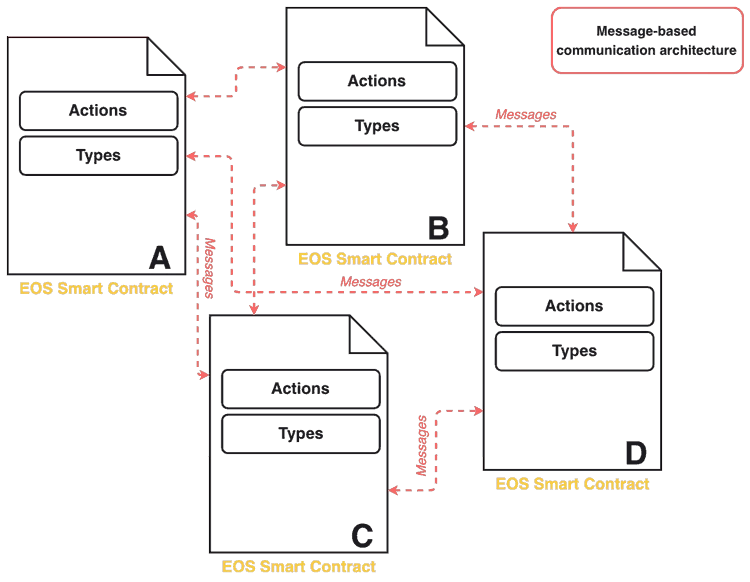
EOSIO actions operate primarily in a message-based communication architecture. A client invokes actions by sending (pushing) messages to nodeos.

EOSIO Smart Contracts can communicate with each other, e.g., to have another contract perform some operation pertinent to the completion of the current transaction, or to trigger a future transaction outside of the scope of the current transaction.

EOSIO supports two basic communication models, inline and deferred.

Communication among contracts should be considered as occurring asynchronously. The asynchronous communication model can result in spam, which the resource limiting algorithm will resolve.

There is no guarantee that a deferred action will be executed.

Action Name Restrictions

Action types are actually base32 encoded 64-bit integers.This means they are limited to the characters a-z, 1-5, and ‘.’ for the first 12 characters. If there is a 13th character then it is restricted to the first 16 characters (‘.’ and a-p).

Transaction Confirmations

By means of confirmation, you should see the transaction in the transaction history with the block number of which it is included.

From a global view of an EOSIO blockchain, every node in the EOSIO network gets a copy of and runs every action in every contract.
Some of the nodes are doing the actual work of the contract, while others are processing in order to prove the validity of the transaction blocks.

receiver is the account that is currently processing the action.
code is the account that authorized the contract.
action is the ID of the currently running action.

Transaction Limitations

Every transaction must execute in 30ms or less. If a transaction contains several actions, and the sum of these actions is greater than 30ms, the entire transaction will fail. In situations without concurrency requirements for their actions this can be circumvented by including the CPU consuming actions in separate transactions.

合约通信

EOSIO中的合约可以相互通信。它是通过基于消息的通信架构实现的。

EOS通信模型就是他们沟通的方式。通信模型有两种类型:Inline Communication Model(内联通信模型)和Deferred Communication Model(延时通信模型)。
6f0b34a3.png

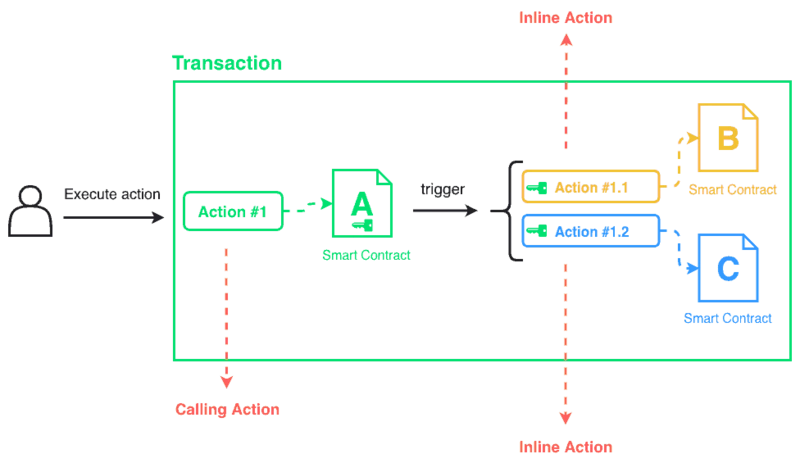
内联操作(内联通信模型)

用户从智能合约A执行操作(Action #1)。当操作开始执行时,它会触发另外两个操作:来自智能合约B的操作Action #1.1和来自智能合约C的操作Action #1.2。一切都在当前交易中完成。
在当前交易中执行并与其完成相关的操作,称为inline action即内联操作。
重要的是要记住内联操作是作为调用操作的一部分执行的。因此,它们与原始交易的范围和权限相同。这是他们将被执行的保证。如果其中一个操作失败,则整个交易将失败。
b838a3ce.png

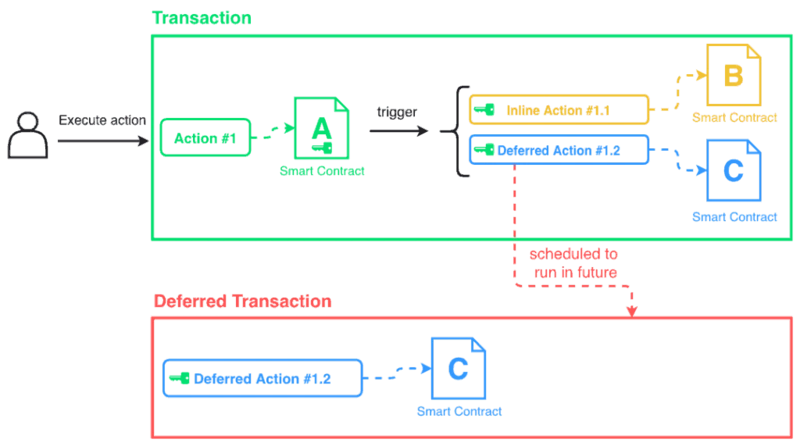
延时操作(延时通信模式)

6526bb28.png 根据生产者的判断,延时的操作最好可以安排在稍后的时间运行。无法保证延期操作将执行。 即使它们不属于同一交易,它们也具有发送它们的合约的权限。

交易可以包含N个操作。但是,每个交易必须在30ms或更短的时间内执行。如果交易包含多个操作,并且这些操作的总和大于30毫秒,则整个交易将失败。