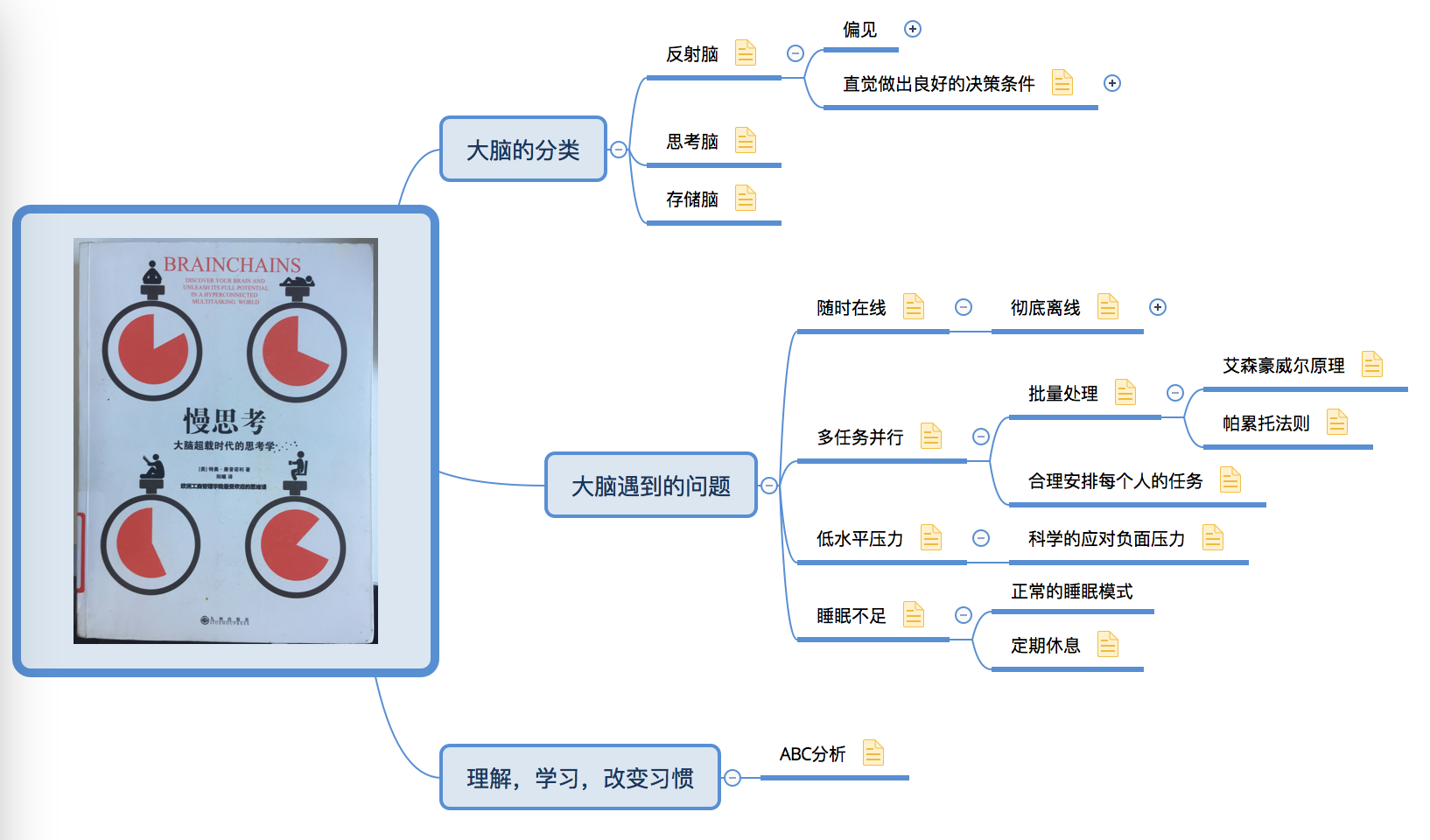
关于科学用脑的一本书,内容不算很多,却很有价值。推荐阅读
在现在这个年代想要慢下来真的好难。“欲速则不达”,古人已经知道的道理,到了现代被忘得一干二净。
ad2b17bb.png

参考文章

目前遇到一个问题,就是64位的java需要调用32位的DLL。

有几种解决方案:

  1. DLL编译为64位的
  2. 使用RPC通讯
  3. 使用HTTP服务RESTful api

目前来看使用HTTP服务是最好的方式。

集中记录一下不错的开源库。

dlib

开源的C++类库,包括机器学习,工业级别,综合型的类库

google base库

git clone https://chromium.googlesource.com/chromium/src/base
综合型的类库

界面库

c跨平台界面库

https://github.com/andlabs/libui

go跨平台界面库

https://github.com/andlabs/ui

c++ 工具库

valgrind
Memcheck是一个内存错误检测器。它有助于使你的程序,尤其是那些用C和C++写的程序,更加准确。
Cachegrind是一个缓存和分支预测分析器。它有助于使你的程序运行更快。
Callgrind是一个调用图缓存生成分析器。它与Cachegrind的功能有重叠,但也收集Cachegrind不收集的一些信息。
Helgrind是一个线程错误检测器。它有助于使你的多线程程序更加准确。
DRD也是一个线程错误检测器。它和Helgrind相似,但使用不同的分析技术,所以可能找到不同的问题。
Massif是一个堆分析器。它有助于使你的程序使用更少的内存。
DHAT是另一种不同的堆分析器。它有助于理解块的生命期、块的使用和布局的低效等问题。
SGcheck是一个实验工具,用来检测堆和全局数组的溢出。它的功能和Memcheck互补:SGcheck找到Memcheck无法找到的问题,反之亦然。
BBV是个实验性质的SimPoint基本块矢量生成器。它对于进行计算机架构的研究和开发很有用处。
也有一些对大多数用户没有用的小工具:Lackey是演示仪器基础的示例工具;Nulgrind是一个最小化的Valgrind工具,不做分析或者操作,仅用于测试目的。

“memcheck”工具。
visual leak detector

天使投资人一般占创业公司多少股权

天使投资一般不会要求控股,10%左右是一般尺度,小于5%或大于30%是出现概率较低的情形。

天使投资、VC、PE 介入企业的节点是什么样的?分别起什么作用?

  1. 天使投资:公司初创、起步期,还没有成熟的商业计划、团队、经营模式,很多事情都在摸索,所以,很多天使投资都是熟人、朋友,基于对人的信任而投资。熟人、朋友做天使投资人,他的作用往往只是帮助创业者获得启动资金;而成熟的天使投资人或者天使投资机构的投资,则除了上面的作用外,还会帮助创业者寻找方向、提供指导(包括管理、市场、产品各个方面)、提供资源和渠道。

  2. VC:公司发展中早期,有了比较成熟的商业计划、经营模式,已经初见盈利的端倪,有的VC还会要求已经有了盈利或者收入达到什么规模。VC在这个时候进入非常关键,可以起到为公司提升价值的作用,包括能帮助其获得资本市场的认可,为后续融资奠定基础;使公司获得资金进一步开拓市场,尤其是最需要烧钱的时候;提供一定的渠道,帮助公司拓展市场。

  3. PE:一般是Pre-IPO时期,公司发展成熟期,公司已经有了上市的基础,达到了PE要求的收入或者盈利。通常提供必要的资金和经验帮助完成IPO所需要的重组架构,提供上市融资前所需要的资金,按照上市公司的要求帮助公司梳理治理结构、盈利模式、募集项目,以便能使得至少在1-3年内上市。这个时候选择PE需要谨慎,没有特别声望或者手段可以帮助公司解决上市问题的PE或者不能提供大量资金解决上市前的资金需求的PE,就不是特别必要了。

响应事件

$(document).ready(function () {
...
$('#dgDevices').datagrid(
{
onDblClickRow:function (index, row) {
console.debug('dgDevices double click');
}
}
)
})

js清除全部数据

$('#dgMileageReport').datagrid('loadData', {"total":0,"rows":[]});

js追加数据

$('#dgMileageReport').datagrid('appendRow', {
simid: simid,
plate: plate,
startDateReport: start,
endDateReport:end,
mileage:data['data']
});
$('#dg').datagrid('loadData', {"total":0,"rows":[]});

bootstrap modal

关键点是要在动画效果结束后,在初始化 datagrid, 否则没有长宽数值,内容不显示

<div class="modal fade " id="procurementRegModal" aria-hidden="true" data-backdrop="static">
<div class="modal-dialog modal-lg animated">
...
<table id="procurement_record"></table>
...
function openProcurementRegModal() {
showDevRegForm();
setTimeout(function () {
$('#procurementRegModal').modal('show');

//modal 动画结束后
//模态对话框可见时触发
$('#procurementRegModal').on('shown.bs.modal', function () {
// 執行動畫結束後的動作...
// 重新加載 datagrid
jQuery('#procurement_record').datagrid({
toolbar:'#tb',
width:700,
height:480,
fit: true,
fitColumns: true,
nowrap: true,
striped: true,
collapsible:true,
url:'',//@ TODO 請添加 URL
remoteSort: true,
checkOnSelect: true,
idField:'id',
rownumbers:true,
pagination:false,
singleSelect:true,
pageSize:5,
// onClickRow: onClickAnaylisRow,
pageList: [5,10,15,20,25,50,100],
columns:[[
{title:'ck', field:'ck',checkbox:true, width:30},
{field:'name',title:'名称',width:100,height: 35},
{field:'author',title:'作者',width:50,height: 35},
{field:'type',title:'索书号',width:50,height: 35},
{field:'press',title:'出版社',width:50,height: 35},
{field:'publication',title:'出版时间',width:50,height: 35},
{field:'quantity',title:'数量',width:50,height: 35},
{field:'intro',title:'介绍',width:50,height: 35},
{field:'date',title:'上架时间',width:50,height: 35}
]]
});
});

}, 230);
backend_url = '/admin/api/v1.0/procurement';
submitType = 'POST';
}

可编辑

http://www.jeasyui.net/extension/190.html

需要包含

<script src="{{url_for('static', filename='js/ext/jquery.edatagrid.js')}}"></script>
<table id="procurement_record" style="width:600px;height:200px"
title="订单信息-图书明细" singleSelect="true">
<thead>
<tr>
<th field="name" title="名称" width="100" editor="{type:'validatebox',options:{required:true}}">名称</th>
<th field="author" title="作者" width="100" editor="text">作者</th>
<th field="press" title="出版社" width="100" align="right" editor="{type:'numberbox',options:{precision:1}}">出版社</th>
<th field="quantity" title="数量" width="100" align="right" editor="numberbox">数量</th>
</tr>
</thead>
</table>

function openProcurementRegModal() {
showDevRegForm();
setTimeout(function () {
$('#procurementRegModal').modal('show');

//modal 动画结束后
//模态对话框可见时触发
$('#procurementRegModal').on('shown.bs.modal', function () {
// 執行動畫結束後的動作...
// 重新加載 datagrid 注意这里是 edatagrid ************
jQuery('#procurement_record').edatagrid({
toolbar:'#toolbarProcurementRecord',
width:700,
height:300,
fit: true,
fitColumns: true,
nowrap: true,
striped: true,
collapsible:true,
url:'',//@ TODO 請添加 URL
saveUrl: '',
updateUrl: '',
destroyUrl: '',
remoteSort: true,
checkOnSelect: true,
idField:'id',
rownumbers:true,
pagination:false,
singleSelect:true,
pageSize:5,
// onClickRow: onClickAnaylisRow,
pageList: [5,10,15,20,25,50,100],
// columns:[[
// // 添加checkbox
// // {title:'ck', field:'ck',checkbox:true, width:30},
// {field:'name',title:'名称',width:100,height: 35},
// {field:'author',title:'作者',width:50,height: 35},
// {field:'press',title:'出版社',width:50,height: 35},
// {field:'quantity',title:'数量',width:50,height: 35},
// ]]
});
});

}, 230);
backend_url = '/admin/api/v1.0/procurement';
submitType = 'POST';
}

添加搜索

<div id="toolbar">
<a href="javascript:void(0)" class="easyui-linkbutton" iconCls="icon-add" plain="true"
onclick="newBook()">新建部门</a>
<a href="javascript:void(0)" class="easyui-linkbutton" iconCls="icon-edit" plain="true"
onclick="editBook()">修改部门</a>
<a href="javascript:void(0)" class="easyui-linkbutton" iconCls="icon-remove" plain="true"
onclick="deleteBook()">删除部门</a>
<span>名称:</span>
<input id="name_search" style="line-height:26px;border:1px solid #ccc">
<a href="#" class="easyui-linkbutton mb-2" plain="true" onclick="doSearch()">Search</a>
</div>

function doSearch(){
$('#dgBooks').datagrid('load',{
name_search: $('#name_search').val(),
phone_search: $('#phone_search').val()
});
}

后台处理 get 请求。

@admin.route('/api/v1.0/users', methods=['GET'])
@login_required
def users():
# jquery 表格接口
page = request.values.get('page')
rows = request.values.get('rows')
if request.values.has_key('name_search'):
name_search = request.values.get('name_search')
if request.values.has_key('phone_search'):
phone_search = request.values.get('phone_search')

遍历数据

var data=$('#dg').datagrid("getData"); // 获取所有数据

增加 checkbox

<table id="dgBooks" title="" class="easyui-datagrid" style=""
url="/api/v1.0/borrowList" method="get"
toolbar="#toolbar" pagination="true"
rownumbers="true" fitColumns="true" singleSelect="false">
<thead>
<tr>
<th field="ck" checkbox="true"></th>
<th field="name" width="130">名称</th>
<th field="author" width="80">作者</th>
<th field="type" width="30">索书号</th>
<th field="press" width="50">出版社</th>
<th field="publication" width="40">出版时间</th>
<th field="quantity" width="40">数量</th>
<th field="intro" width="50">介绍</th>
<th field="date" width="50">上架时间</th>
</tr>
</thead>
</table>

语法

CREATE VIEW view_name AS
SELECT column_name(s)
FROM table_name
WHERE condition
注释:视图总是显示最近的数据。每当用户查询视图时,数据库引擎通过使用 SQL 语句来重建数据。

概念

视图(view)是一种虚拟存在的表,是一个逻辑表,本身并不包含数据。作为一个select语句保存在数据字典中的。
通过视图,可以展现基表的部分数据;视图数据来自定义视图的查询中使用的表,使用视图动态生成。

基表:用来创建视图的表叫做基表base table

作用:

  1. 简单:使用视图的用户完全不需要关心后面对应的表的结构、关联条件和筛选条件,对用户来说已经是过滤好的复合条件的结果集。
  2. 安全:使用视图的用户只能访问他们被允许查询的结果集,对表的权限管理并不能限制到某个行某个列,但是通过视图就可以简单的实现。
  3. 数据独立:一旦视图的结构确定了,可以屏蔽表结构变化对用户的影响,源表增加列对视图没有影响;源表修改列名,则可以通过修改视图来解决,不会造成对访问者的影响。

直接在Mac OS X的应用列表中启动 Keychain Access,当然你也可以在Chrome里面选择Settings –> Advanced settings –> Manage Certification,这样出来的就是Mac OS X的 Keychain Access 这个应用程序。
b1e573a1.png

在 Keychain Access 的界面中,点击左下的 + 按钮,选择刚才得到的SSL证书,就将该证书导入了。

最后我们要选择 Always Trust 这个证书,否则SSL warning还是会有。在 Keychain Access 中,双击刚才导入的证书,在出现的对话框中,展开 Trust 那个部分,然后选择 Always Trust 就可以了。比如下图就是12306网站的SSL证书:

59bd346d.png

重启Chrome,再访问那个网站,就没有SSL warning了。

mac下面

openssl req -x509 -newkey rsa:4096 -nodes -out cert.pem -keyout key.pem -days 365

然后输入CN,省,市,组织名称,组织下属部门,通用名字,email等信息
生成一个证书cert.pem 和对应的私钥 key.pem 有效期 365 天。
阅读全文 »

安装

go get github.com/julienschmidt/httprouter

使用样例

RESTful API样例。使用还是非常简单方便的。

阅读全文 »